Offizieller Kommentar

This is by design because the volume is being controlled by your DJM.
Aktionen für Kommentare

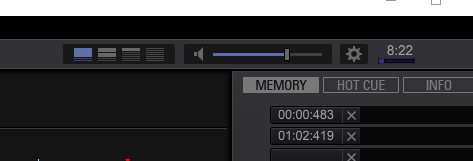
The audio slider in the above picture does not work, whether I am playing through the usb link channel 1 (Have DJM900), or via the link. Its frozen cant click before or after does nothing, when you click on the mute button, the little slash goes across it, but the sounds still plays.
Windows 10
Latest Rekordbox 4.0.8
This is by design because the volume is being controlled by your DJM.
Post ist für Kommentare geschlossen.
This works on 3.3 by the way.
Thanks for the response, why is the volume different between when you load a tack in rekordbox (top section), extremely loud, and when you click on the waveform to the left of the track listing (really quiet).
Also why doesn't that volume bar move when you alter the DJM volume then?
You mentioned it is intended, so this was a purposeful change from 3.x then?
Thanks
Tony

@Tony > If you're outputting the audio to a device where the volume can't be controlled by software, you'll notice a red notification bar across the bottom of the screen informing you that it's controlled by your hardware, and thus, that slider doesn't work.
In v3 it had an override, but in v4 that function has changed.