
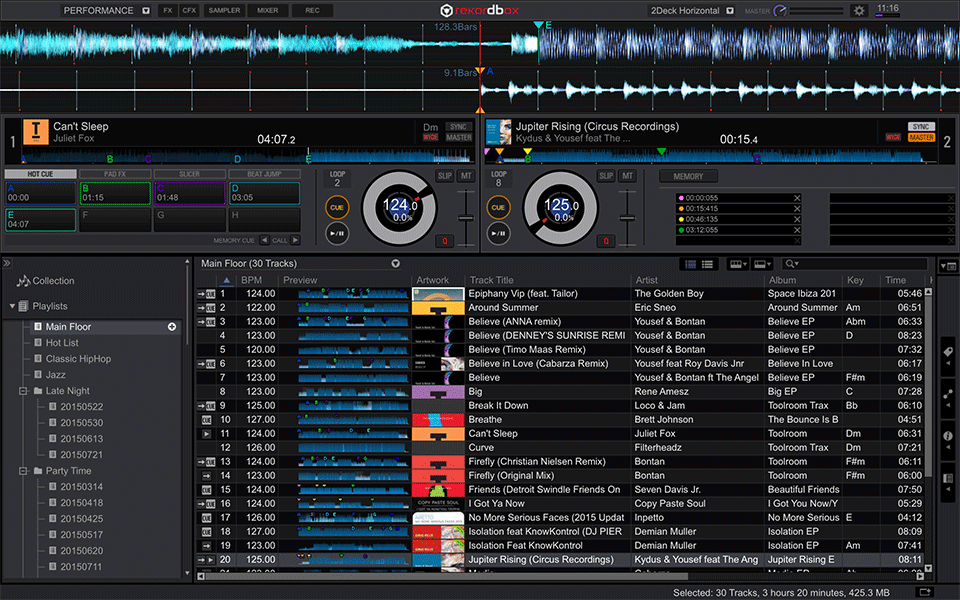
performance mode is a paid plugin to make Rekordbox dj software like serato and traktor
so you get whats in this pic. Check out rekordbox.com and look at "rekordbox DJ"


Aktionen für Kommentare

Hi Guys,
I've been away from my CDJ's and mixing for a little while. I was using Rekordbox 3.2.xx with my 2000's, and DJM2000.
I fire up my laptop and decks today to have a quick spin and an update prompts me to go and download v4, which I've done and installed.
Looking around the the new website, I'm confused.
What is Performance mode for? I don't have a Link button showing in that mode, only in Export mode. From the website it would seem that in Performance mode, one would see what all of the decks are doing on the computer screen, while still using the decks traditionally, e.g. loading tracks from RB into the CDJ and rocking away.
Scratching my head, it now appears that you use your CDJs connected as USB controllers to play the tracks out of RB on the laptop, in a controller/laptop configuration.
What am I missing here?
Post ist für Kommentare geschlossen.
performance mode is a paid plugin to make Rekordbox dj software like serato and traktor
so you get whats in this pic. Check out rekordbox.com and look at "rekordbox DJ"

Hey Zac,
Just stick to "Export" mode. That's more like the Rekordbox that you know - a library management system that helps you load music onto your CDJs.
The "Performance Mode" is a paid upgrade that is almost a different program altogether. It's like Serato or Traktor where the music plays from your computer instead of your CDJs.
Thanks for the replies guys, I appreciate it.
I went off and had a read of the "Connectivity Guide" - and that pretty much answered everything.
I'd use performance mode if the DJM2000 had better integration.