Offizieller Kommentar

If you want to have two copies, simply rename the old one, then download a copy from rekordbox.com.


Aktionen für Kommentare

The latest RB version (4.0.7) does not successfully update, because the updater doesn't close currently running RB and it hangs there for ever.
Basically, when one opens RB and new version is detected, clicks Start and the updater starts - but hangs on a screen "Closing Rekordbox" popup.
Maybe it is just my environment?
If you want to have two copies, simply rename the old one, then download a copy from rekordbox.com.
Post ist für Kommentare geschlossen.

just go to rekordbox.com and download it and install
Not what I want, because if you download it and install it like that (not upgrading) it doesn't remove the old version...or does it?
yes, it overwrites it
Will try. Thx.
FYI, I have tried like you said, installing 4.0.8, and like i already said, it does not overwrite previous version, only desktop link is overwritten. I still have 4.0.6 installation, which is exactly why i opened this topic. I want to update, not install another version beside old one.
If anyone cares, Windows 10.
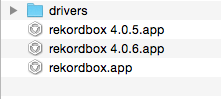
i never since day 1 have used the updater and it overwrites every time, the only time it will not overwrite isa if you rename the program like Rekordbox 4.0.5 vs it just being rekordbox
Maybe its a windows thing, in that case, sorry, i don't use windows
Yeah, tha't why i pointed it out. On windows, at least in my case, since day one all the rekordbox installations were named after the version number. X:\whatever\Pioneer\Rekordbox 4.0.8 ... etc.
It is not a big deal anyway, but things should work "the right" way. Lately, at least i have such feeling, things are going worse and worse with each update. And it all started with the DJ module introduction....
at first you did not say to was on windows, just saying, :)
can't you just go into and remove it manually with the uninstaller?
not everyone uses mac :), just sayin :)
I cam, but that is not the point i am trying to make.
Update is called update for a reason...And it doesn't work. I just want it to work :)
wouldn't effect the performance really anyway, I have like 6 version installed on mine in case i want to go back cause of any bugs, lol
not everyone uses mac :), just sayin :)
LOL, i know, i just assumed the installer would overwrite on both OS' same way any program does on windows when theres an update
True.

@Mitja > What version of Windows are you using? I will bring this up to the engineers.
It can happen on some computers - simply manually install the new version and remove the old one if so desired.