Have a feature request or suggestion? Post your idea here!

Post

2 Follower Folgen
0
Avatar

Recording set with DJM and CDJ's

I have found many topics on recording sets, but not really the answer that i'm looking for....

Is there an easy way to record sets with the following setup:

  • I play with DJM900 Nexus, and 2 CDJ2000 Nexus and Rekordbox on my mac
  • I connect everything through ethernet cables to a switch and that's it.
  • CDJ's are connected to the DJM via cinch of course :-)

Now I don't really now how to record a set. Do i have to use the Record out of the DJM? And if yes, where do i attach it to my computer? Or can I use the network that I already created with my switch? Do i have to install something in Rekordbox itself?


Thanks!


Michael

Post ist für Kommentare geschlossen.

10 Kommentare

0
Avatar

Assuming that your using your laptop only as USB storage device and not your 2000nxs in HID mode with rekordbox DJ. The most simplest way to record a set is:

1. connect your DJM via USB to your laptop

2. go to system preferences > audio > input and make the DJM-900nxs as your default input device. If it's not on the list, then you may need to install the drivers for your DJM.

3. open Quicktime > file > New Audio Recording

4. adjust the channel trim levels on the DJM that the 2000nxs are connect too.

That's pretty much it for basic audio recording.


SC 0 Stimmen
Aktionen für Kommentare Permalink
0
Avatar

Forgot to mention, press record when you ready to record and then press it again when your done. You will have to save the file before you close Quicktime to keep your recording.

SC 0 Stimmen
Aktionen für Kommentare Permalink
0
Avatar

ah ok thank you for the tips!

Would you also know if (and how) i can use Rekordbox's native 'REC' button for this?


thanks!

Michael 0 Stimmen
Aktionen für Kommentare Permalink
0
Avatar

I don't know if rekordbox in export mode has recording functionality.

In performance mode the "REC" option is at the top of the app. Just press that, then the record function and settings will appear at the center of the app.

SC 0 Stimmen
Aktionen für Kommentare Permalink
0
Avatar

I have my CDJs and DJM connected via LAN.
I have one USB cable from my mixer into my Mac - when plugged in the DJM setting utility automatically pops up and is configured to the Master Out of the DJM.

You can record from Link, CD, USB, etc in Export mode.
This is how I do it now - much easier and better than using a line in cable and Audacity.

Shªun_N 0 Stimmen
Aktionen für Kommentare Permalink
0
Avatar

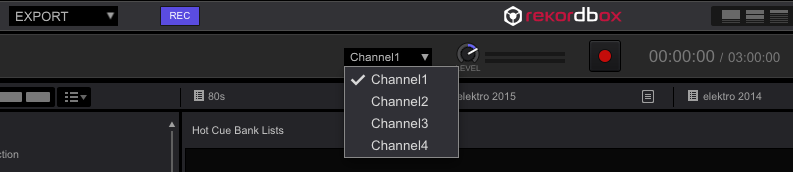
Hi and thanks for this feedback. I had to dj yesterday so took the occasion to try and connect the DJM to my computer through USB cable. I installed the driver upfront, and the connection with the DJM succeeded because I could access it in my audio settings. Nevertheless, in the 'REC' panel of Rekordbox, i could only select input sources 'channel 1', 'channel 2' ... up to 4. There was no 'Record out' in the dropdown, and as i selected any of these four channels, nothing happened (no actual incoming signal). I took a screenshot, maybe somebody knows what steps i'm missing?


Michael 0 Stimmen
Aktionen für Kommentare Permalink
0
Avatar

Does your DJM setting utility look like this;

Where USB9/10 is your MIX(REC OUT)?

Then it should show in rekordbox drop down menu as Master Out;

Shªun_N 0 Stimmen
Aktionen für Kommentare Permalink
0
Avatar

No it was looking differently, I don't remember the value for USB 9/10, but will check that again next time. The first four lines (USB 1 to 8) were not greyed out neither. They were filled with channel 1 to 4 'post fader' or so.

The problem is that I don't have my own DJM at home, so I can only test this in the weekend when I go dj. So I will keep you informed on the progress next week ;-p


Thanks for this tip!

Michael 0 Stimmen
Aktionen für Kommentare Permalink
0
Avatar

just to make sure: the USB9/10 is the one at the top left of the mixer? Next to where I can plug a USB stick?

Michael 0 Stimmen
Aktionen für Kommentare Permalink
0
Avatar

Yes, correct.

I have the NXS2 so have mine in USB[B] but it's the same difference.

The one USB cable is so much simpler and easier.

I used to have 1 twin RCA cable from my Mac to my mixer for output sounds (such as system sounds, iTunes music, website sounds, etc) and another twin RCA cable from my mixer to my Mac for recording (with Audacity).
I don't need these anymore now I have one USB cable :)

Shªun_N 0 Stimmen
Aktionen für Kommentare Permalink