Have a feature request or suggestion? Post your idea here!

Post

3 Follower Folgen
0
Avatar

Pre listening with Headphones without master sound

Dear Pioneer,

i tried to call your support but really no one there is answering the phone. So my last chance before i send you back the DDJ-RB i bought a few days ago ... is to hope you will and can answer me this question.

When i want to pre listening tracks on my headphones i am still hearing the sound of the master track. So that means i always have both tracks. That is really annoying.

So is there any possibility to pre listening the track for that i pushed/taped the cue button?

Dan Schnorrbusch

Post ist für Kommentare geschlossen.

3 Kommentare

0
Avatar

Dan,

I’m having the same issue and haven’t received a solution or workaround for use on my 2 channel DJM-S9. I’m at the point that I believe the preview function is geared toward users who have more than 2 channels I.e., (4 channel mixers). 

It’s a useful feature that I would gladly love to use with my setup, but since I’m a 2 channel guy (mixer/turntables) this feature was created to utilize an unused audio channel which the djm s9 don’t have readily available. There are workarounds, however, to go in and out of Rekordbox’s preferences to change the preview channel to the available channel every time you want to preview a track  would be counter intuitive and convoluted.

i guess I’ll stick to loading the track I’m previewing into actual deck and cue it up that way.


TJ


Thoris Johnson 0 Stimmen
Aktionen für Kommentare Permalink
0
Avatar

Hey TJ,

don't ask me why but it works now with DDJ-RB. 

Dan

Dan Schnorrbusch 0 Stimmen
Aktionen für Kommentare Permalink
0
Avatar

@Dan > It's about understanding how the headphone cueing works...

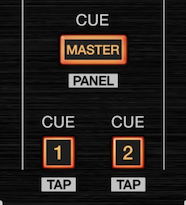
Here are your monitoring buttons:

Pressing the MASTER CUE will put the audio from the master into the headphones. If you were to turn down the master level or either of the channels, that would fade out.

Pressing the 1 CUE or 2 CUE buttons will preview the audio on that channel as a "pre-fader listen" (aka PFL).

Pressing any of those in combination will simply overlay the audio thereof.

@TJ > I don't think he's asking about the track preview function within rekordbox; unfortunately there is no good option to do that on the DJM-S9 due to its audio configuration. Your best bet is to load a track into a deck. Sorry! 

Pulse 0 Stimmen
Aktionen für Kommentare Permalink