lol - glad to hear the support line is referring me by name. 😂
What utility are you using to stream with? Personally, I'd recommend using OBS to do it, and I even have a guide on streaming with OBS here.
@djpulse : I recently tried to run a livestream session on FB Live, selected the djm 900 nexus 2 for the audio input, got no sound, it was connected via usb. When I did this with a djm 850 it worked perfectly fine and I want to know what what the reason was for it not working.
I had installed the correct driver from your website and was also told that it may be the firmware on the mixer required an update, which I then performed still with no luck.
I have a Macbook 13inch m(mid 2012) Pro currently running Sierra.
I just called your helpline who said I should address this Question to Dj Pulse, any help would be great.
Post ist für Kommentare geschlossen.
lol - glad to hear the support line is referring me by name. 😂
What utility are you using to stream with? Personally, I'd recommend using OBS to do it, and I even have a guide on streaming with OBS here.
Lol more work for you !!
I am familiar with OBS but it wasn't necessary in this instance on FB live you can directly select the audio input, I did so with a djm 850 and used a web cam and was good to go. My MacBook recognised that the djm 900 nexus 2 was connected but did not automatically open the pioneer utility as it does with my djm 850 and no sound was being captured into the laptop, I even opened audacity to double check, selected the mixer but no audio was captured. I have seen quite a few posts about this on google also, wondering if it's a general incompatibility or something I didn't do correctly.
I've never used it direct, it could be something to do with the software as well.
The fact the utility didn't open is normal, that can be disabled (I have mine all turned-off for the fact I have drivers for virtually every product installed on my computer and don't need device-listeners active in the background for that many products!)
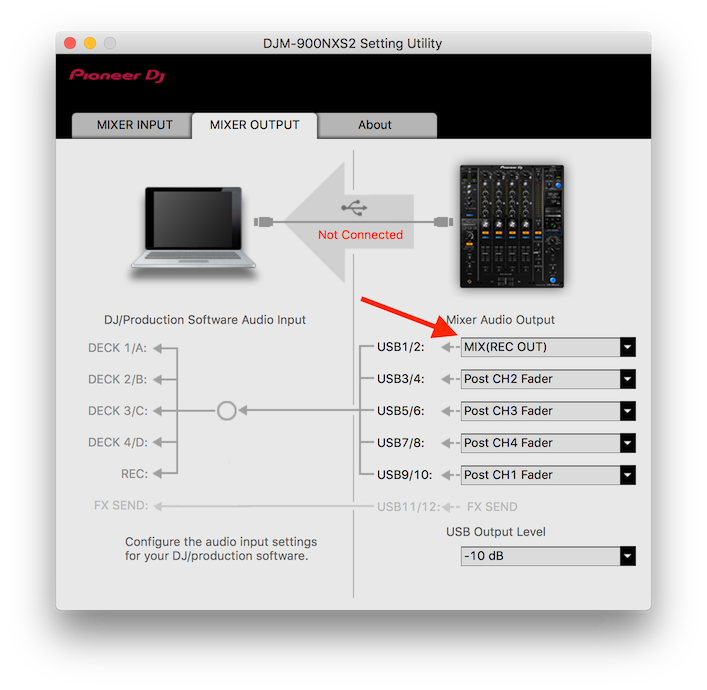
Did you ensure that you have the REC-OUT selected as the 1/2 outputs in the device panel? Chances are the streaming software is only looking at the first pair even if it can access the mixer as a CoreAudio device.
aww ok yeah that's understandable. The devices panel where? Usually when I use the 850 it detects everything automatically so not sure what you're referring too
Sorry, I meant the Setting Utility: