Have a feature request or suggestion? Post your idea here!

Post

2 Follower Folgen
0
Avatar

Unexpected behaviour with Clear Hotcue Keyboard shortcuts on Mac

Rekordbox 5.4.2
Macbook Air (Pre 2018)
OS 10.14.1
UK physical Keyboard
Default keyboard mapping (Performance 1)

Clearing a hotcue using the default shortcut keys does not work for every expected key on Mac. Also some of the default mappings for Deck1 are the same shortcut keys used by Mac OS to take screenshots. Here's what I'm seeing for each key:

Deck 1:
Clear Hotcue A (Shift + command + 1). Actual behaviour, Clears Hotcue A as expected
Clear Hotcue B (Shift + command + 2). Actual behaviour, Nothing happens
Clear Hotcue C (Shift + command + 3). Actual behaviour, Mac OS takes a screenshot
Clear Hotcue D (Shift + command + 4). Actual behaviour, Mac OS displays crosshair icon to drag out a screenshot

Deck 2:
Clear Hotcue A (Shift + command + 6). Actual behaviour, nothing happens
Clear Hotcue B (Shift + command + 7). Actual behaviour, Clears Hotcue A but should clear hotcue B
Clear Hotcue C (Shift + command + 8). Actual behaviour, nothing happens
Clear Hotcue D (Shift + command + 9). Actual behaviour, Clears Hotcue C but should clear hotcue D

Infinite

Post ist für Kommentare geschlossen.

4 Kommentare

0
Avatar

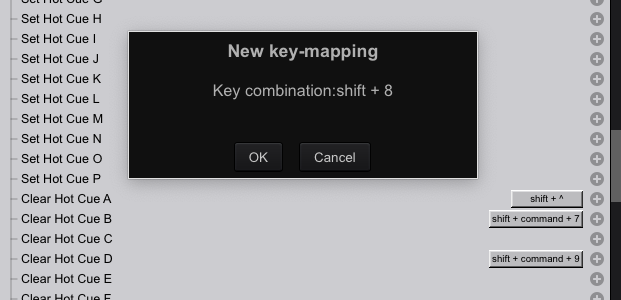
Looks like something strange going on. When I try to change the existing shortcut, the RB dialog is not displaying the correct value e.g. I press Shift + 9 on the keyboard but the pop-up dialog shows Shift + 8. 

Infinite 0 Stimmen
Aktionen für Kommentare Permalink
0
Avatar

It's not happening with my US keyboard layout, I get 9 when I map 9, and 8 when I use 8. Do you have something changed in your system settings?

Pulse 0 Stimmen
Aktionen für Kommentare Permalink
0
Avatar
I had look through my system settings but nothing obvious is jumping out. I tried the following:
 
Removed any extra keyboard Input Sources. Tried with just English - US.
Changed Regional settings to US (and rebooted)
Disabled any Accessibility options (I don't use any).
Checked there are no existing conflicting keyboard shortcuts in System Preferences, Keyboard, Shortcuts.
Created a new shortcut for the Native ’Notes’ app on Mac OS, Cmd+Shift+9, this works no problem in Notes
Tried alternative shortcut combinations with the '9' key. Cmd+9 works, Option+9 works.
 
All keys are working as expected in all applications outside Rekordbox so it doesn’t look like any kind of hardware fault on my MacBook. 
 
I also tried typing inside Rekordbox and any keys I try are are working as expected (apart from the shortcuts I’ve already highlighted) e.g. in the search field the characters appear as expected when I type with or without a key combination like Shift+9 
Infinite 0 Stimmen
Aktionen für Kommentare Permalink
0
Avatar

I got the Shortcut to work but there's still an issue somewhere. I pressed Shift+9 and the pop-up incorrectly say Shift+8. I went ahead and saved it anyway. It appears as Shift+8 in the list of shortcuts (see screenshot). The weird thing is that the shortcut actually works as expected when I now press Shift+9 (it clears hotcue D on deck 2)

Infinite 0 Stimmen
Aktionen für Kommentare Permalink