
See Deleting the playback history.
The description of the manual is about HISTORY, but it should work in PLAYLIST as well.
Aktionen für Kommentare

1. I had synced a few playlists from my rekordbox to an device
2. Then I decided to make a new playlist in rekordbox (named: all history) , which i wanted to sync to the device. So I selected this new playlist and DESELECTED all the other playlists, meaning that I only selected only ONE playlist to sync.
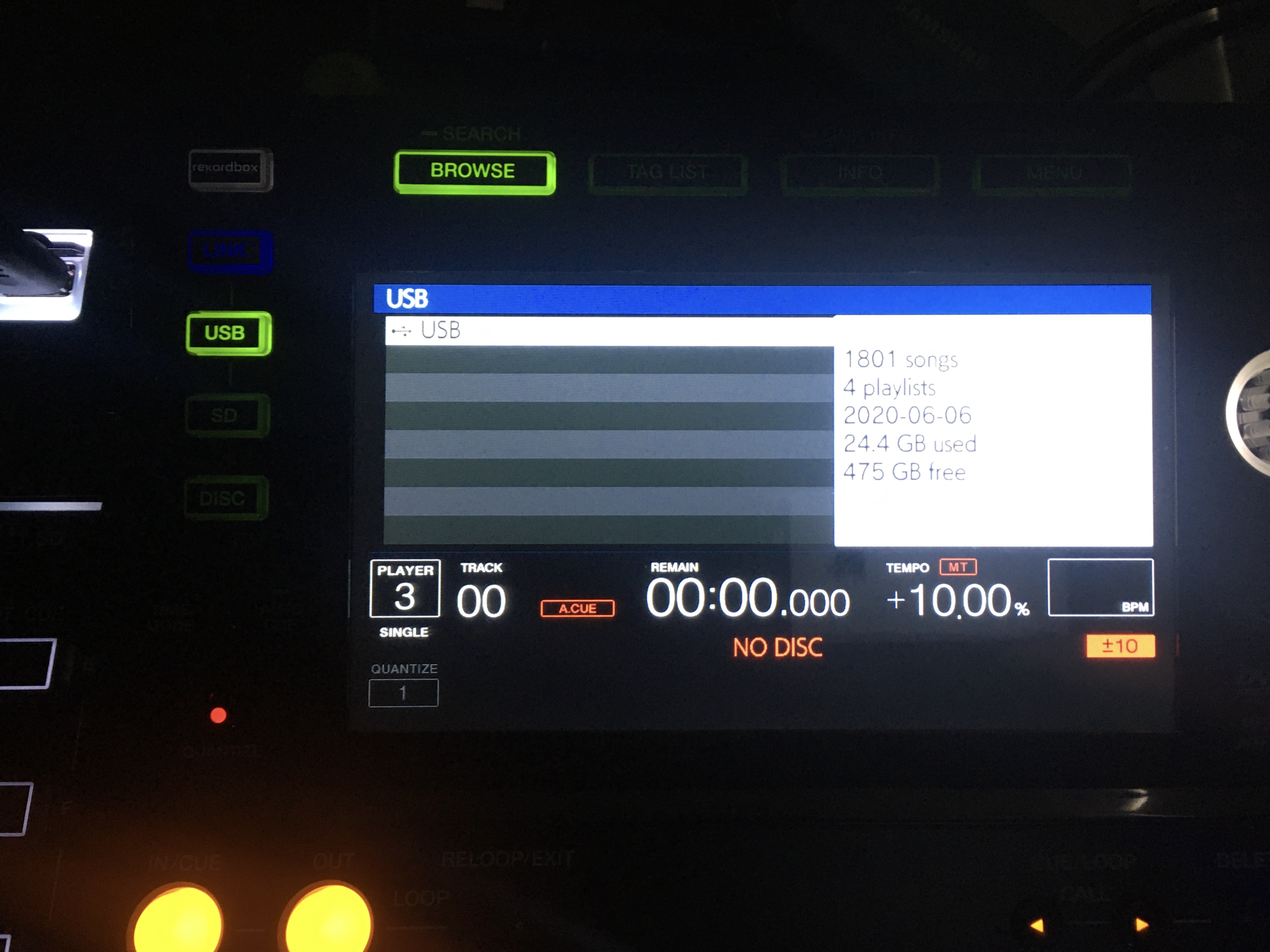
However all the other playlists REMAIN on the device. Also the tracks of the earlier playlists are still on the device. I also made a picture of my CDJ with the info that still more than one playlists are on the device, including all the old tracks. (So you can see that 4 playlists are on my device while I only synced ONE playlist.
As you can also see that in rekordbox, the playlists which I did not select to sync, turned light grey.
I did discover that it happens when I rename playlists. Old name playlists stay on the usb.
I hope the attached pictures make this all more clear.
selecting: "Delete playlist tracks from device if playlist is deleted" does not make any change.
I hope to receive a response from Pioneer with an advice on how to solve this :)

Post ist für Kommentare geschlossen.
See Deleting the playback history.
The description of the manual is about HISTORY, but it should work in PLAYLIST as well.