
Official comment

Hello Machael,
DDJ engineers looked at your issue and they assume the issues you reported may be caused by the MIDI setup.
This solution is only for Mac users so that it might not solve Franky's issue.
Franky, please inform us your computer OS.
Reload Audio MIDI settings.
(1)Connect DDJ-RB to your computer and turned the power on.
(2)Open [Applications] folder, [Utilities] folder and [Audio MIDI Setup.app].
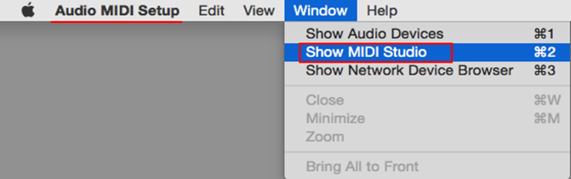
(3)Open [Audio Devices] window. Confirm that [Audio MIDI Setup] is displayed on Menu bar.
Click [Window] and choose [Show MIDI Studio] or [Show MIDI Window]. (The displayed name depends on OS version.)
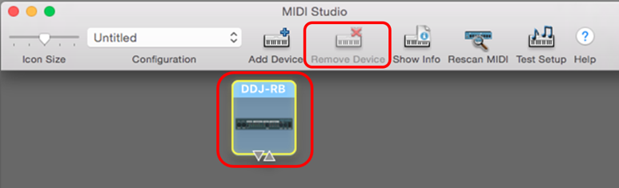
(4) When the [MIDI Studio] window opens up, click [DDJ-RB] icon. The icon turns to blue color, click [Remove Device].
"DDJ-RB" icon disappears and comes back again.
(5)Close [Audio MIDI Setup] and turn DDJ-RB power off.
(6)Turn DDJ-RB power on and run DJ Application.
If you still have any issues, please let us know.
Best regards,
CRM, Pioneer DJ


