
@Dom > Are you using the Apple USB-Ethernet adapter or another brand?
Can you open the terminal and enter:
nfsd status
...and tell me the result?
Comment actions

Hi there,
I'm having trouble getting any response from Rekordbox when connecting to my XDJ-RX. I've been trying for a few months to get this to work, but nothing I do gets the link button to appear in Rekordbox.
Specs:
- MacBook Pro (Retina, 15-inch, Late 2013), running OS x Sierra (10.12.3)
- XDJ-RX software at 2.20
- Rekordbox software 4.2.5
- ethernet cable linking laptop to XDJ-RX, with functioning ethernet-USB adapter
- Firewall off (and incoming connections allowed), wifi off
- works using performance mode via midi (USB) cable
Any help would be much appreciated! :)
Thanks,
Dom
Post is closed for comments.
@Dom > Are you using the Apple USB-Ethernet adapter or another brand?
Can you open the terminal and enter:
nfsd status
...and tell me the result?
Hi - thanks for the quick reply.
I'm using a 'Ugreen USB Ethernet Adapter Lan Adapter'. I use this often to connect to the internet so I assume it is functional.
Here's the result from the terminal:
"nfsd service is enabled
nfsd is not running"
Yeah, your mileage may vary with those 3rd-party adapters. From your previous post, it sounds like you're connecting the XDJ-RX directly to the adapter without an ethernet hub or router, correct?
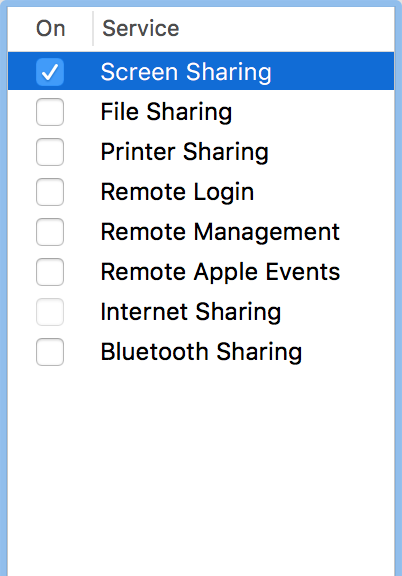
Do you have any network sharing enabled?
Yep - connecting directly, no router.
The only thing enabled in sharing preferences is screen sharing. Might it help if I turn it off?

I am using the Apple Thunderbolt to Gigabit and there is no Problem. Maybe your third Part and USB is the Problem.
@Sigo - that's good to know, may be the answer. I would like to avoid spending £25 if I have to though. @Pulse, might this be the answer?
Have recently bought the Apple Thunderbolt to Gigabit adapter, still no luck.
Also tried:
- disabling firewall (and allowing connections for Rekordbox etc.)
- disabling wifi
- numerous different ethernet cables
- turning Mac and RX on and off in different patterns
@Dom > Are you connecting directly to the RX or is there any networking hardware in between?
No - straight from the ethernet port at the back of the RX, through the Gigabit adapter (https://www.apple.com/uk/shop/product/MD463ZM/A/thunderbolt-to-gigabit-ethernet-adapter) into my macbook

