search for gate mode ;-)
but yes, it's quite annoying that on a Standard Setting the cue Buttons start to Play the track instantly, also on cdjs in native mode :-(
Comment actions

I am coming from an S4 and Traktor and now have the new XDJ RX and moving to Rekordbox (Win 10 on a PC). When I load a new track, the new track automatically starts playing. Also, if I make a hot cue point and I press the hot cue button this also automatically starts the track (from the saved point) rather than staying at this cue until I press start. Is there a way to turn off auto start for a loaded track and hot cue points? Thanks
Post is closed for comments.
search for gate mode ;-)
but yes, it's quite annoying that on a Standard Setting the cue Buttons start to Play the track instantly, also on cdjs in native mode :-(

Go to the Utility screen of your XDJ-RX and go to "Auto play mode" --> turn it off.
XDJ-RX manual page 29
Thanks guy's, only issue, this is great when using a laptop and I can use\set 'gate mode' in the deck settings from the laptop, but when using USB sticks\hard drives (which I am trying to switch to, to lose the laptop) this option is not available (directly on the RX). Auto play on or off makes no difference. Any ideas? Many thanks for your ideas.
When the autoplay is switched of the tracks don't play automatic right?
The hot-cue behavior is not changeable

It would be nice to have the autoplay button somewhere up in the top right for easy accessibility. When I need to use it, I need it very fast, and going through the settings menus to remember its location isn't great...

@Rob > Sorry, too many buttons on the screen would clutter it further, hence being in the preferences.
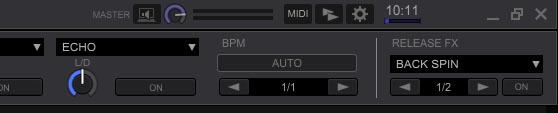
Hey Pulse, if MIDI can be considered necessary on the main screen, I don't think its stretch of the imagination to put an autoplay button there too. I photoshopped an example, and it doesn't take up much real estate or clutter the screen.
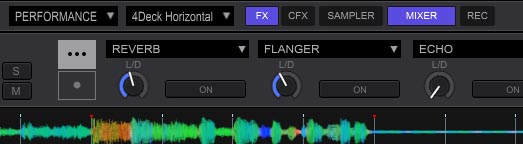
And while we're talking about layout, it would make much more sense to put the layout/visuals/view all on the left side since these affect the screen layouts. Put the performance/export mode next to the 2Deck/4Deck pulldowns. Much cleaner, less confused, less clutter.
If the programmers/designers don't want to do it or don't think it's necessary, that's an ok reason, but to claim 'clutter' seems like an off-the-cuff excuse not a reason.
Top Right Autoplay:
Top Left Layouts: