
Official comment

Unfortunately there isn't a way to do what you're asking, and in my frustration of trying to figure out a workaround, I'll be sending a writeup to the rekordbox team to ask for an improvement to this feature.
So here's the workaround...
- Open rekordbox and go to your Collection view.
- Open the My Tag configuration window on the right:

- Scroll to the bottom and create 3 new tags:
- In collection
- In a playlist
- Not in a playlist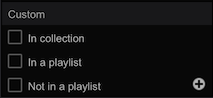
- Select every track in your collection (CTRL+A Windows / Command+A Mac)
- Check the box beside In collection
- Go through each playlist, select all tracks in that playlist
- Check the box beside In a playlist
- After all playlists have had their tracks tagged, create a new intelligent playlist
- Name the intelligent playlist Not in a playlist
- Set the criteria for: My Tag > does not contain > In a playlist and click OK
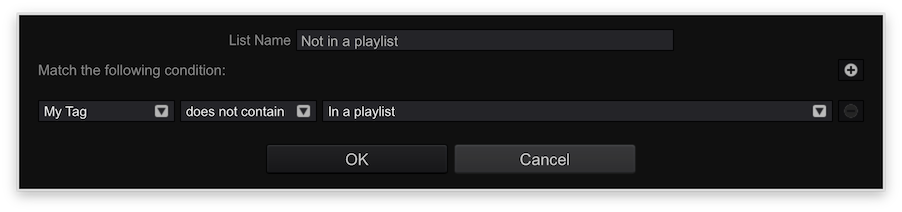
- The playlist will be filled with tracks which are NOT in any playlists. Select all the songs in that intelligent playlist.
- Check the box beside Not in a playlist
- Click on the Collection to go back to your full collection list
- Click the Track Filter button above the collection:

- Tick the checkbox to enable the tag filter, and click the Not in a playlist tag:
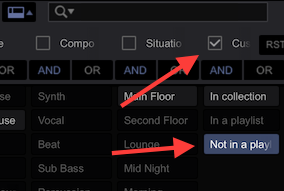
- All of the tracks now showing in your collection window are not in a playlist.
You can do one of two things...
- Select all of the tracks and delete them. This will only remove them from your collection. If you leave them in a general folder (eg. Music\October) and then you import the parent folder again (the Music\ folder), it would add them to the collection again.
- Right-click on those files one at a time, and select either Show in Explorer (Windws) or Show in Finder (Mac), then delete the file, close the window, then delete the entry from the collection in rekordbox.
So currently, this isn't a quick / easy way to find the songs not in a playlist, nor is it easy to physically delete the song directly from within rekordbox (although this feature has previously been requested).
Comment actions


