
When you load a song, if you don't see a wave form while the song is playing - push the browse button and the waveform will be displayed. Try this and then let us know.
Comment actions

Hi folks! :-)
I need your help! And sorry for my bad english. Normaly I speak german.
That's what I see on my CDJ 2000 Nexus player displays:
https://www.pioneerdj.com/en/product/player/archive/cdj-2000nxs/black/overview/
But I would like to see this:
https://www.pioneerdj.com/en/product/player/archive/cdj-2000nxs/platinum/overview/#/color-picker
What I'm doing wrong?
Yes, I've analysed all the songs.
Is it better to use usb cables or lan cables between the Mac Book Pro and the CDJ 2000 Nexus players?
I would like to drag and drop the songs in the CDJ players-area in the Mac Book screen and than control them by the CDJ player themselves (on the hardware machines).
Did I missed a adjustment / setting in the Rekordbox that I can see the wave form on the player displays and that I can zoom in the wave form?
As well the "Loop Mode", "Slip" and "CDJ" Buttons doesen't work anymore, since I've bought the newest Rokordbox version about 1 month ago. The software from the CDJ players are also updated.
I'm missing the "ta ta ta ta...-noise" to stop on the right place in the song to make a cue or a loop. Even if I press the "CDJ" instead of the "Vinyl" button, it works like the vinyl-modus. There is no "ta ta ta ta...".
In the case I've forgotten to replace the cursor in the search area, to write and search a song in the Mac Book, there comes a "bong- / fail-noise", when I press a letter, which everyone can hear on the loudspeaker. How can I switch off this nois?
Post is closed for comments.
When you load a song, if you don't see a wave form while the song is playing - push the browse button and the waveform will be displayed. Try this and then let us know.
Thanks for trying help. But no sorry. That doesn't work.
Here you can see both versions. With (1. picture) and without (2. picture) the BROWSE button activated.

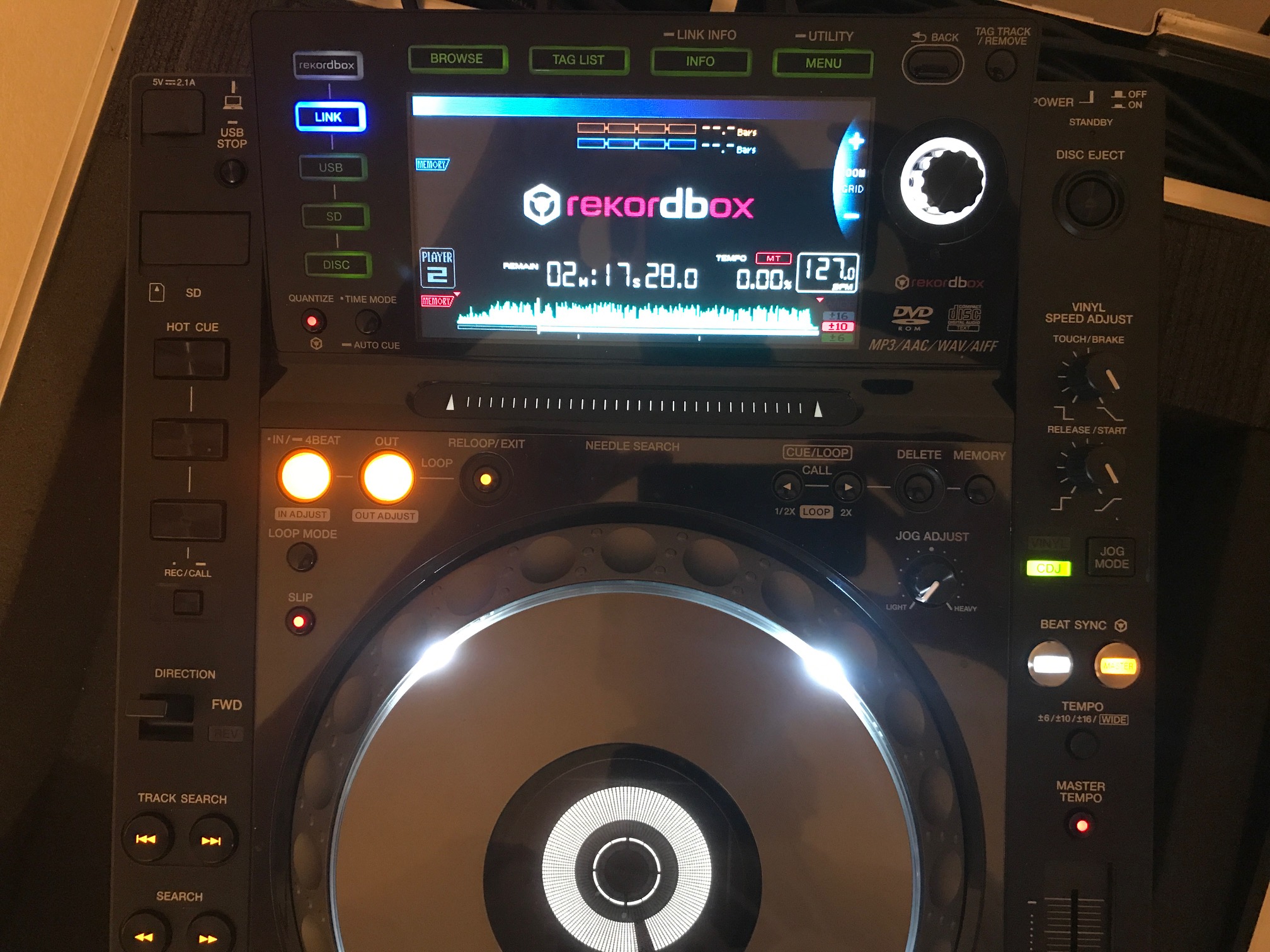
There is no big wave form.
There isn't a red circle for the "SLIP".
No fields for the "LOOP MODE" on the bottom of the display to activate them in the "NEEDLE SEARCH".
And the red and blue rectangles on the top of the display do nothing. They don't count the beats, as they should.
Do you have a contact Person in Switzerland from Rekordbox to show them live my problem?

@CARREY > Sorry, where are you loading the tracks from?
Hi there!
I'm not shure, what you want to know, so I start from the beginning. :-)
Some tracks are made by myself (ripped from my own CDs with the software "CDex" to mp3 in VBR between 192 + 320 kbps), a few are from the iTunes store, but the most are downloaded on diffrent pages with torrents. I do this with my Windows pc, prepare them, write exactly Interpret, song name, year, cd name and so on in the software / musicplayer winamp and than copy them from the Windows pc in the newest MacBook Pro in the iTunes. There I make lists and intelligent lists. exactly the same view with the tree I have than in the Rekordbox on the left side. When they are analysed I search in the search area on the right, take the song I want like drag and drop above in the area from the player 1 or 2 and can play them.
@CARREY > Sorry, it was more the last part I was looking for - you're linked in rekordbox EXPORT mode! ;)
With the waveforms not showing, that tells me the likely culprit is your configuration of your firewall. Please see the firewall information here (or test it with the firewall disabled), let me know if anything there helps you.

