Official comment

@Sjoerd Roelofs > Please file a rekordbox ticket here and our support team will be happy to assist you in resolving this issue.
Comment actions
@Sjoerd Roelofs > Please file a rekordbox ticket here and our support team will be happy to assist you in resolving this issue.
Post is closed for comments.

Hello,
Symptomes on MAC Sierrs 10.12.6
Master level works on the controller. Output works on controller.
No other knob works. Downloaded all-inds of updates... no effect.
Owner: fed up and frustrated
Also, being on 13" laptop... Have i screwed up by purchasing pioneer rekordbox?

Did you install the audio driver for DDJ-RB into your Mac?
https://www.pioneerdj.com/en/support/software/ddj-rb/#drivers
Hello, i have done that. Numerous uninstalls/reboots/installs.
Also updated the firmware of the DDJ-RB
No success
Perform the following checks.
Reload Audio MIDI settings.
(1)Connect DDJ-RB to your computer and turned it power on.
(2)Open [Applications] folder, [Utilities] folder and [Audio MIDI Setup.app].
(3)Open [Audio Devices] window. Confirm that [Audio MIDI Setup] is displayed on Menu bar.
Click [Window] and choose [Show MIDI Studio] or [Show MIDI Window]. (The displayed name depends on OS version.)
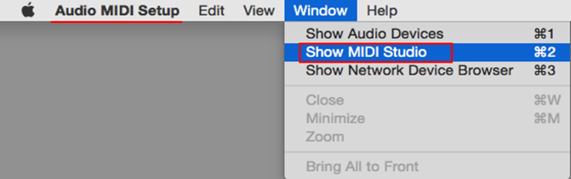
(4)[MIDI Studio] window opens up, click [DDJ-RB] icon. The icon turns to blue color, click [Remove Device].
"DDJ-RB" icon disappears and comes back again.
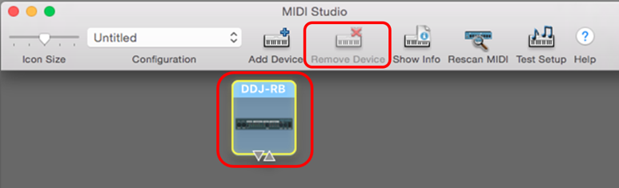
(5)Close [Audio MIDI Setup] and turn DDJ-RB power off.
(6)Turn DDJ-RB power on and run DJ Application.
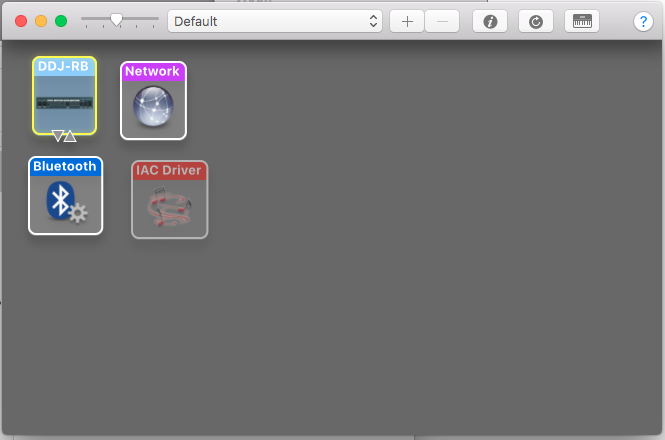
The minus-sign is inactive
Did you activate the rekordbox dj lisence key?
open [Preferences] > [License] > [rekordbox dj], click [Activate] and enter the license key to activate it.


Hello,
I'm facing the exact same problem.. cant remove my device from midi studio and my license is active.. any help?


