Official comment

You can change one of the existing mappings on the XDJ-RX if you wanted to do that function.
Comment actions

Hi there,
Is there a way to set key-sync within the controller rather than using the keyboard?
You can change one of the existing mappings on the XDJ-RX if you wanted to do that function.
Post is closed for comments.

I'm interested in this as well. I also have a DDJ-RX, and I would like the SYNC button to be for key-sync rather than BPM-sync. I tried looking in the midi-learn section, but I could find a way to change it.

Hi Guys,
This is tottaly speculations from my side but my guess is: Pioneer will launch RX2 model with this functionality (I also heard here in the forum they will launch RZ2 very soon).
For all others that want to have this possibility in previous controllers have to use DDJ-XP1 in combination with the controller.
I hope that I am wrong but the past history show me that, see for example Serato Flip function that was only released in DDJ-SX2.
Of course now the situation is a bit different because DDJ-R series intend to be used only by RB, so I am curious about comments from Pioneer Support Guys
Sergio
Agreed Sergio - exactly my thoughts...
Hi Pioneer - can you assist with changing the mappings on the XDJ for DDJ?
@Tony > Open the MIDI panel (button top right), click ADD > KEYSHIFT > KEYSYNC:
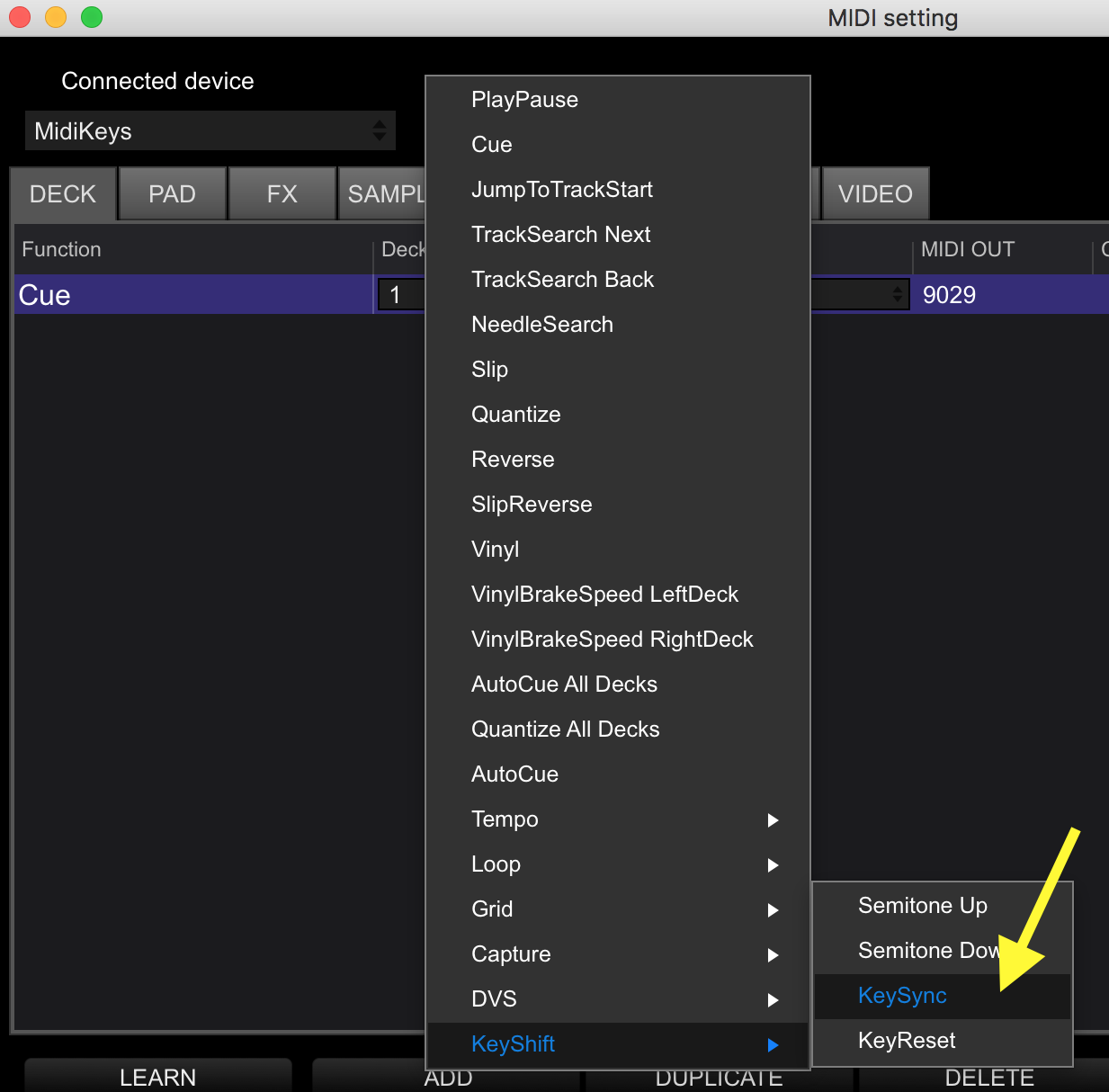
Then click the LEARN button, and press the button on the controller you want to use for that KeySync function. If it tells you that button is already assigned to some other function, go and find that function (by name), and remove the MIDI key assignment or delete the whole line, then add the LEARN for the KeySync.
Repeat for every deck for which you want to have a key sync.

Best idea "jnikken", thank you! =)
I mapped it like that with my DDJ-RZ now. Thanks Pulse! =)
But I wonder... Is there any way (any choice in MIDI) to go to the original-semitone direct? Like a "KEY-reset-button"
Also, you MUST make the KEY bigger, its tiny now... hard to see, hard to work with. Feels like not have full control when is so small.(And I got a 21" monitor!!)

I have remapped my track skip forward and back buttons with +/- semitone and they work on the controller but only within midi mode, the buttons revert back otherwise. Is there any way for these settings to stay stored when just using the controller alone?
@Garry > As opposed to ...? The DDJ is a controller, intended for use with the software. If you're using it "alone", what are you using with it to play from?

