Official comment
@Alan > Yeah, I understand users might want to browse through the Explorer because of how they've organized their music folders, but the search functionality through the collection is really the way to go.
@pulse pioneer dj
I have my tracks analysed ok pulse, that's not the issue. I couldn't find how to search but the other comment here says to click on collection so I did and now the magnifying glass logo comes up on the right side of the screen to search which is what I was looking for so thanks for your help, I can now search for artist name and track name aswell as album....... happy days.
I didn't know I needed to go further up out of my explorer from my hard drive and click on collection to then search.
@Alan > Yeah, I understand users might want to browse through the Explorer because of how they've organized their music folders, but the search functionality through the collection is really the way to go.
Post is closed for comments.
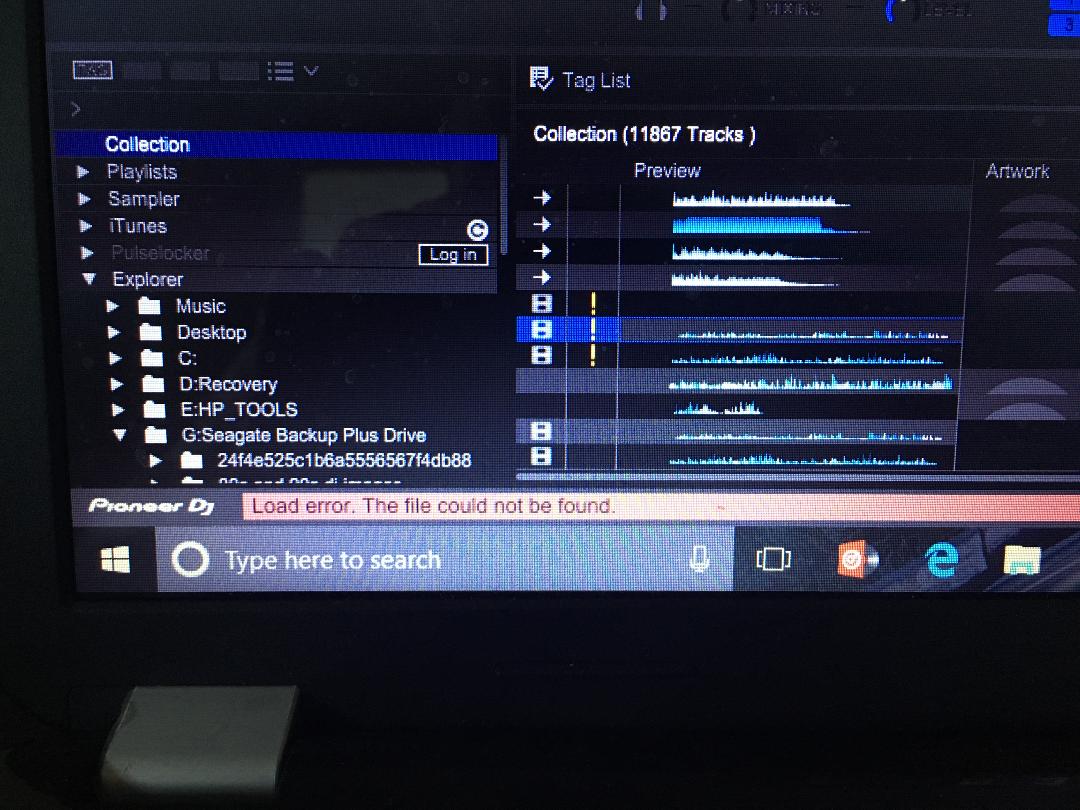
@pulse pioneer dj Thanks for that and yes I can now search for a track now but I have come across an even bigger problem and would love to know if you know the solution? Well, it took me 2 weeks to drag all my music folder over to rekordbox to analyze the bpm of each track but I stupidly changed the main folder name and now none of the songs are playable, but are still there in the main destination folder. I have put on a photo there is an exclamation mark ! and says no file found. I want to know if I should completely delete all of my 2 weeks work and start all over again? as some songs haven't beat matched correctly. And how do I delete all my imported collection as I have my external hard drive plugged in its called Seagate as you can see in the pic. So I want to know how to delete all my collection and start all over again.
Thank you for your assistance.
Alan.

@ pulse Pionner dj
Thank you for that, also could I simply delete rekordbox and reinstall it and start all over again? is there so many times your aloud to use the licence key?
Alan.
I wouldn't suggest deleting rekordbox unless there was a specific reason to be doing so.
You can install with the same license key on two different computers at the same time, but if you want to move it to another computer, you simply deactivate one.
Why wouldn't you suggest deleting rekordbox and simply putting it back on again and start again
When you remove the application, all of your database and settings are left behind for future installations. If you want to wipe the database and start from scratch, that's a different question entirely - but even then, you shouldn't need to do that just because a few songs need to be re-analysed.
Well there's over 11,000 songs haha made up in different genres, 80s 90s dance 2000 chart 2010 11 12 13 14 15 16 17 dance remixes 2017 loads haha so that's why I just wanted to wipe it and put it back on. As it's not just 10 songs it's a lot of songs lol.
So select everything in your collection and delete it, then re-import as you sort things out.
I tried to do that but I can't find a simple way of selecting them all lol how do I select every track in "collection" then delete them all? I can then start again and drag them Over for them to analyze.
CTRL+A on a PC
COMMAND+A on a Mac
Will that select everything tho all tracks in collection? Or just 1 track?
Yes, that will select all tracks - hence the function of "select all."
Thanks for your help with this, another question is if i delete the whole collection it won't delete the original destination folder from my external hard drive will it? It's just from the rekordbox software "collection"
Correct; none of the audio files themselves are deleted in that procedure, just the entry in the database.
Thank you again for your help it's much appreciated :-)