Official comment

Two ways...
- Use MyTag and create an Explicit tag.
- Use the colour options to mark those tracks with red.
Comment actions

How can I tag a track as explicit? With pulselocker (RIP) dirty tracks were marked with a red E in the first column...
Two ways...
Post is closed for comments.
I am using MyTag for now. The problem is: the E does nog show up like in the picture below. This symbol gives me a quick view of tracks that i have to play so that parents finally get their little children from my dancefloor :)
Is it possible to place a checkbox 'explicit' in the info overview of each track?

I understand that, but there isn't an option for that within rekordbox. If you've used MyTag already, create an intelligent playlist to show only songs with that particular tag, then add the colour to them and it's easy to see:
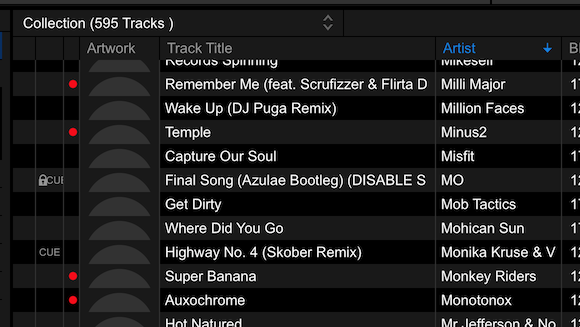
Good tip but not an option for me. The colors are marking the energy levels. Can you pass it as a feature suggestion?
Unfortunately there is no specific tag for "Explicit" in most file formats (AAC has one), so it's not a default tag - it would have to be rekordbox-specific.
I know Jay (another moderator here) and I have discussed an awesome feature that could be associated with this -- the ability to "block all explicit" to prevent accidental play of an E track.
It's a valid suggestion, I'll pass it along.


