Have a feature request or suggestion? Post your idea here!

Post

3 followers Follow
0
Avatar

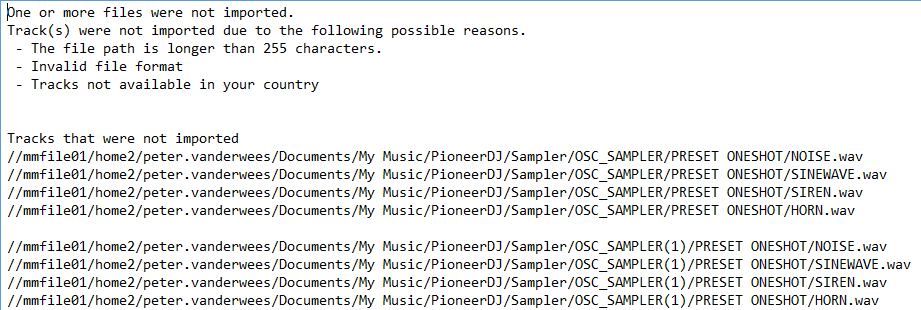
Rekordbox duplicates OSC_SAMPLER folder every time I start it up

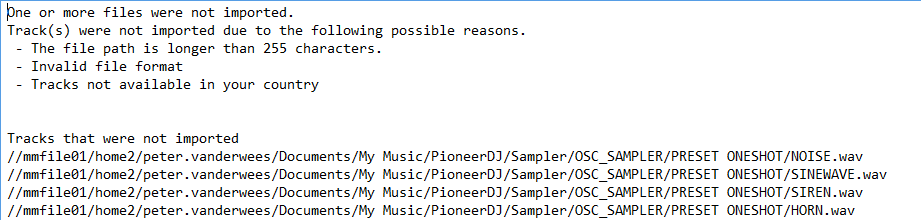
So I have a weird problem which I can’t seem to solve. Every time I startup Rekordbox I get the message ‘One or more files were not imported’, and it seems Rekordbox isn’t able to find the four standard samples.

It duplicates the OSC_SAMPLER folder and I’m also not able to save samples.

I’m sure it a pretty easy thing to solve, but I just don’t see it.

All my songs are on a separate hard disk (I have two in my laptop) and Rekordbox has no problems with that. I guess Rekordbox has a problem with the roaming user profile maybe?

Greetinx Peter

Petah

Post is closed for comments.

5 comments

0
Avatar

Guys,

Would really love to get some help here. I’ve finally found the way to change the path but that doesn’t solve it. I can’t get the standard samples to work and I can’t create new ones.  It keeps revering to the original path in the log, even if I enter a path on a completely different drive.

I’m left with Rekordbox with a non-working sampler. Not really ideal as I can’t use the sampler on my DDJ-RB now…..

Greetinx Peter

Petah 0 votes
Comment actions Permalink
0
Avatar

Yeah, the problem is the path -- rekordbox doesn't like non-local paths for core elements.

Have you modified the rekordbox settings file at all?

Pulse 0 votes
Comment actions Permalink
0
Avatar

Hello,


I have just bought an Interface 2 to use with Rekordbox and have this exact same problem which is driving me mad. I have my music folder attached to my NAS which is clearly the problem but I can't find where to edit the path or simply stop these being loaded, I don't have a sampler so I don't even need them. I'd rather not have to move my music folder local again. I've tried changing the sampler setting in rekordbox3.settings but it doesn't make any difference.

Please can someone help?

Adam Sabido 0 votes
Comment actions Permalink
0
Avatar

@Adam > Did you mount the NAS as a local path or with a symlink so rekordbox thinks the files are local?

Pulse 0 votes
Comment actions Permalink
0
Avatar

Hello,

I've mapped a drive to the NAS (I'm using Windows 10), however in order to change the location of the music folder you have to use \\<NAS IP> and can't use Z:\. As far as adding music goes, simply using the file navigator and adding from Z:\ works perfectly fine.

I was wondering if there might be some config file which stores the location of the music folder so I could change that to Z:\? Or even change it to a local location and use the symlink as you've suggested.

To be honest I'd be happy to just store these sampler files locally if I could but I can't find anywhere to change it.

Adam Sabido 0 votes
Comment actions Permalink