Have a feature request or suggestion? Post your idea here!

Post

5 followers Follow
0
Avatar

RDJ - Change Deck Number

Is it possible to assign Player 2 & Player 3 of CDJs to Decks 1 & 2
of rekordbox DJ in performance mode?

Or can rekordbox DJ be configured to only show Decks 2 & 3?
(controlled by CDJs, players 2 & 3)

In Export mode, I had CDJ 1 set as Player 2, and CDJ 2 set as Player 3 so I could use them on CH2 & CH3 of DJM.
This also enables the red jog on air lights.

This method doesn't work in performance mode though.

In Performance mode, I have to set CDJ 1 as Player 1 and CDJ 2 as Player 2 in order for the software to display on Decks 1 & 2 of rekordbox DJ.
Also, the on air rings do not light when in performance mode.

I want to use the same setup as I do in Export mode when also in performance mode.

I'm using NXS2 setup.

Is this possible?

Shªun_N

Official comment

Avatar

Yes! I missed the post back in April, and then I had to get out my stuff in order to test after your post Friday.

No, you can't just show 2&3 in performance mode. I wish it were possible to re-number / re-order the decks, but unfortunately the GUI isn't designed to switch up. The best you can do is select the deck regardless of the player number:
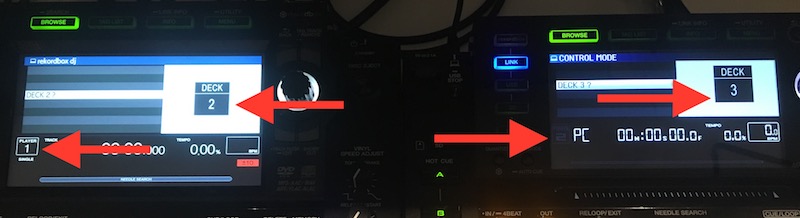
And then show 4 decks in rekordbox:

But now your right CDJ (Player 2) is the lower left deck 3, and your left CDJ (Player 1), is the upper right deck 2.

On-air doesn't work with CDJs in Performance mode, regardless of the mixer used.

Pulse
Comment actions Permalink

Post is closed for comments.

14 comments

0
Avatar

So the only way to get decks 1 and 2 playable in Performance mode would be to assign my CDJs to decks 1 and 2 and also use CH1 and CH2 of mixer?

Or could CDJs be assigned to numbers 1 and 2 but controlled my mixer's CH2 & CH3?

Shªun_N 0 votes
Comment actions Permalink
0
Avatar

With regard to the audio output, you can stick that anywhere you want, so you're not limited there by the channels; you could use channels 1 & 4 or 2 & 3 if you wanted, the software doesn't care what the outputs are, just configure that in the audio settings.

Pulse 0 votes
Comment actions Permalink
0
Avatar

1.5 years later and this is still not possible? I'm surprised that not more people complain about the lack of this feature. I won't use Rekordbox Performance until this is possible. My players are assigned to channels 2 and 3 on the mixer. In order for Quantize FX to work, player numbers need to be 2 and 3 as well. This means I cannot have the 2 deck view in RB Performance. With the 4 deck view, apart from taking up half the screen, deck 2 shows up on the right side and 3 on the left, opposite the way they actually are. I simply want to show two decks with Player 2 and 3. Will this ever be implemented in the software?

KNZL 0 votes
Comment actions Permalink
0
Avatar

@Marcel > You can use decks 1 & 2 assigned to outputs 2 & 3 of the mixer and still use the FX.

Pulse 0 votes
Comment actions Permalink
0
Avatar

Thanks for your reply. I probably didn't explain myself very well. I am talking about the FX Quantize function of the DJM-900NXS2. It ONLY works if the player numbers are the same as the Mixer's channel numbers. So the only way I can have a 2 Deck view on RB AND use FX Quantize is by naming the players 1 and 2 and using channels 1 and 2. I hate doing that as I'm used to playing with channels 2 and 3 (plus 1 and 4 with 4 decks) which is the most logical layout.

KNZL 0 votes
Comment actions Permalink
0
Avatar

If you're using the DJM as your audio device, it should still work if you route the output audio signal to the other channels.

Pulse 0 votes
Comment actions Permalink
0
Avatar

But if you use the DJM as the audio device, that is negated.

Pulse 0 votes
Comment actions Permalink
0
Avatar

Ok I've tried this again, hoping that there would be a different outcome to the last 5 tries I had. I set the left Xdj-1000mk2 to Player 1 and the right one to Player 2. I route them to channels 2 and 3 on my Djm900nxs2. When I press the quantize button on the DJM it keeps flashing, meaning Quantize does not work. What am I doing wrong...?

KNZL 0 votes
Comment actions Permalink
0
Avatar

It gets more difficult when u try and hook up two cdjs and two vinyls in performance mide

Ratu 0 votes
Comment actions Permalink
0
Avatar

This is the exact situation I am having. CDJ3ks on Ch 2/3, for any pro link functions to work, need to match mixer channels. Except, RB in Perf mode cannot toggle which Decks to display... so, you have to do the 4-up view that to the OPs point, takes up half the screen. 

What are we doing wrong? If nothing, and this is a 'feature' when is this going to be fixed? 

Putting the CDJ3ks in HID mode along w/ pro dj link is redundant and I don't have enough room or usb ports for that mess. 

tzwizard 0 votes
Comment actions Permalink
0
Avatar

@Tom > Please don't cross-post. As answered here, there is a low number of requests for this so it's not a high-priority fix. It's on the list, but we don't have any information on if/when it will be added.

Pulse 0 votes
Comment actions Permalink