Have a feature request or suggestion? Post your idea here!

Post

5 followers Follow
0
Avatar

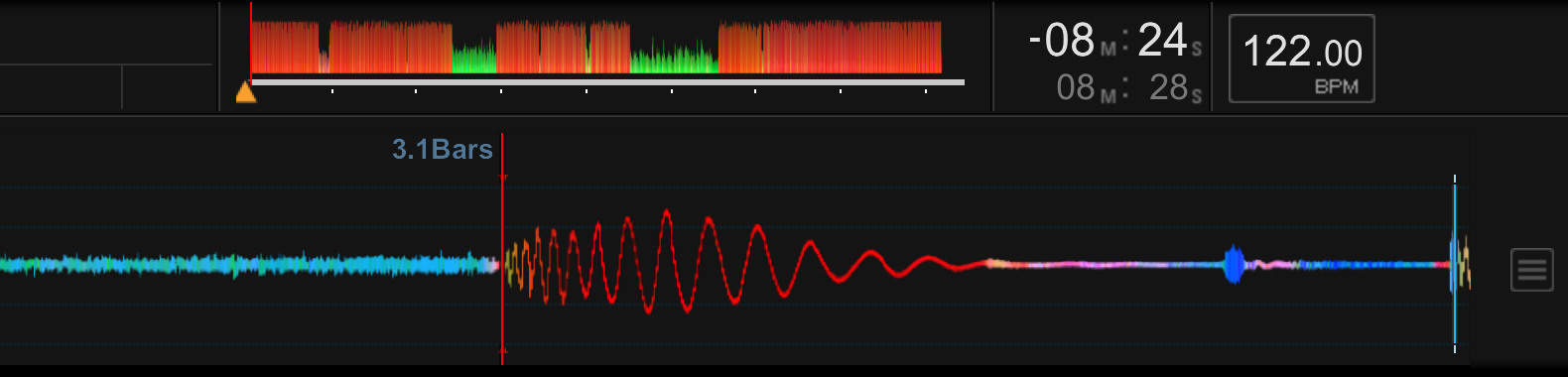
Set first beat of track

So after analyzing a track, rekordbox sometimes sets the first beat of the track a few bars before the beats actually start. When moving the grid to the left or right, i can only edit the number in the current range. What I mean is, if the analyzed track's 1.1 should start where rekordbox has set it at 3.1, I can only move between 2.1 and 3.1. I can't move it all the way back to 1.1.


Don't know if my explanation is making any sense. I've added a screenshot. In this case, I need the current beat to be 1.1. How would I do this?


Karan Fadnavis Answered

Official comment

Avatar

@Karan > Unfortunately there can't be "negative count" in rekordbox (like you could do in Serato DJ, for example). If the 1.1 bar/beat is more than 1 bar from the start of the track, it will be that number of bars regardless. In your example, there are 2 full bars of "nothing" before the first beat. You would simply set a memory point and have rekordbox / your devices set to auto-cue to the first memory point on load. Yes, it will always start counting from 3, but that's how it works now. Sorry!

Pulse
Comment actions Permalink

Post is closed for comments.

4 comments

0
Avatar

If I'm understanding correctly, press CUE where you want the first beat, save as Memory Cue (or Hot CUE) and make sure load to first memory point (or hot cue) is selected in Preferences.
Choose Hot Cue column in browser view and make sure all are checked for tracks to load at first hot cue point.

Shªun_N 0 votes
Comment actions Permalink
0
Avatar

Thanks. I was wondering if it was just me unable to figure it out.

Karan Fadnavis 0 votes
Comment actions Permalink
0
Avatar

Has anything changed regarding this since 2017? I notice some of my tracks will have a negative bar count preceding the first beat, but only when Rekordbox has analyzed and determined that itself.

Clearly, there is support for negative bar count now, so there must be some way to manually set it, right? If not, why not? Rekordbox track analysis frequently requires correction, so if the app can automatically set this, why not allow the user to do so as well?

Can we submit that feature request to the developers?

Tony R 0 votes
Comment actions Permalink