Have a feature request or suggestion? Post your idea here!

Post

2 followers Follow
0
Avatar

Come suonare con il vinile e ddjsx2

salve ho scaricato da poco la versione trial di rekordbox, volevo un'informazione sono un possessore di una ddjsx2 e volevo capire in che modo posso suonare oltre la consolle con un vinile mi spiego meglio a tre tracce ma la traccia del vinile non con vinile vergine ma con un vero e proprio vinile con incisa la musica su di esso e se possibile vedere all'interno del programma la traccia del vinile caricata Spero in una vostra collaborazione grazie anticipatamente.

giovanni lasorsa Answered

Official comment

Avatar

If you're asking if you can play a record while using rekordbox dj or dvs with the DDJ-SX2, the answer is yes. When you flip the channel input switch over to PHONO - the software will show that the input for that deck is from the turntable rather than the software.

Pulse
Comment actions Permalink

Post is closed for comments.

20 comments

0
Avatar

Grazie per la collaborazione ma il deck dovrei metterlo in absolute o relative? perché ho provato ma niente.

giovanni lasorsa 0 votes
Comment actions Permalink
0
Avatar

It doesn't matter -- in relative mode, you have access to the hot cues while using the timecode vinyl, but absolute mode prevents those from being used.

Pulse 0 votes
Comment actions Permalink
0
Avatar

La traccia da vinile l'ascolto ma non viene caricata all'interno del software, cosa dovrei fare per farla caricare ?

giovanni lasorsa 0 votes
Comment actions Permalink
0
Avatar

Ho notato in un video a riguardo il rekordbox dvs che nella sezione preferenze in dvs sotto la i 4 deck per la calibrazione non mi compare routing setting "control Hardware"  "rooting" come mai ?

giovanni lasorsa 0 votes
Comment actions Permalink
0
Avatar

No, the turntable can be any brand.

Are you trying to use DVS mode or simply play a music record?

Pulse 0 votes
Comment actions Permalink
0
Avatar

With CH1 and CH2 on the SX2 set to PHONO on the input, rekordbox will look like this:

But that's only for playing an audio record through the player; if you want to use DVS, you need to set the input on the SX2 to PC.

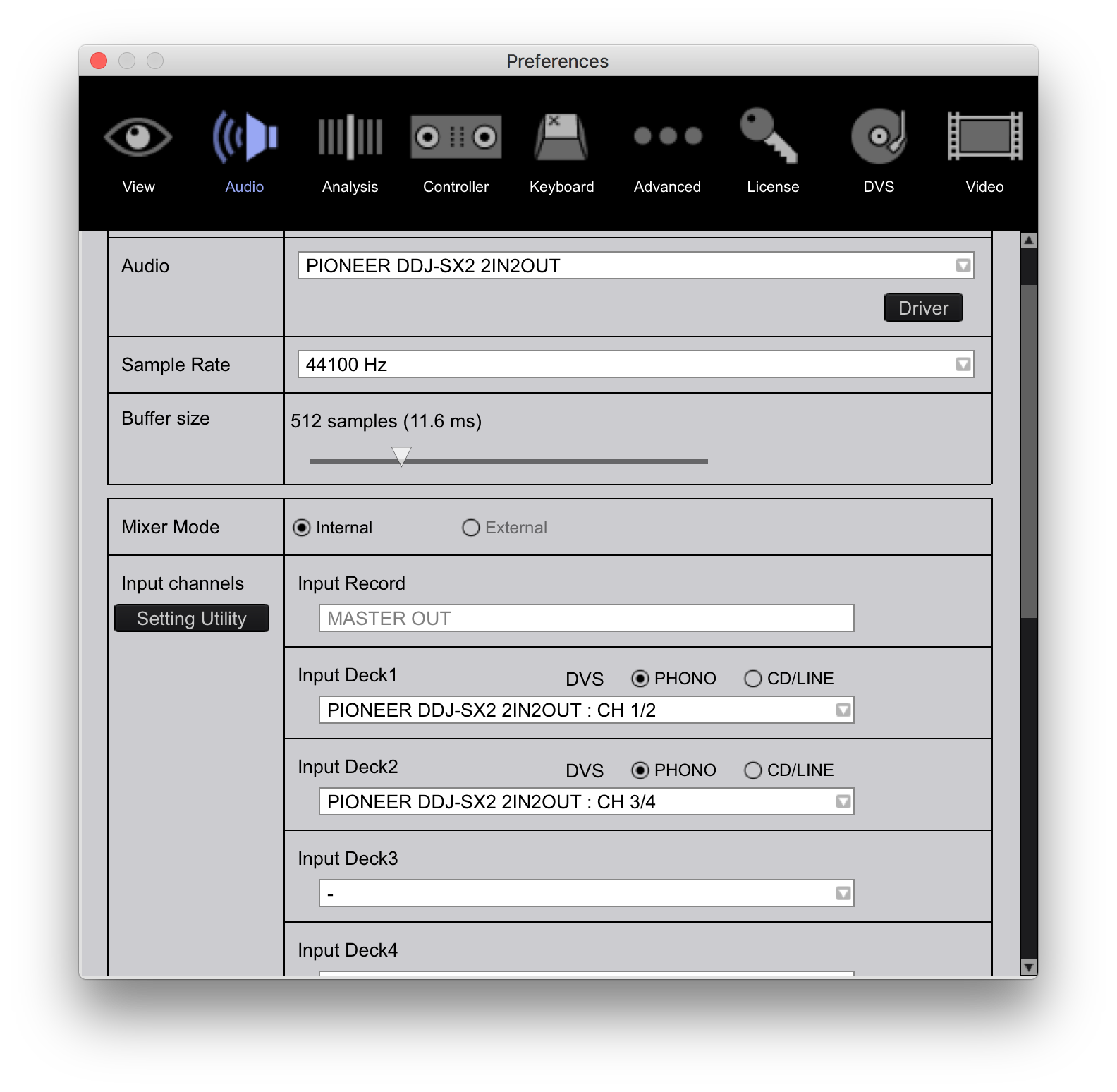
Your Audio Preferences should look like this:

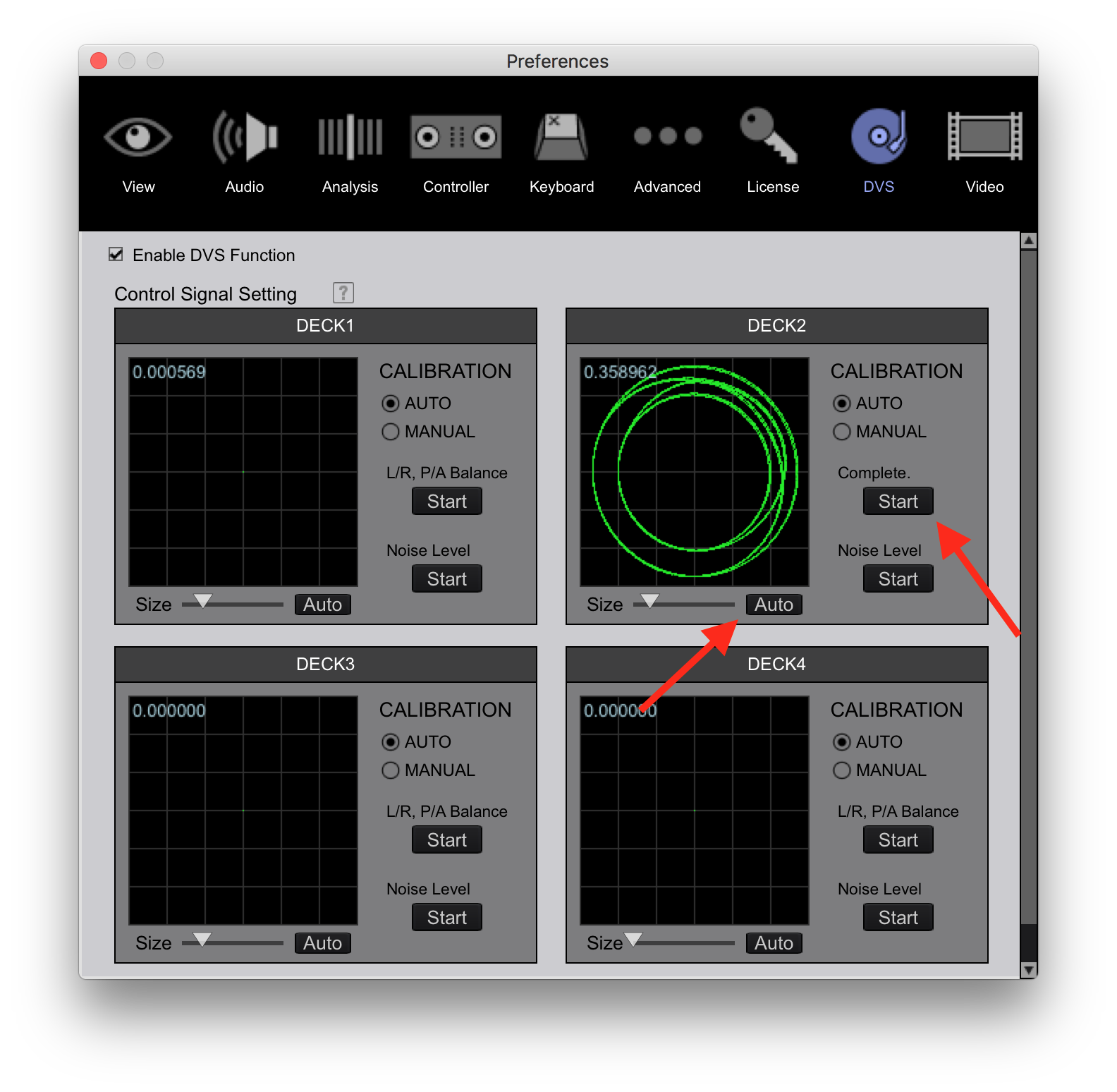
And once you have timecode playing, go to the DVS page and click the AUTO button below the deck to calibrate the tone, and the START button to the right to calibrate the balance.
Pulse 0 votes
Comment actions Permalink
0
Avatar

Ho impostato tutto come mi ha detto ma la traccia del vinile comunque non viene caricata all'interno del software ! Non compare un'analisi della traccia e il bpm e tutto il resto.

giovanni lasorsa 0 votes
Comment actions Permalink
0
Avatar

Let's start over...

1) Connect your turntable to the LINE/PHONO input on CH1 of the DDJ-SX2.

2) Set the input switch (on the front of the SX2) to PC.

3) Within rekordbox, verify that you have DVS mode enabled (the checkbox at the top of the DVS preferences page).

4) On the Audio preferences page, verify that your audio device is the DDJ-SX2 2IN/2OUT.

5) Also on the Audio preferences page, verify that the input decks for DVS are set to PHONO and are assigned for CH1 and CH2.

6) Play your timecode.

7) On the DVS preferences page, click the AUTO button below the deck to calibrate the tone, and the START button to the right to calibrate the balance.

Pulse 0 votes
Comment actions Permalink
0
Avatar

ma la calibrazione devo farla con un vinile vergine ?


giovanni lasorsa 0 votes
Comment actions Permalink
0
Avatar

la calibrazione la faccio con un vinile qualsiasi e non con un control vinyl 

giovanni lasorsa 0 votes
Comment actions Permalink
0
Avatar

I thank you in advance for the support you are giving me hoping to solve the problem!!!

giovanni lasorsa 0 votes
Comment actions Permalink
0
Avatar

No -- the DVS mode is for use with timecode records only! rekordbox will support use of the official rekordbox vinyl or Serato noisemap vinyl.

If you want to use a regular record (music), there is no calibration required, and you must put the SX2 channel input selector to PHONO.

Pulse 0 votes
Comment actions Permalink
0
Avatar

ok  il vinyle riesco ad ascoltarlo ma non viene caricato nessun bpm all'interno del programma non carica niente.

giovanni lasorsa 0 votes
Comment actions Permalink
0
Avatar

Correct - the vinyl will play through the audio connection but the software is not intended to detect the BPM or do anything else. It's a "through" audio connection.

Pulse 0 votes
Comment actions Permalink