Have a feature request or suggestion? Post your idea here!

Post

5 followers Follow
0
Avatar

Genres in Rekordbox

Can I remove genres from the list? There are lots I will never use and some of my own I added, so to make the list a lot smaller, this would be helpful.


Thanks!

Hans Dekkers

Post is closed for comments.

9 comments

0
Avatar

Same Question: a while ago i tagged some songs, but I tagged the genre without a capital letter and now I have in the drop down list "house" as well as "House", "electro" and "Electro" so this is annoying and with a left click in the list is seems not to be possible to erase things

s_decoster 0 votes
Comment actions Permalink
0
Avatar

I have the same problem... Looked for some kind of DB or XML file in different locations (under program files, app data, etc.) but couldn't find a way to shorten/edit the list

Phildefer 0 votes
Comment actions Permalink
0
Avatar

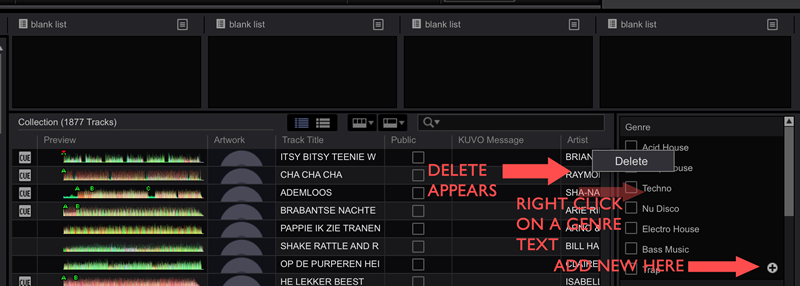
Rekordbox 4.0.5 can do it (don't know in previous verions)... right click them to delete, or hit the + button to add.

ceepee-in-the-mix 0 votes
Comment actions Permalink
0
Avatar

ALSO MAKE SURE YOU'RE RIGHT CLICK IS ENABLED ON A MAC (else cmd click i think) !!

ceepee-in-the-mix 0 votes
Comment actions Permalink
0
Avatar

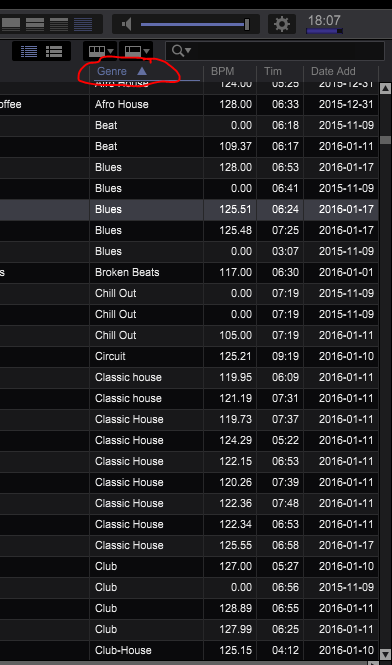
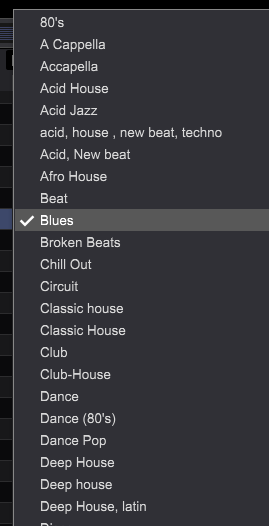
Ok I see, but this is using the tags. What I am looking to do is edit the drop-down list from the Genre column:


In the second image you can see duplicates, or irrelevant genres

Phildefer 0 votes
Comment actions Permalink
0
Avatar

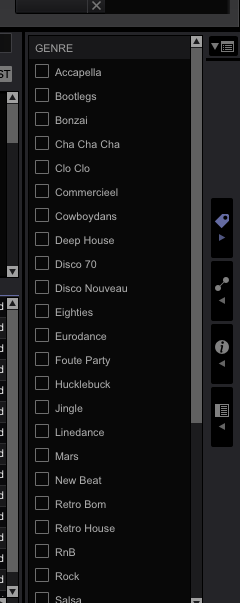
Open the My Tag window on the right, there you see them, you can checkbox select each track in one or more genres "and" edit the names of genres, remove duplicates. The My Tag editor can be opened by using the top 1 of the 4 icons on the right of your screen. Check this:


ceepee-in-the-mix 0 votes
Comment actions Permalink
0
Avatar

Oh I get your point now ... the Genre you see is coming from the ID3-tag of your music files.  I guess you'll need third-party tools (e.g. MP3 Tag Editor, works really good, Windows) to clean it up.  Personally I don't use that ID3-tag.  I've categorized them by my own tags (like stated in screenshots above).  For backward compatibility to my MP3 files, I've checked the option (see settings rekordbox) to assign those values to the "comment" field.  So at least my files get updated in the ID3 tag with the genre I checkbox. (You never know for what that's good, someday, sometime :-)) 

ceepee-in-the-mix 0 votes
Comment actions Permalink
0
Avatar

Hi, I have the same issue. Even though the genres in the list are not in my ID3-tags they still appear in the drop down menu. I have checked the tag editor, all of my files with tagging softwares etc... In the filter section I have 78 genres but in the list at least the double. Doesn anyone has a clue of why?

Thanks

Francesco Papaleo 0 votes
Comment actions Permalink