

Please do not post crash or error logs before we request them.
First, update to rekordbox 3.2. If you still have crash errors, follow these instructions:
- From the “Go” menu in the Finder of Mac, select "Go to Folder...".
- In the popup window, please type in “~/Library/Application Support/Pioneer/rekordbox” to open the folder and find “rekordbox3.settings”.
- Control-click or right-click “rekordbox3.settings” then select “Open with” -> “Other...” and use TextEdit to open the file.
- Find the following line in the settings file.
<VALUE name="DisableOpenGL" val="0"/>
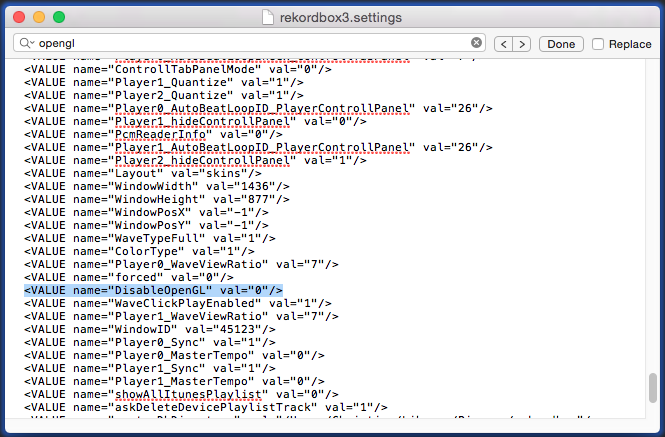
- Then, change the value from “0” to “1” as shown below.
<VALUE name="DisableOpenGL" val="1"/>
Please note: Be sure to copy the text "1" including the quotation mark " " in for example,
<VALUE name="nexusServerIsActivated" val="1"/> in the TextEdit and paste them instead of directly typing the value 1.
Close the file and restart rekordbox.
Please try this process to solve the crash problem.
Because of the "smart quotes" function of Mac, when a user changes the text 0 to 1, the double quotation text is changed so that the value can be read as 0 instead of 1 even after changing the value.


Comment actions