Have a feature request or suggestion? Post your idea here!

Post

2 followers Follow
0
Avatar

[TICKETED] DDJ SZ Upfader/Line Curve/Slope

I am aware of all the great corssfader settings the SZ has, but I mix with the up/down line faders mostly

The line faders are set to a preset curve and are not adjustable in on the SZ mixer area.

Though just about all other controlers mixers intergrate with the software program (serato) because the SZ mixer is as an independent mixer so the Serato Line Fader Curve settings are greyed out due to the fact that the SZ mixer section is not intergrated its like a standalone mixer so Serato doesnt have control of this area.

With that being said all other professional line Pioneer mixers have a line fader curve switches right on the mixer, the Pioneer DDJ SZ mixer does not.

However the DDJSZ does have the hardware Utility but there is no settings within it for the faders/curve.

The fader curve it currently has is a sloped curve like ) instead of and smooth incremental slope like /

Is Pioneer considering adding the control in the Utility for upfader curve?

DJ Dynasty

Official comment

Avatar

A VERY late reply, but to answer the question ... unfortunately, no, there are no plans to include settings to adjust the channel fader curve via a utility menu or UI within software. Sorry!

Pulse
Comment actions Permalink

Post is closed for comments.

4 comments

0
Avatar

Not sure, will ask the engineers what the current slope is and if it's configurable by the user.

Pulse 0 votes
Comment actions Permalink
0
Avatar

Hi Pulse,

Thank you for all your efforts here. Have you gotten any response on this ticket? Maybe as a possibility to be added to the hardware utility? 

DJ Dynasty 0 votes
Comment actions Permalink
0
Avatar

Hi Pulse,

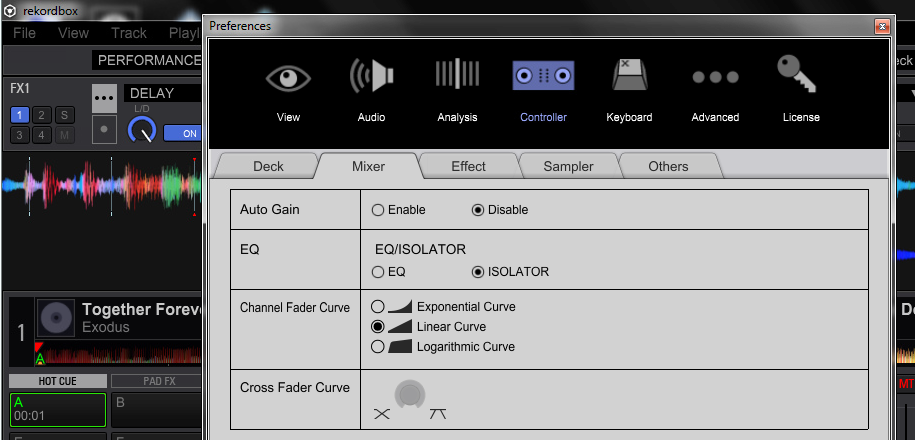
Though its not in the SZ utility I ended up going for the Pioneer DJ trial and sure enough with the SZ connected, in Performance mode in the Preferences | Controller | Mixer and there is the option for the upfader curve.Now the upfader in the mixes feels more even for smoother fades Im glad this worked out

DJ Dynasty 0 votes
Comment actions Permalink