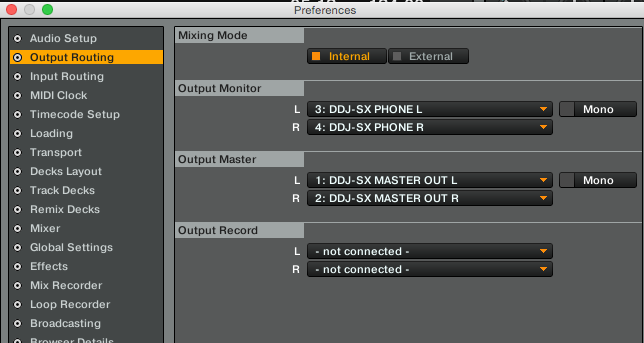
@Steve > Can you take a screenshot of the Audio Setup and Output Routing tabs of the Traktor preferences? The image below shows one setup for the SX set to internal mixer; you should be able to set yours for external and assign the output channels.

Hi, I have just purchased a ddj-sx2 and after realising nothing works on xp anymore (which I've been using traktor 2.6.0 on and previous versions since 2009) I've installed both traktor (latest version) and serato (latest version) onto one of my desktops temprarily.
I am having a similar issue with the ddj on both programme unfortunately. I've updated the firmware and installed the latest ddj driver.
If I play music via windows media player the audio goes through the ddj with no problems, I have control over the master volume and booth, headphones etc but if I load a track into any deck in either traktor or serato I get nothing through the master, booth or phones (although its registering on the relevant channel)
(I've adjusted trims, faders, masters etc)
Any help on this is much appreciated.
PC specs:
Windows 7 64bit, Intel 2600k, 16gb ram, Asus mobo, no other sound card installed (not even on board)
Post is closed for comments.
@Steve > Can you take a screenshot of the Audio Setup and Output Routing tabs of the Traktor preferences? The image below shows one setup for the SX set to internal mixer; you should be able to set yours for external and assign the output channels.

I've got it working but it wasn't the settings, it was a bad case of the "I'm only going to work in the USB port I was plugged into when you installed the driver"
Although I am still having an issue with traktor, its crackling like its got latency issues no matter what I set it too. Its definitely not the PC (I've tested it for latency spikes etc not long ago, plus serato works faultlessly now with no issues)
Ah, gotta love Windows.
If it works with Serato, it's not the hardware, it's likely Traktor. Can you grab a screenshot of the process monitor (sorted by CPU usage, highest at the top, be sure to click the "Show processes from all users" button if you're on Windows 7 or older) while you are experiencing the audio issues?