
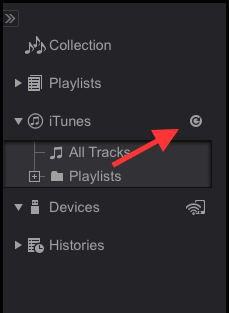
Try clicking this button:


Comment actions

Upgraded from 4.0.6 to 4.0.8 this evening and now it is not locating the iTunes library and not able to play any music.
Whilst the Browse option under 'Advanced' section of preferences seems to be working the 'Open' option remains greyed out.
Showing no tunes available under iTunes.
There are tracks contained within Playlists. However when you click on them they say file not found.
Using Macbook Pro.
Itunes has always been on an external hard drive and no issues before today's upgrade.
Is it possible to go back to 4.0.6?
Post is closed for comments.
Try clicking this button:

I wish it was that simple. It may just be an issue with my Mac. I have a windows PC and I have since downloaded Rekordbox onto that and it works fine.
My problem is that under Preferences (advanced setting database) it lets me choose the browse option but not allowing me to tell rekordbox where the music is held - the Open box remains greyed out.
Have uninstalled Rekordbox. Went via website and whilst I chose the option that said I didn't have a copy, when i installed it, it just loaded the copy I had previously loaded.
Have restarted and shutdown the Macbook but no change.

@Rob > You're not clicking the MUSIC folder, it wants to know where your iTunes library file is located (the .itl or .xml file) -- while your music is external, chances are your library file is in the Music folder of your user's home folder.
Brilliant. Really appreciate the help and guidance.
Only downside is that all the existing playlists, where cue points etc have been stored are saying that they can't locate file. When I use the relocate option, I can find the track in the 'Music' folder and it allows you to choose the 'Open' option but then says already in the Collection - that is true, there is a copy in there but not with cue points.
Doesn't seem to be a way to import them from the USB either - well the track does but not the cue points. Is this something else obvious I am missing or is it back to the drawing board?
@Rob > Do you have two copies of your music?
That was the problem. Got a bit impatient over the weekend and had imported the music folder. I have now deleted that and all tracks now located.
Yours,
A very satisfied customer.
Awesome - enjoy!


