
I agree with the effect select blinking all the time, would be nice to turn it off !!
Comment actions

OK, there is a lot to love about this mixer! Overall I think Pioneer did a good job. But with that said. There are a few things I don't like.
1. Am I the only person that thinks the up-faders are to close to the pads? Sometimes if I am cutting with the up-faders or even just muting the audio for people to sing along in the club. I have hit the pads directly above the faders by mistake. Everyone knows the key to a great battle mixers is plenty of space around the faders so you can comfortably cut ,scratch & juggle with out hitting anything else on the mixer. I basically midi mapped the 2 pads above each up-fader to do non essential things just so this won't happen. I hope this gets addressed in a future model.
2. The pad lights are perfect when I'm in my studio mixing my radio show. But damn they are bright in the club when all the other lighting is low. Would be nice if there was a control panel option where you could control the brightness. To be clear, I'm talking about the (Button Light ON). The button OFF is not bad. & yes you want it brighter for the on effect. But its just a bit extreme.
Would also be cool if when you re-midi-map the cue-points, they stay whatever the marker color in SDJ is. If you re-map them all the Cue-point just become White. This was 1 of the features I like better about the S9 over the 62. But if you want to customize your mixer, that goes out the window & white also happens to be the brightest color. Ugh.. LOL.
Last thing on the lights. The mixer effect select blinking all the time. Just gets a bit annoying. Wish there was another option then Blink, to show what effect is selected.
Would be interested to see if this is just a personal problem.. LOL
Post is closed for comments.
I agree with the effect select blinking all the time, would be nice to turn it off !!

you have a setting for the pads brightness in the mixer menu
Tried that boss, It ships default on the lowest brightness. U can only make it brighter.. I want it less bright.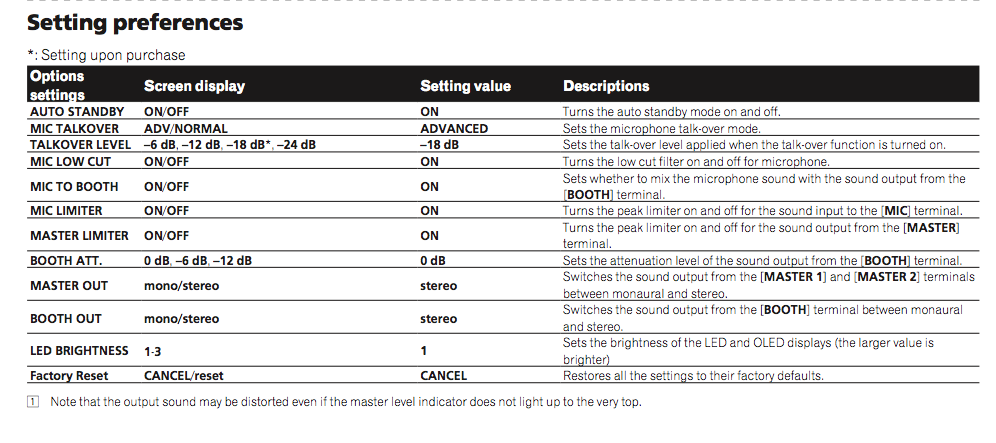

Received my S9 this week, it's awesome but two things:
- Leds are way to bright and even annoying if you're just using vinyl.
- Can't figure out how to save the fx, if no laptop i connected the settings doesn't do anything.

@Jonas > The FX are not saved to the mixer they are simply controlled by it. The FX generator is built into the software.
hmmm too bad, a basic roll function is way better than a vinyl brake fx.
What about the leds? any way to change those bright green pads? next firmware update maybe?
See page 32 of the owner's manual.
On page 32, are you referring to the led brightness? it's only possible to make them brighter, not less bright

