
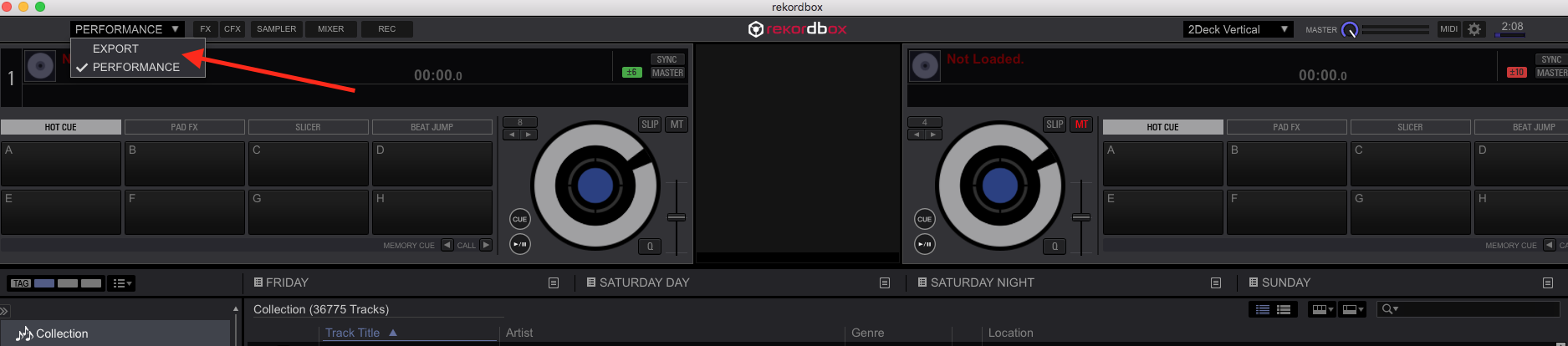
did u actually activate "performance" mode? you have to enable the trial to see the decks


Comment actions

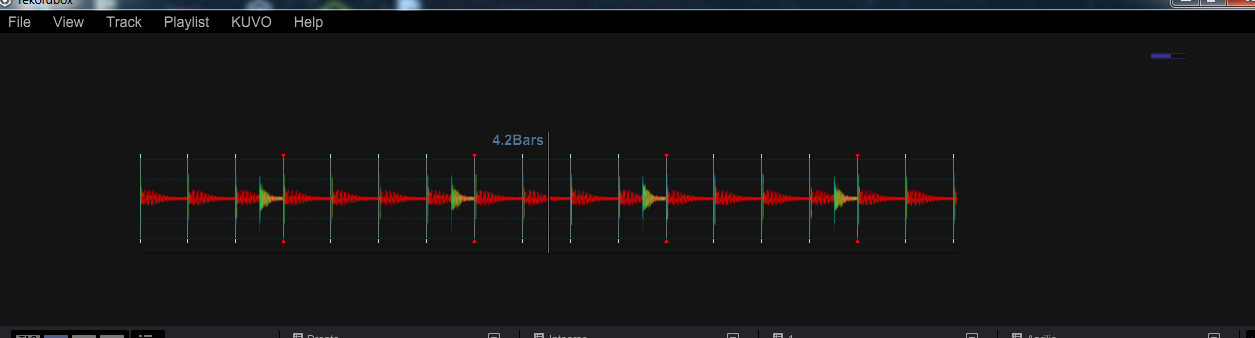
The upper side of the software (the deck and all its controls) is missing. The waveform is there!
It happened the same with all the 4. versions.
I am using "Rekordbox for file management", on a Windows 7 machine.
This make me still use R. 3.3.0.
Post is closed for comments.
did u actually activate "performance" mode? you have to enable the trial to see the decks

@Marian > Can you please post a screenshot?
 @BriChi -> I do not see that drop-down menu
@Pulse -> Here is the screenshot
I do not see the buttons, but If i click on the region where the "play/pause" and "Cue" buttons should be, the software will respond (pausing the track or jumping back to the cue position).
I've also noticed that an old bug reappeared: not being able to scroll through the browser tree using the notebook's touchpad.
@Marian > Have you updated your graphics drivers from the chipset manufacturer's website? Links to the main ones are located in this article.
@Pulse > I have the latest driver. Unfortunately this is an old notebook and it needs to be replaced soon.
I stilll have some professional software on it (video editing, Traktor ...) and they work fine.
Rekordbox is relatively a soft program, with a smaller "engine" and not so many tweaks. Strange they have chosen to use some top-end features (high demanding graphics elements) mixed with ones which are still not good enough for professional use.
I am not saying is bad that they use high quality visual elements! But the quality gap between some elements inside this software is too big.
Another point is that, when new elements are brought to a program, they can be tweaked to consume less power (efficiency). Not the case with Rekordbox. Everything seems so raw.
Thanks for trying to help!


