
MIDI mapping jog wheels in Rekordbox DJ is not currently possible.
Comment actions

How to mapp jog wheels in rbdj for ddj wego,pitch bend?
is there any midi mapping for ddj wego?
Post is closed for comments.
MIDI mapping jog wheels in Rekordbox DJ is not currently possible.

How is that possible???? How could we use a controller WITHOUT JOG WHEEL?????
Are you serious??
PLEASE FIX IT THE ASAP!
I've just bought my new DDJ-RB and I can't use my jog wheel!

@Christos > Yes, you can. The DDJ-RB does not require mapping as it is native to rekordbox. Third party controller jog wheels, however, can currently not be mapped.
I can't! When I plugged my DDJ-RB in my laptop, there was not any mapping!
Here at the MIDI setting window [page 4] https://rekordbox.com/_app/files/img/MIDI_LEARN_operation_guide_en.pdf
there is the DDJ-RB in the connected devices!
Where I connect my DDJ-RB, there isn't any DDJ-RB option at the connected devices!
It has the option USB MIDI. So the Rekordbox "sees" my DDJ-RB as a third party controller and there isn't any mapping preset for my controller.!
Please fix it! I MUST have that mapping! I can't play! There is not any configuration for my jog wheel function!


@Christos > Could you please go to the Applications > Utilities > Audio MIDI Setup app, go to Window > MIDI Studio and see if the DDJ-RB is shown there (you may need to scroll the window).
If it IS NOT shown, please disconnect the RB, get a different USB cable and connect it to another USB port on your Mac.
If it DOES show up, disconnect the USB, select the DDJ-RB, then click the Remove Device button. Reconnect the USB and if it does not show up, click the Rescan MIDI button. If it shows up, then before opening rekordbox, go to Applications > Pioneer > DDJ-RB > DDJ-RB driver version display utility and see if the firmware version is shown. If not (and/or the device is disconnected), the window will look like this:
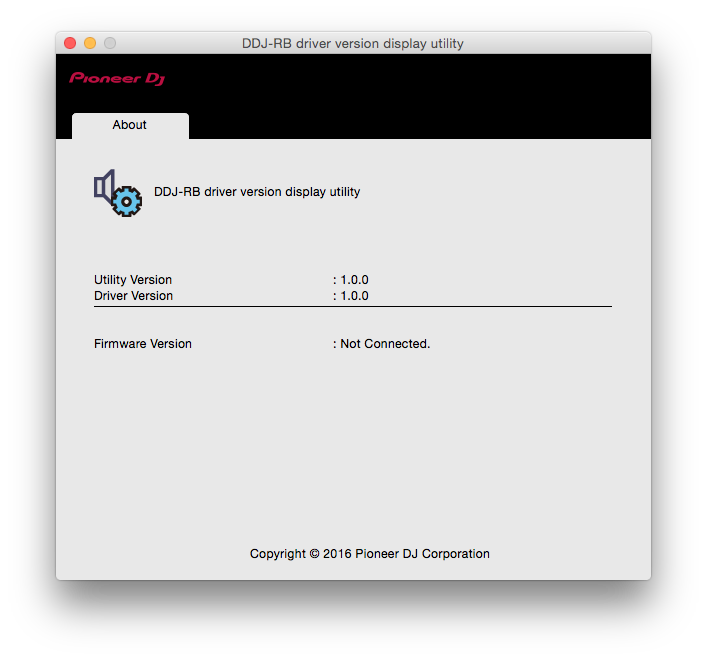 If the version number is shown, the hardware is detected. Open rekordbox, ensure you're in Performance mode, go to Preferences > Audio and scroll to the bottom to see what is shown beside Control Device Information.
Let me know where you get to with those instructions.
Oh, and you did install the drivers, right?
@Christos > You asked us to "FIX IT THE ASAP!"
Were you able to resolve the issue with the instructions provided?
@Pulse I'm not sure if I installed the drivers right. :/ What if I hadn't installed them right? Should I do uninstall the Rekordbox and the drivers?
I've tried to solve the problem, but I couldn't so.
I couldn't buy a new usb cable, because I was for 2 weeks now in an island in Greece, where there isn't any shop to buy that cable from.
I will try to fix it the soonest the possible.
Thank you very much for your response and your instructions. I appreciate that! :)
@Christos > No worries, I just wanted to follow-up. ;)
If you haven't installed the drivers, or even if you have, reinstalling won't hurt - and that would be a good first step. Be sure to have the RB disconnected from the computer when installing, then reboot after installation completes.

Having the same problem on a Mac. I bought a ddj sb2 and no midi mapping is available in rekordbox dj. Any help?
@Giuliano > The SB2 is a pre-configured device. Be sure you're using the latest version of rekordbox dj and connect the SB2. That's all.

lol. Did that a number of times and it didn't work. Anyhow solved the problem by configuring a new midi device for the Sb-2.
You mean by deleting it from the MIDI devices list within the Audio MIDI Setup utility?

Im Having MiDi Mapping Issues Also.....is there somewhere to download the csv file for ddj rb?


