
Please post a screen shot of your rekordbox Audio Preferences windows.
Comment actions

Hi,
I'm having trouble with getting rekord box (performance mode) to work with the DJM900NXS2 connected to (2) XDJ-1000s. I've followed the directions in your connections guide online but can't get the XDJ1000s to recognize rekordbox and the playlists I have in my collection.
Any help is appreciated. I'm hoping this is just a step we may have missed.
I'm running a MACBOOK PRO also running OSX Yosemite.
Thanks!
Travis
Post is closed for comments.
Please post a screen shot of your rekordbox Audio Preferences windows.
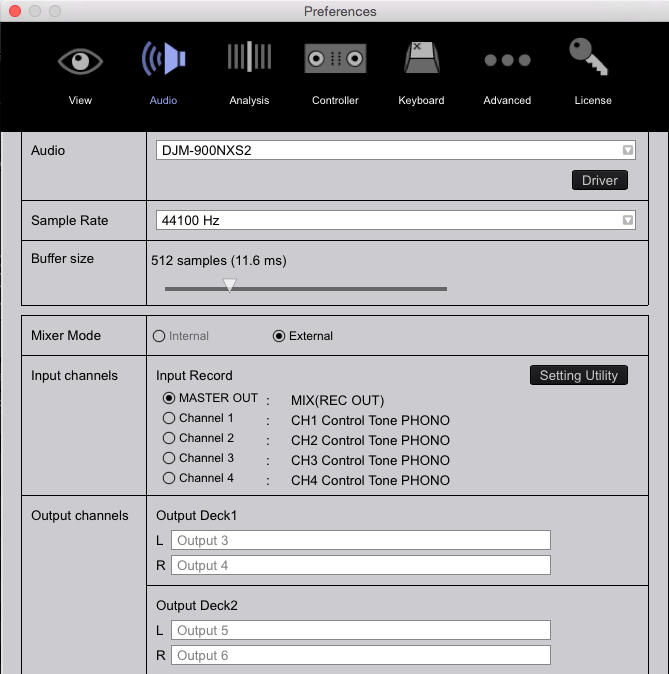
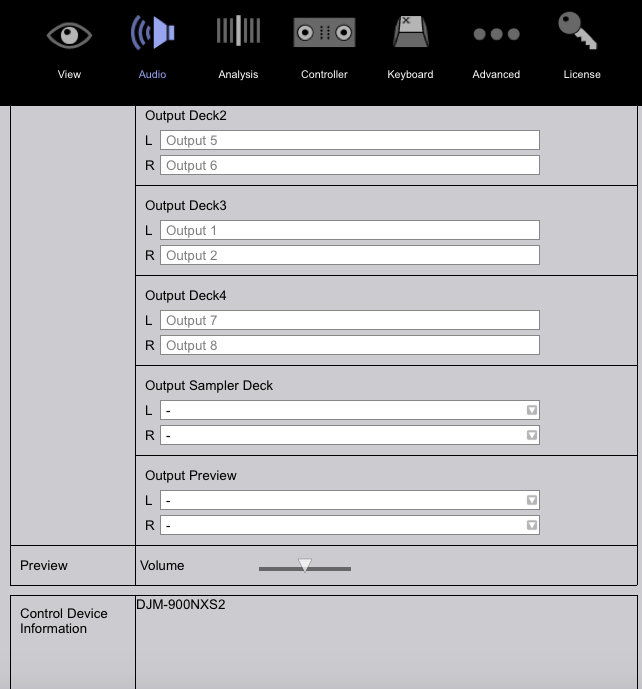

What exactly is the problem? Is it the XDJs or the mixer?
If it's the mixer, set your channel input selectors to USB A on all 4 channels, you should have audio from each deck in rekordbox going to the mixer.
If it's the XDJs, connect them both via USB and set them to LINK (ensuring, of course, that they're updated with the latest firmware), then on the screen you get the selection to select which deck they're controlling. Rotate to choose, then press the knob to select.
I have rekordbox running in Performance mode, it is connected through USB to the A input on the top left of the mixer, all channels are turned to the A position. When I press the rekordbox function on the XDJ, above the link input, there is nothing else showing up after that.
Also the Djm 900nxs2 is updated to the latest firmware v1.09, and the XDJs are v1.05
You don't press the rekordbox button, you press LINK and then push the encoder knob, rotate to choose a deck and press the encoder again to select it.
There is nothing appearing under link to select a deck. If I use two USB cables and plug one into the back of each XDJ, both coming out of my macbook, then I see the select deck option. Then I put the Input selector knob (above all the channels of the djm) on Line and it will then output audio, only through XDJ (1) that is selected through my audio preferences. I have control of the rekordbox software on my laptop through the XDJ (2) There is just no audio coming out of the mixer
Thank you a lot for the help so far. I hope I'm not being a hassle, this kind of troubleshooting must be frustrating sometimes.
@Travis > It seems there's a misunderstanding -- you don't LINK players via USB; that's only for controlling rekordbox in PERFORMANCE mode.
If you aren't running a trial or have purchased a license for rekordbox DJ (performance mode), your only option is to use basic mode (aka export mode), and you link your players via ethernet for that communication. In that configuration, NONE of the devices are connected via USB and your audio runs from the XDJs to the DJM.
I may have seen where the confusion is. I am trying to control the Performance mode of my trial version of rekordbox on my laptop with the xdjs. I am NOT using a USB *flash drive* plugged into my player in order to load music on to a deck. I want to use my laptop to load the tracks on to the players and be able to control the software with the players. My music I am trying to play is stored on my laptop which has one data cable coming out of the USB *Port* , and into the computer input A on the djm 900nxs2.
Right now I am unable to try any suggestions because I am going to sleep.
Thanks again for the help so far and hopefully tomorrow we come to some sort of solution

I think this will Help you...I know you have XDJ's but check page 7 here, may help you .
@Travis > Then connect ONLY the USB cables from your XDJs to the computer and then press the LINK button on your XDJs when rekordbox is in PERFORMANCE mode.


