Have a feature request or suggestion? Post your idea here!

Post

3 followers Follow
0
Avatar

Sorting by KEY in Separate Playlists

Hi,

Let's say I have multiple playlists on my USB stick. How do I sort the tracks by KEY on the CDJ900 for a particular playlist? Because if I go to the menu on the CDJ and sort by KEY it will sort all tracks from all playlists on that USB. I just want to sort by KEY on a specific playlist. Could anyone please advise?

Thanks

Julius Laurasonis

Official comment

Avatar

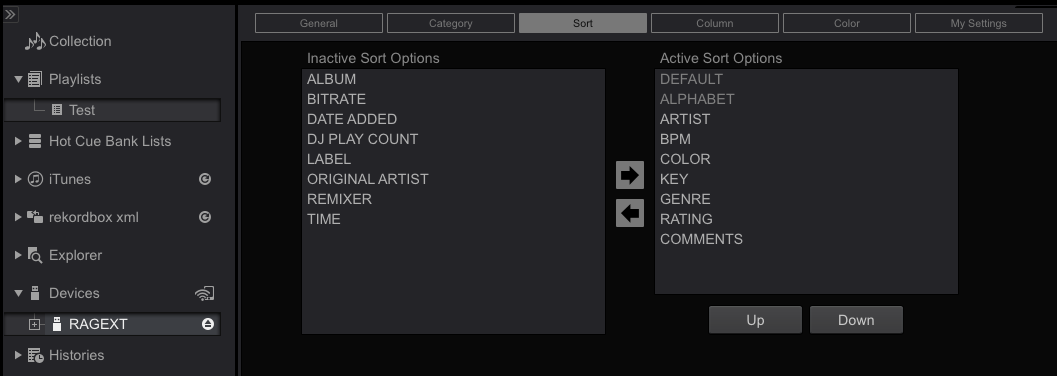
Connect your USB export device, click on it from the list on the left (in EXPORT mode, if you have rekordbox DJ), click the SORT tab at the top, add the fields you want from the INACTIVE list to the ACTIVE list.
Pulse
Comment actions Permalink

Post is closed for comments.

6 comments

0
Avatar

Hello Pulse,

Thank you for the answer, but I am still not sure how this will help in what I am asking?

If I choose the sort by key only, how will I be able to sort by key for just one playlist and not for the whole track collection on that usb?

Thank you!

Julius Laurasonis 0 votes
Comment actions Permalink
0
Avatar

@Julius > Once you have added the KEY filed to your sort option, you can then open a playlist on the CDJ, then press the MENU button and select KEY to sort that playlist.

Pulse 0 votes
Comment actions Permalink
0
Avatar

Thanks again,

Correct me if I'm wrong, but won't that sort ALL tracks on that USB stick by KEY? How do I sort in a specific playlist if there are multiple playlists on a single USB? I'm using CDJ 900.

Julius Laurasonis 0 votes
Comment actions Permalink
0
Avatar

@Julius > See where I said "open a playlist on the CDJ"? That means you're ONLY looking at the tracks in that playlist when you perform the sort. ;)

Pulse 0 votes
Comment actions Permalink