Have a feature request or suggestion? Post your idea here!

Post

5 followers Follow
0
Avatar

pioneer djm-s9 audio output from computer to mixer via USB

Hello guys, I've got just a quick question on DJM-S9; I have my S9 hooked to the computer, Serato is opened and when I use iTunes, or looper with beat Iwould like to scratch to, it plays in my left channel - i would like to be able to change it also to right channel - is it possible, please? I had rane ttm57sl before and there was an option in sound preferences (I could choose if output from my computer will play in line 1 or line 2).

Michal Kamenický

Post is closed for comments.

10 comments

0
Avatar

Having exactly the same issue. Prefer to scratch on the left side, and it's not posssible to get the standard audio output to the right side. I'm on windows btw.

My workarround is to use the onboard soundcard, hook that up to the right line-in and setting the windows sounds to the onboard soundcard. This way I'm able to scratch to a looper.

Btw it's a shame that something like this has been overseen in developement, especially on a scratch mixer.

Flowshi 0 votes
Comment actions Permalink
0
Avatar

My solution for now is "jack to cinch" cable from macbook headphones out to mixer aux in, this provides me a channel with looper and i can train my combos on both turntables without switching anything. Btw. this works with serato dj and analog records as well...

Michal Kamenický 0 votes
Comment actions Permalink
0
Avatar

Okay guys, a couple of things...

1) You're using a $1700 mixer and you want to use iTunes to play music with it? O_o Why?! Why aren't you running that music in Serato?

2) You can always reverse the crossfader if you'd prefer to swap the side you're scratching on.

3) Most software only allows outputs 1&2 to be chosen as it is intended for general consumers who are not using multi-ouptput devices.

Pulse 0 votes
Comment actions Permalink
0
Avatar

Hello, not sure if you understand the problem:

1. This is not matter of iTunes. If you want to train scratches on both hands, you usually place some scratch sounds on both left and right deck (or you use 2 analog scratch records) and you play some track as a beat you scratch to (usually from flash looper, looper cloud, iTunes, or whatever player you have installed - in case you don't use external device). Then you practice e.g. 8 bars on one hand, 8 bars on the other, while the beat is still playing. You can practice this way seamlessly, without need to switch anything... so this is not about "using iTunes instead of serato.."

2. This doesn't solve the problem at all, as the beat will always play on the left side

3. Rane TTM57sl had possibility to choose the computer line in between line 1 and line 2 back in 2006

As it was mentioned earlier, the only solution for now is to route headphones output from computer to AUX IN on the mixer, which btw. works perfect for me :)

Michal Kamenický 0 votes
Comment actions Permalink
0
Avatar

@Michal > What's the source of what you're scratching? Serato? A vinyl record?

Pulse 0 votes
Comment actions Permalink
0
Avatar

I understand that you still want to have the audio come through on the other side, but without using another application capable of sending to a multi-out device, the S9 nor any other Pioneer DJ mixer, is unable to have an output other than 1/2 selected by default.

There is other software you can use to re-wire the signal, or ... use Serato, or the sample banks within Serato... there are lots of options you guys aren't considering that beat the pants off iTunes.

Pulse 0 votes
Comment actions Permalink
0
Avatar

Hey Pulse here a link to one of my loopers I did with folks from a scratchforum, just to get the idea what we're talking bout. Loopers are very common in the scratchscene.


http://www.tablist.net/weblooper/#/looper/2006


So it runs a certain loop endlessly, this way you can scratch the whole day if you want to. The sound is coming from the OS soundsetting (either Windows or MacOS).

You can use real vinyl or DVS, if you route to an aux channel you can use both hands/both sides to scratch (that's the way Michael is doing it).

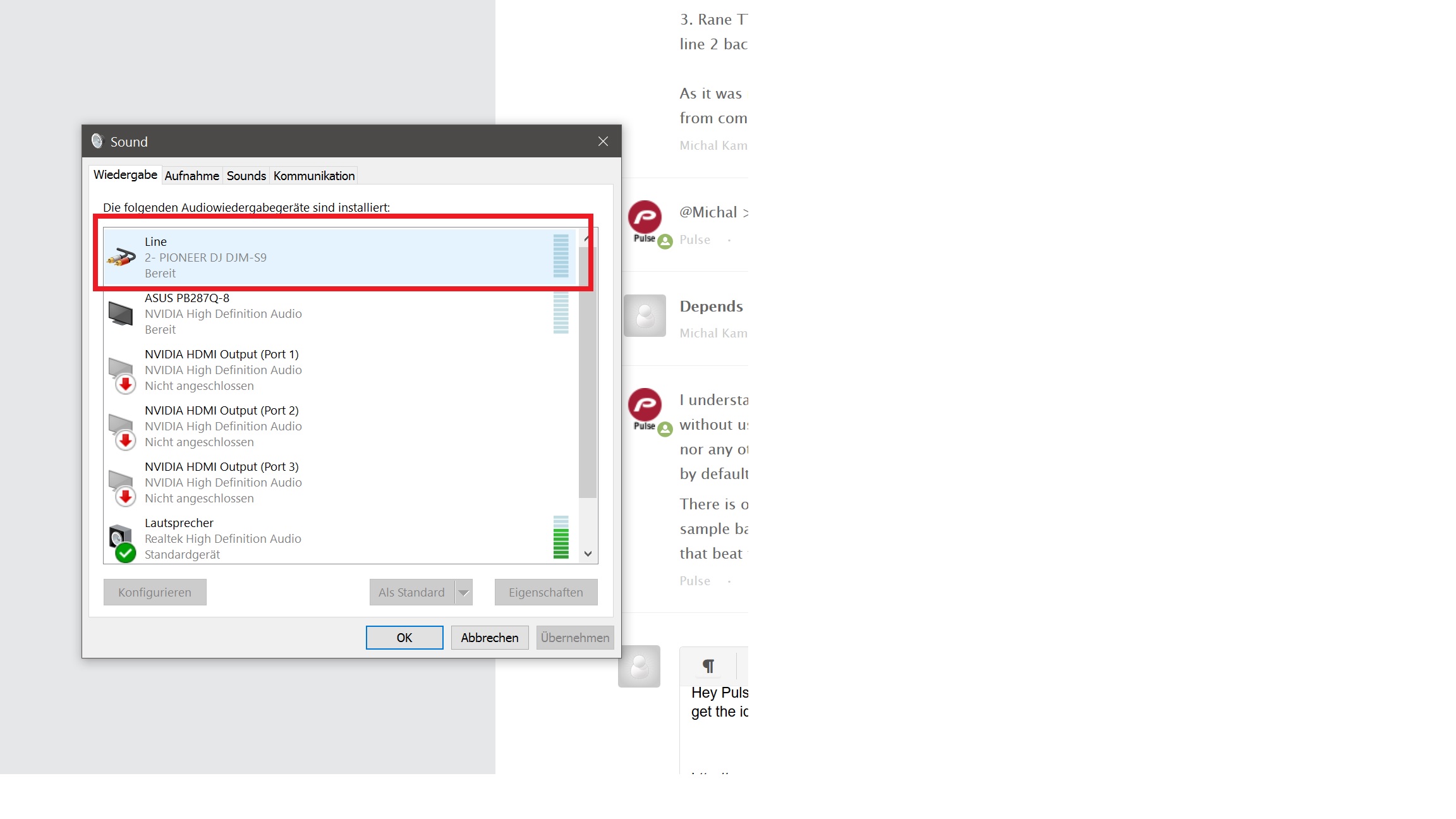
On other soundcards you can choose in the soundsettings which channel is used for the OS-sounds. The DJM-S9 give me only one channel which is always the left one (1-2). See my screenshot, it's a german windows, but you'll get what I mean.


I had a NI-Tractor soundcard before, it also offers 4 in- and outputs, and you can use all those for the windows sounds, loopers, Itunes or whatever aswell as in tractor to controll 4 decks.


Even my graphiccard offers more than one output!

Flowshi 0 votes
Comment actions Permalink
0
Avatar

I just found out the solution for this problem on mac computer. You need to go "sound and Midi settings" by typing that into your spotlight. (this setting cant be found in system settings)

Select "DJM-S9" on a list from left. Click lower right corner button that says something about speakers. Set front left to "3" and front right to "4" and you´re set.

Juuso Luukkanen 0 votes
Comment actions Permalink