Official comment

In your iTunes preferences, make sure this box is ticked.

Then in rekordbox, hit the reload iTunes library button


Comment actions


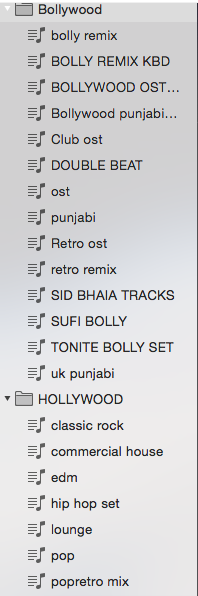
HI,
USING THE updated version of rekordbox & itunes.
M in trouble with iTunes playlist which is not shown in rekordbox. the sub folders show when i click on the expend to open the sub folder seen there is no playlist . in iTunes i have checked all the playlist i have created are there as it was previously it all happen in between 5 minutes....
please revert if anybody know the solution... thanks in advance.
In your iTunes preferences, make sure this box is ticked.
Then in rekordbox, hit the reload iTunes library button
Post is closed for comments.

I am having the same issue and have tried the fix. Any more suggestions?

same problem

same problem here for a few weeks now, tried a few fixes by connecting to different XML Files (manually exported library and auto updated library) but nothing has worked yet
makes even a right click and see to whether all folders are displayed and not only the syncronisierten !!!

@Joe > What, exactly, is not working?
Under the iTunes area of the sidebar I can access all the playlists that aren't in folders, but once I put playlists into folders, then the folders won't open for me to see the contained playlists. I can see the tab next to the folder change from + to - but the folder itself never opens.
When I import the folder into the softwares playlists, everything is fine and all the subfolders and contained playlists open up perfectly fine.
But I've tried using the normal library.xml file, I've tried manually exporting my library and linking RekordBox to that file, but nothing seems to work.
I don't know if it's worth noting that when I open RekordBox, I always have to refresh iTunes in the sidebar for everything to appear. It's never there when I first open up the software like it was when I first started using RekordBox DJ.
What happens if you use the Sync Manager?

has anyone managed to fix this its driving me mad, all my songs seem to be there so the music is available however the playlists i have organised in itunes just wont show up. the playlist titles are there but no music in them.
@Mike > Have you ever used the sync manager before?

Same issue - Mac 10.15.7 w/ RB 5.8 - tried above - is there a solution?

The issue started for me when I started to create folders to group playlists on iTunes.
Then when refreshing in Rekordbox with the iTunes arrow, in Performance mode, some playlist do appear but some not, without any specific logic.
But in Export mode > Sync manager, I can see all the arborescence properly with all the playlists in folders.
I keep refreshing and stuff, nothing works. Im thinking of forgetting folders on Itunes!
@Steph > Mac or PC?
Mac, OS Ventura and was also the case on Monterey
Thanks
Ventura is not yet supported, but please open the preferences and ensure you have the iTunes connection method set to FRAMEWORK.
Sure it always has been the case
Steph - are you using rekordbox 6.6.8? If not, that could be why, but if you are, please file an inquiry ticket here and our support team will gather some additional information to assist you in resolving this issue.