Have a feature request or suggestion? Post your idea here!

Post

4 followers Follow
0
Avatar

CDJ-2000NXS2 hot cue and loop problems

Hello - How do I get hot cues and loops to stop auto-playing when selecting them when CDJ-2000NXS2 is paused? In other words, when selecting a hot cue or a loop when the deck is paused all I want is for the playhead marker to move to the hot cue marker or turn loop on without the track automatically starting to play. This is driving me nuts trying to figure out on own and have given up so any help is greatly appreciated. Thanks

HARO

Official comment

Avatar

@HARO > The CDJ hardware itself will always play the Hot Cues when they are pressed, this is normal operation. If you are using the CDJ with rekrodbox dj (in performance mode) and want it to stop after you release it (if the player is NOT in play mode), then you want to enable the GATING option in the rekordbox preferences:
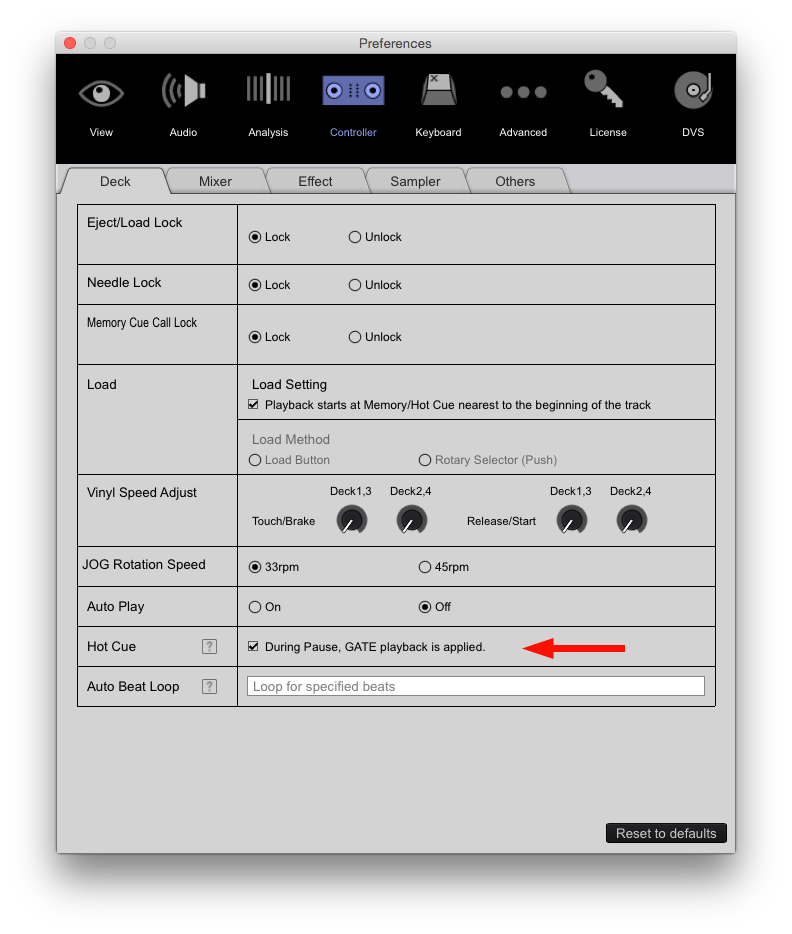
Pulse
Comment actions Permalink

Post is closed for comments.

9 comments

0
Avatar

Why not storing them as cue Point. In that case you can select them without Auto Play.

Frank Richter 0 votes
Comment actions Permalink
0
Avatar

Thanks for reply. I'm fairly new to RBDJ with CDJs so please bear with me. What is difference between cue point and hot cue? How do you store and recall cue points? How many cue points can be stored? Are cue points able to be color coded like hot cues are?

HARO 0 votes
Comment actions Permalink
0
Avatar

If you are new to the topic I recommend to read the recordbox Manual. It is pretty detailed on the topic. In Addition there are lots of tutorials in YouTube showing how it works.

Cue Points are visible in the waveform Display on the CDJ and can be collour coded. When selecting a cue Point it is started via the Start/Pause button.

Frank Richter 0 votes
Comment actions Permalink
0
Avatar

Hi - Thank you for the info. Will give that a try. Any advice for turning on loops while CDJ is paused without the track automatically playing?  Additionally, have you, Pioneer DJ, considered just making these functions' actions mode dependent? In other words, whenever a hot cue or loop is turned on when the deck is paused they simply turn on without playing, but if the deck is already playing the hot cue or loop plays? Or even better yet, just make this a user preference in setup menu?

HARO 0 votes
Comment actions Permalink
0
Avatar

@HARO > Unfortunately many functions of the players follow historical operation modes rather than software operation modes. If you're used to Serato DJ's method of "gated" hot cues (if the deck is playing, the hot cue plays, if you're paused it stops when you release the button), the way the hardware works seems backwards to you, but for DJs who have been using the hardware for decades, this is how it's always worked and changing it may receive backlash.

I understand that many users would prefer this (myself included) however including layers upon layers of preferences and options within the menus of the hardware and software are not ideal, and should a DJ walk up to equipment and forget to load his preferences (either via a USB "My Settings" feature or manually), the accidental negative performance would be undesirable.

Pulse 0 votes
Comment actions Permalink
0
Avatar

there’s no logic behind autoplaying hot cues even from a historical standpoint. I understand skipping the track on the fly but that’s what play button is for. if the track is paused logically the hot cue shouldn’t be autoplaying. if it plays it’s totally cool. there’s so much more not very necessary settings on CDJ I hardly dount implementing this feature would confuse anyone.

Pista Kralovic 0 votes
Comment actions Permalink
1
Avatar

As I noted, this is referred to as "gated" function, which simply hasn't been implemented (for whatever reason). It has been asked for many times, but we don't have any information on if/when it would be added to existing or future players. Sorry.

Pulse 1 vote
Comment actions Permalink