Official comment
No, sorry, the USB S/R connection is for Audiobus or InterAppAudio use only.
If you want to create S/R loops, that would require a bit more technical configuration of the audio device and the software.
Hi there,
Is that possible to connect a computer as USB A with Traktor and Send to the return AUX/INSERT channel with the same computer?
No, sorry, the USB S/R connection is for Audiobus or InterAppAudio use only.
If you want to create S/R loops, that would require a bit more technical configuration of the audio device and the software.
Post is closed for comments.
So how to use that S/R channel?
Idealy, i want to play with traktor and use S/R to have the sound from effects on ableton...
I'll come up with some instructions, but no sense in me doing so for PC if you're on a Mac (or vice-versa), so which OS are you running?
I have a mac book pro (2015) with El Capitan, Ableton 9 and Traktor pro 2.
(i really appreciate your help, thanks...)
Still no instruction for the moment?
Sorry, we've been a bit busy with additional traffic and rekordbox issues, I'll see about getting that for you this week.
@Alexandre > Okay, so here's how I did it...
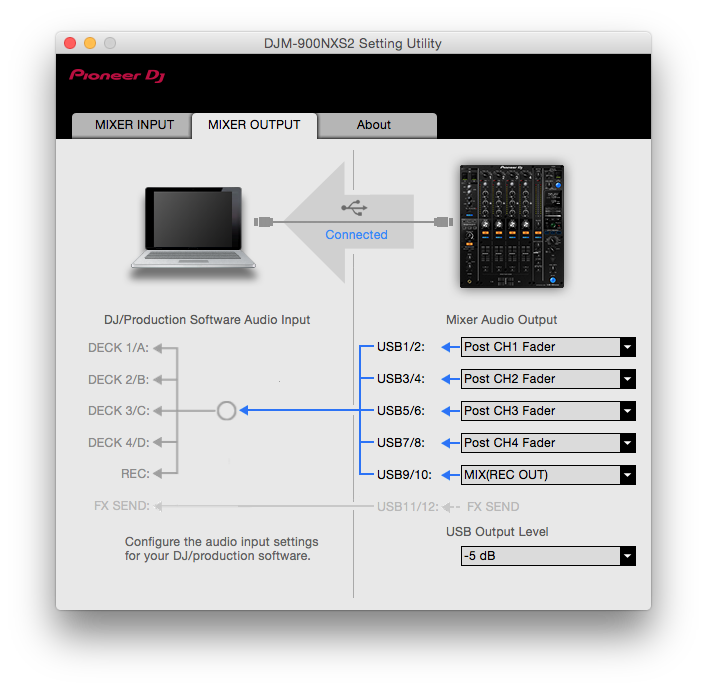
Open your DJM-900NXS2 Settings Utility and ensure that you've got all your Outputs set as shown:

(It doesn't actually matter what the 9/10 input is; you won't use that unless you want it for recording.)
All 4 channel input selector switches should be set to the same USB input (likely USB A).
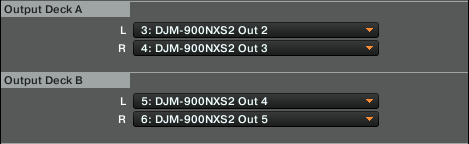
In Traktor, configure your Audio Setup for the DJM-900NXS2, on the Output Routing set the mixer mode to External, and configure the decks as follows:

No need to configure anything for your Output FX Return or Input FX Send.
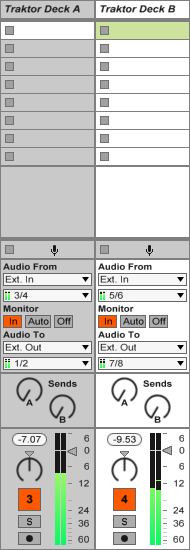
In Ableton Live, select the DJM-900NXS2 as your input and output device, and configure the ins/outs for only the stereo pairs. Next, set up two audio channels like this:

Add audio effects to your heart's content.
On your DJM itself, assign CH1 and CH4 to crossfader B, and then assign CH2 and CH3 to crossfader A. Move the crossfader all the way to the B side and leave it there. Put the CH2 and CH3 faders full-open.
Play a track through Traktor, bypass all your Ableton effects, adjust the "return" levels on the CH1 and CH4 trim knobs so they match the CH2 and CH3 inputs.
Mix using CH1 and CH4, DO NOT move the crossfader unless you want a slight delay with the audio mixed, or you want to go full to the other side and have a completely dry signal from Traktor.
That's it! Kinda technical, a bit of a work-around, and limited to 2 channels, but an easy way to get the job done without needing additional software or other tricks.