Have a feature request or suggestion? Post your idea here!

Post

1 follower Follow
0
Avatar

Midi Map for Denon MC6000mk2

Hi

I have been trying to midimap my Denon MC6000mk2 controller to Rekordbox, however, I cannot get the play/cue button to work even via midi learn.

Please can anyone offer any advice or provide a midi map? 

Stephen Bernard Hill Answered

Official comment

Avatar

@Stephen > I've moved your post as you did not read the MIDI Maps forum rules:

Do not post requests for maps or any other topics in this forum, it is for MIDI maps only. Any user not adhering to these rules will have their post(s) removed.

To answer your question, you likely have an issue with another MIDI signal overriding the PLAY/CUE button. Either consult the owner's manual for your controller, contact Denon to provide additional information, or simply use a MIDI monitoring application to find the specific MIDI value required for that button and enter it manually.

Pulse
Comment actions Permalink

Post is closed for comments.

6 comments

0
Avatar

Hi, According to the controller MIDI guide, the play/cue button should give a valued of 90 43 and when the learn function is used in the software this is what is logged when pressing that key on my controller. I have also used a MIDI in and out program to confirm this same value. However, the button will still not work the play/cue button in the software. Can you shed any further light?


Stephen Bernard Hill 0 votes
Comment actions Permalink
0
Avatar

@Stephen > I took a look at the owner's manual for that unit... would you like the good news or the bad news?

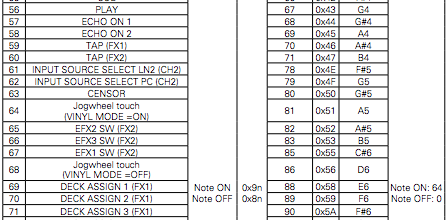
The good news is you have the right signal:

It's listed as "9n" where 'n' is the MIDI channel number (0 for deck 1, 1 for deck 2, etc), and HEX 43 as the note.

The bad news is at the bottom-right of that image... "Note ON: 64" -- that value doesn't register with rekordbox to trigger the play; it requires a full 127 in order to activate.

You'll need to use a MIDI remapper. On a PC, you can use MIDI-OX or on Mac, try MIDI-Pipe.

Pulse 0 votes
Comment actions Permalink
0
Avatar

Many thanks for your help. How would this be set up on MIDI-OX i.e changing from a value of 64 to 127?

Stephen Bernard Hill 0 votes
Comment actions Permalink
0
Avatar

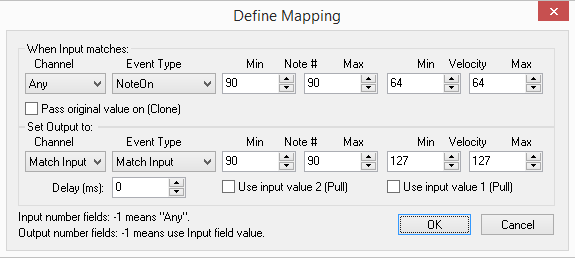
MIDI-OX > Options > Data Mapping...

Click Insert...

Set up any item you need to re-map; you could do this with -1 for all, but then there may be problems with any "Note On" that should be less than 127 (not sure how many that would be, but you can at least test it out if you want before defining each and every Note #):

When you're done, click OK and you'll go back to the Translation Map window, click the Turn Map On checkbox at the top-right, click OK.

You should now see MAP in a blue box at the bottom right.

Give that a whirl.

Pulse 0 votes
Comment actions Permalink