
Official comment

@Christian > Exactly what I had suspected. I can give you instructions on changing the settings file. First, you need to know your current username. To find it, open the "Users & Groups" System Preference pane:
- Open "System Preferences" application
- Click "Users & Groups"
- Click the padlock to unlock it, if it is not already unlocked. Enter user name and password for an Admin user.
- Right click on the User name you want to find the home directory for, select "Advanced Options..."
- Observe the path as noted next to "Home directory:"
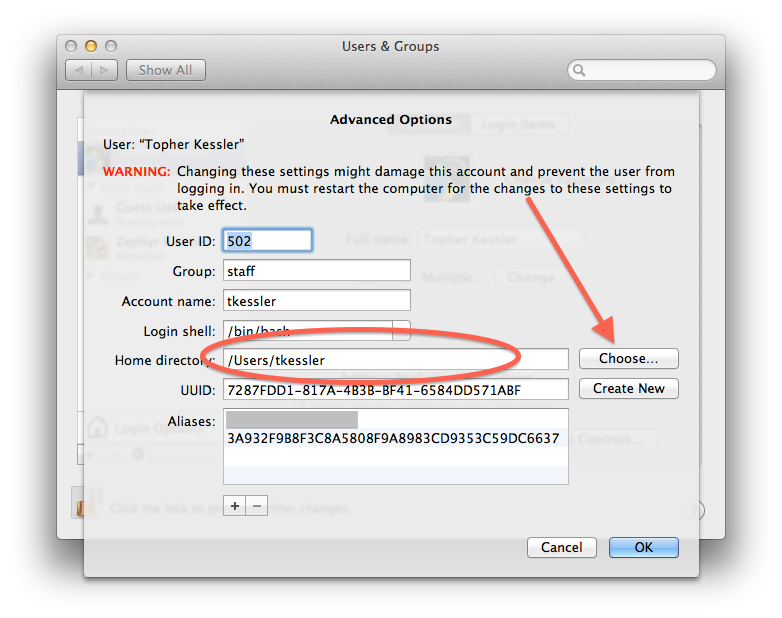
Don't click "Choose" (borrowed this image from the web).
Next, open your Finder, click Go > Go to Folder... and enter the following:
~/Library/Application Support/Pioneer/rekordbox/
...and click Go.
Open the rekordbox3.settings file. If it prompts you to choose a program, use the TextEdit application.
Before you make any changes, go to TextEdit > Preferences and uncheck the Smart Quotes box. Close the preferences and locate the following line:
<VALUE name="pioneerDirectory"
You'll need to modify the VAL to change the username portion of the path to match the username you found in the steps above.
Save the changes, close the file, open rekordbox and cheer.


