
Official comment

Hello Dave and Jason,
Will you please follow the steps below to reinstall the DDJ-WeGO driver?
[Steps]
1. Remove DDJ- WeGO from your PC.
2. Close VirtualDJ.
3. Uninstall the DDJ-WeGO driver from Control Panel > Programs and Features.
4. Reboot Windows.
5. Install DDJ- WeGO driver again from the link below.
https://www.pioneerdj.com/en/support/software/ddj-wego/
6. Connect DDJ- WeGO to your PC again.
7.Turn on the power switch of DDJ- WeGO.
8. Launch VirtualDJ.
After installing the driver, go to Start > Pioneer > DDJ-WeGO > DDJ_WeGO Version Display Utility as shown below.
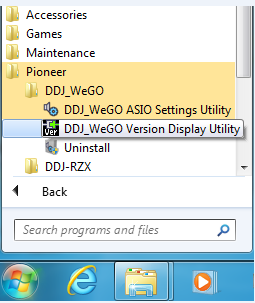
Please check "Pioneer_DDJ_WeGO_Version.exe" is shown in the Version Display Utility.
If you still have any issues, please let us know.
Thanks,
CRM, Pioneer DJ
Comment actions


