
Have a feature request or suggestion? Post your idea here!

Post

2 followers Follow
0
Avatar

No sound from DJM 450

Hi,

I am still having problems with my DJM 450, i cannot seem to get sound on my pc through the USB.

I have followed all the pioneer sites step through and i can get rekordbox dj to record but not any other recording program, plus no sound through my speakers laptop as playback set to laptop speakers and line in DJM 450.

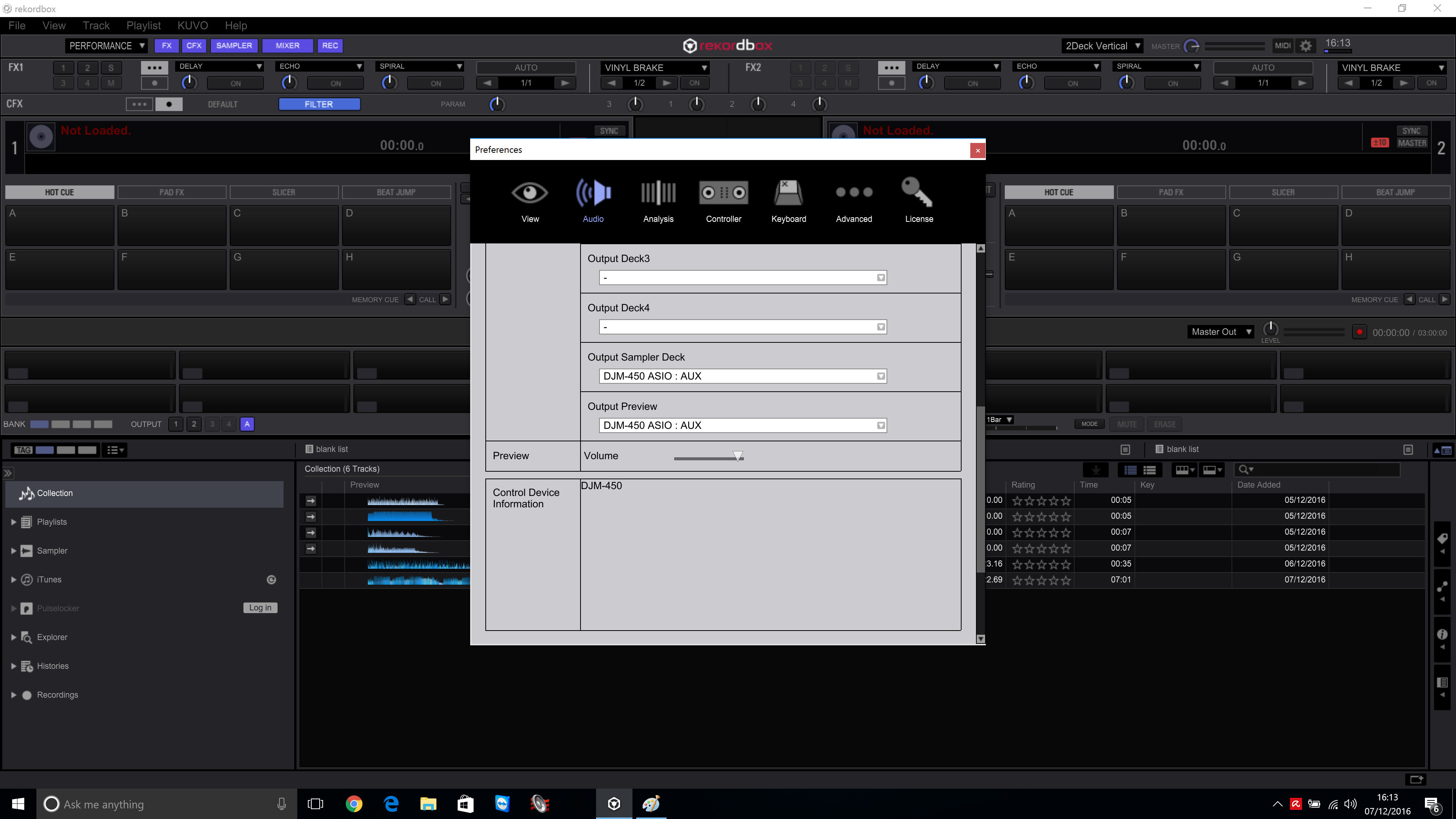
I have attached some pictures to see if anyone can see something wrong.

This is my first Pioneer mixer and not sure all the limitations there is on this mixer. or is the mixer possibly faulty?

many thanks 

Jay


Jason Answered

Official comment

Avatar

First, you don't need to use the internal mixer in rekordbox, you have it configured for external use.

Second you don't have the audio outputs configured properly. Output deck 1 should be on CH1, and deck 2 should be CH2.

In order to configure it to record in other software, you'll need to assign the inputs to 5/6 as those are the only ones set to the REC. If you want, you can reconfigure it for 1/2 to be REC, which may be needed as some applications don't support ASIO.

Pulse
Comment actions Permalink

Post is closed for comments.

9 comments

0
Avatar

Hi,
Thank you for replying to my question and I am a little confused, as my last mixer from another make used just plug and play.
So I have tried this on 2 windows 10 and a windows 7 laptop, same errors all the time so not sure if it has a faulty sound card.
As it is only a week old and never worked correctly.
So I have a few questions as I have tried what you advised and I still have no sound, in fact it’s worse as Rekordbox does not pick up any input, But when I use usb 1/2 as rec out and do I use crossfader A + B as USB 3/4 + 5/6 or Post ch? I have tried both and when I use Post Ch on USB 3/4 it only shows Post CH2 not CH1.
CH1 shows on USB 5/6 only and then when I reboot it asks for the driver to be installed again, plus there is no windows usb connection chime when mixer is connected. But does bring up the setting utility.
And I have tried the output deck 3 + 4 but still no sound, in preference under Audio should the sample rate be 48000 HZ?
Also I cannot find any documents regarding setup with this.
It’s been a week now of going round in circles and 3 windows rebuilds, so as I mentioned earlier it could be possible to have faulty soundcard.

Thank you for your help and look forward to your reply.

Jay

Jason 0 votes
Comment actions Permalink
0
Avatar

The problem you're likely having is either that you're not using the ASIO drivers, or your application doesn't support ASIO drivers.

Ensure that you have installed all Windows updates and service packs. If you still have problems with it, please follow the instructions here to remove and re-install the driver.

Pulse 0 votes
Comment actions Permalink
0
Avatar

Hi,

I have mentioned before i have reinstalled windows 10 3 times now and all the windows updates are up to date. i am using the latestest asio from your site and followed all the trouble shooting guides and uninstalled and reinstalled the driver so many times i have lost count. i had a Allen & Heath DB4 before this mixer and had no isues with ASIO all i did was plug and played. so all the other the other programs are not comaptible with the ASIO for this mixer except Reckordbox? i see other people having the same issues. i cannot believe all 450 owners have this trouble, so could it be a soundcard issue? many thanks

Jason 0 votes
Comment actions Permalink
0
Avatar

i like to add if the pictures above are incorrect what ASIO driver i am using is incorrect, have tried 1\2 as recand no sound at all. and the deck 1 and 2 are set correctly not like the screenshot shows. also before you closed my other post did you see what i replied to your last comment? many thanks

Jason 0 votes
Comment actions Permalink
0
Avatar

Sorry for the delay, I don't have one on hand and trying to get information from the product team.

Pulse 0 votes
Comment actions Permalink
0
Avatar

Hi, No worries as i still have not got it to work, 


many thanks

Jason 0 votes
Comment actions Permalink
0
Avatar

@Jason > Sorry for the delay on this, somehow my ticket got mis-assigned in our system and was just now answered. Are you still having issues?

Pulse 0 votes
Comment actions Permalink
0
Avatar

Hi,
yes it's all working perfectly now since the driver and firmware updates.

Thanks for getting back to me.

Jay

Jason 0 votes
Comment actions Permalink