
@Christopher > Are you on Mac or PC?
Comment actions

The Trim dial on SB2 has stopped working on deck 2. For some reason however, the mids dial on deck 2 control the trim function in both rekordbox and serato. What this means is that when I increase the mids, the trim dial also increases on whatever software I'm using. The trim dial itself however does not control anything.
I've tried using different USB's to connect the SB2 to my laptop and nothing changes. I even tried mapping the gain function in serato to the trim dial but serato can't even detect that I'm moving it.
What could be wrong. This is a recent issue.
Post is closed for comments.
@Christopher > Are you on Mac or PC?
I'm on a mac.
Could you please download this MIDI Monitor and run it with the SB2 connected (no application running), and test the trim and mid EQ knobs to see if they are sending the proper MIDI signal? Here's the numbers you should expect to see:
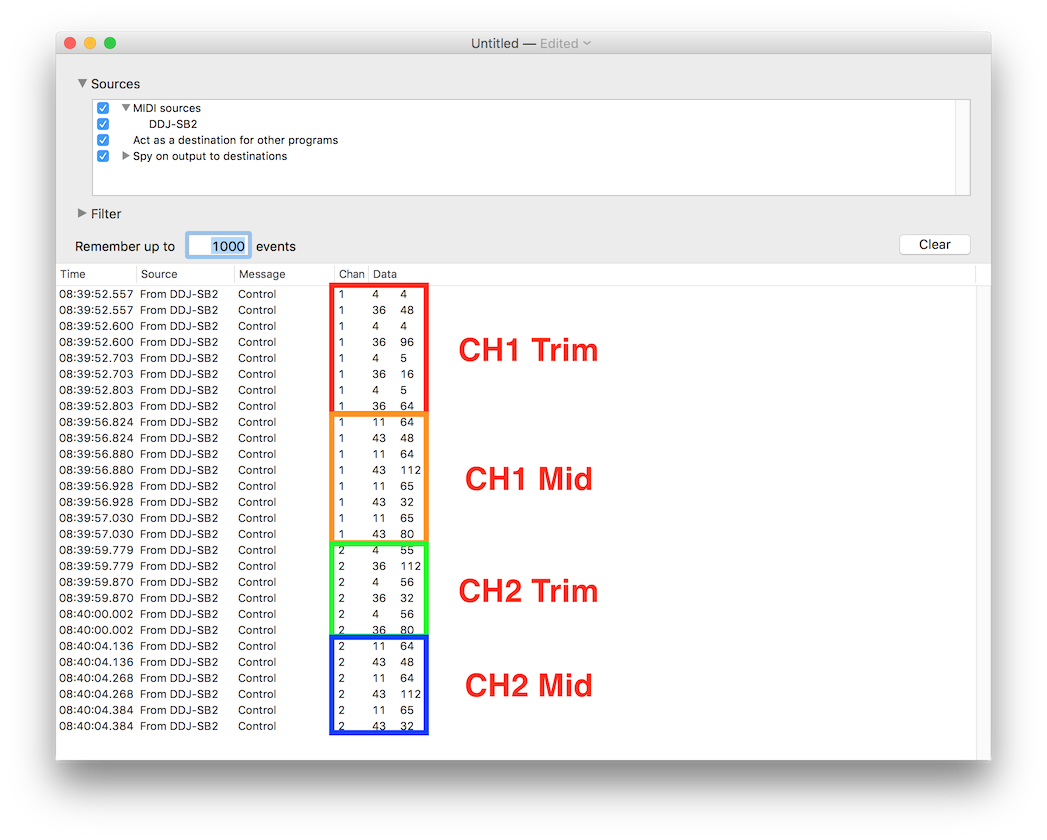 CH1 Trim: MIDI Channel 1 / Data 4 & 36
CH1 Mid EQ: MIDI Channel 1 / Data 11 & 43
CH2 Trim: MIDI Channel 2 / Data 4 & 36
CH2 Mid EQ: MIDI Channel 2 / Data 11 & 43

Hi,
I am having the same problem. I ran the midi monitor and I am not getting these numbers. How do I go about resolving this issue?

I am also having the same problem I am on a windows 10 laptop
It's possible your computer isn't providing adequate power to the SB2; please try using a different USB port, USB cable, or a powered USB hub.

Hi,
I tried the MIDI method above. I am getting readings for ch 1 mid, ch 2 trim, and ch 2 mid. ch 1 trim is still not working. I have also tried using a different USB port, including a hub. Could this be pointing to a hardware defect? How do I go about fixing it?
Thanks!
@Johan > Please contact Pioneer DJ technical support in your region to have your hardware inspected and/or serviced.

