
If you're using hardware with rekordbox at the time, try taking that deck 1 channel fader all the way down and take deck 2 up. The lighting follows the "master" deck assignment.
Comment actions

Hello,
I have installed RB-DMX1 with 4 LED par fixtures. Analysed phrases of a track. Put the same track in all 4 decks. Only if the track in deck 1 is played the lights react to the song. When deck 2 is playing and deck 1 is stopped the lights stay off. In deck 3 and 4 the macro scenes are not loaded in the performance view (under the track and phrase info) and also lights are not working when a song is playing in deck 3 or 4.
Post is closed for comments.
If you're using hardware with rekordbox at the time, try taking that deck 1 channel fader all the way down and take deck 2 up. The lighting follows the "master" deck assignment.
ok, thanks for the info! I just connected the RB-DMX 1 to my PC to play around a bit. And indeed when opening the mixer part in RB and I switch the faders the lights follow the master deck!
So now I connected my DDJ-RX and it doesn't work anymore :-(
When DDJ-RX and RB-DMX1 are connected to the USB ports of my PC the music plays very very slow. I think my PC has an internal USB hub.
I could not find the requirements for my PC to work with RB-DM1 together with DDJ-RX. My PC worked without problems with DDJ-RX connected (processor and RAM is ok for running RB).
Both should operate simultaneously without issue. Have you checked the audio configuration within rekordbox?
Hello Pulse,
If I only connect RB-DMX1 to my PC the lighting feature works. If I only connect my DDJ-RX the controller works. But if I want to connect both I first have to plug in RB-DMX1 and secondly DDJ-RX. If I do it in another order my PC doesn't recognize the RB-DMX1! In screenshot you can see that both hardwares are recognized. When I start a track I have no sound and the track moves very slowly. When I open the mixer view in RB I can see a good response of fader movement (moved on the controller hardware). I tried to put audio buffer size to 42ms, that did not help. Even if I switch of lighting feature in the settings the track will not play. I have to disconnect the RB-DMX1 and than the track plays flawless... If I try to reconnect the RB-DMX1 my PC does not recognize it. I first have to unplug the DDJ-RX again... I made a small video: https://photos.app.goo.gl/NzjnADBh9qUix3DB2
I realy appreciate your help!
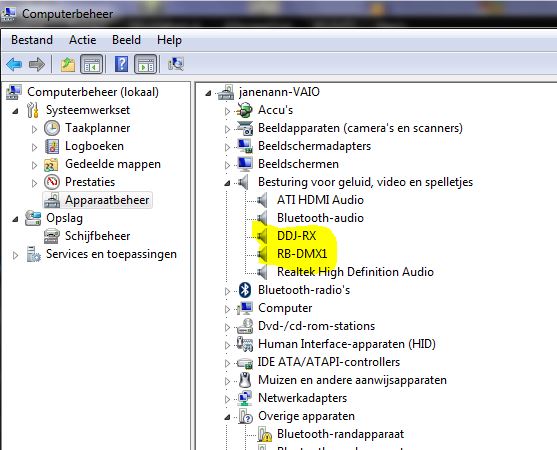
Could you try moving the pitch fader all the way to -100% and then back to 0% to see if that still happens?
Moving the pitch fader did not help, disconnecting the RB-DMX1 helped.
But... I tried a lot of combinations in the mean time (reboot PC a few times, start RB first and connect hardware, first connect hardware and afterwards start RB, first connect DDJ-RX, start RB and then connect RB-DMX1, used a powered USB hub,...) and suddenly it worked! Without any change in software or settings... And then after 30 minutes of playing the LED on the RB-DMX1 was still on but lights did not work anymore.. I had to disconnect all hardware, reboot my PC and start over again. For the moment it is working.
It looks like the lights are not only reacting on masterdeck. When playing a track in deck 2, deck 2 is master and lights react on the track in deck 2. When I move the volume fader of deck 1 above the level of the volume fader of deck 2 (with track in deck 1 paused) the lights react on deck1 while deck 2 is still master. So every time when I set deck 1 ready to mix, the lights stop acting on the music because the track is paused.
Witch topic can I use to post my findings about the RB-DMX 1 or wishes?
I'll look into that issue for you.
For problems, use the rekordbox topic.
For suggestions, use the product & feature suggestions topic.

