Official comment

Yep, gotta love good ol' Apple and their driver security changes to High Sierra!
Comment actions

Hello just got in my ddj 1000 which is updated with 1.4 firmware and drivers are updated as of April 3. I am having issues with trying to get the audio to go out to my powered k12 speaker. I only hear it from my labtop macbook pro. Currently the only option for audio is built in output, and above that it says core audio which can not be clicked on. The master volume leds work as they light up when I start the unit but does not work when playing tracks. I do see the leds working on individual channels and also here audio from laptop.
The things I tried where to download the audio drivers again, also turn off rekordbox and the unit and computer and restart again but with no change. I have one k12 connected to the audio master 1 channel L. Please help so frustrating that I can't figure this out and the manual really does not help either thanks guys in advance.
Yep, gotta love good ol' Apple and their driver security changes to High Sierra!
Post is closed for comments.
Was able to fix the issue by unloading drivers then reloading again then going to system preferences right after the driver renstalled and then navigating to security and privacy then to general and on bottom said to allow pioneer ......so pressed allow on bottom of screen on macbook pro. Then disconnected ddj 1000 usb connection and reconnected then rekordbox audio recognized the ddj 1000 as audio source.

Hey Guys
I seem to be running into a similar issue, but with recording with the DDJ1000 connected. I'm running the latest firmware (v1.05) and just upgraded to latest rekordbox (5.4.0, release, not beta) I have master selected but see no audio signal displayed. Obviously the recordings are silent.
Out of hope, I tried the above steps but don't see any prompts.
What's more, when I disconnect and play in performance mode, I have a signal on master and can see that in the UI. When I connect the DDJ1000, the master signal drops to nothing. I've attached a few screenshots of the screens as well as my settings.
Any thoughts?
Screenshot playing WITHOUT DDJ 1000 attached, note the recording line level:

Screenshot playing WITH the DDJ-1000 attached, note the recording line level:

Screenshot of DDJ-1000 fader/levels while attached (obviously):
screenshot of audio settings:

@CLS > Which OS are you running? I'm trying to figure out why you don't have this section of the control panel? (I'm wondering if maybe it's because I have DVS installed, even if it's disabled... it didn't used to show...):
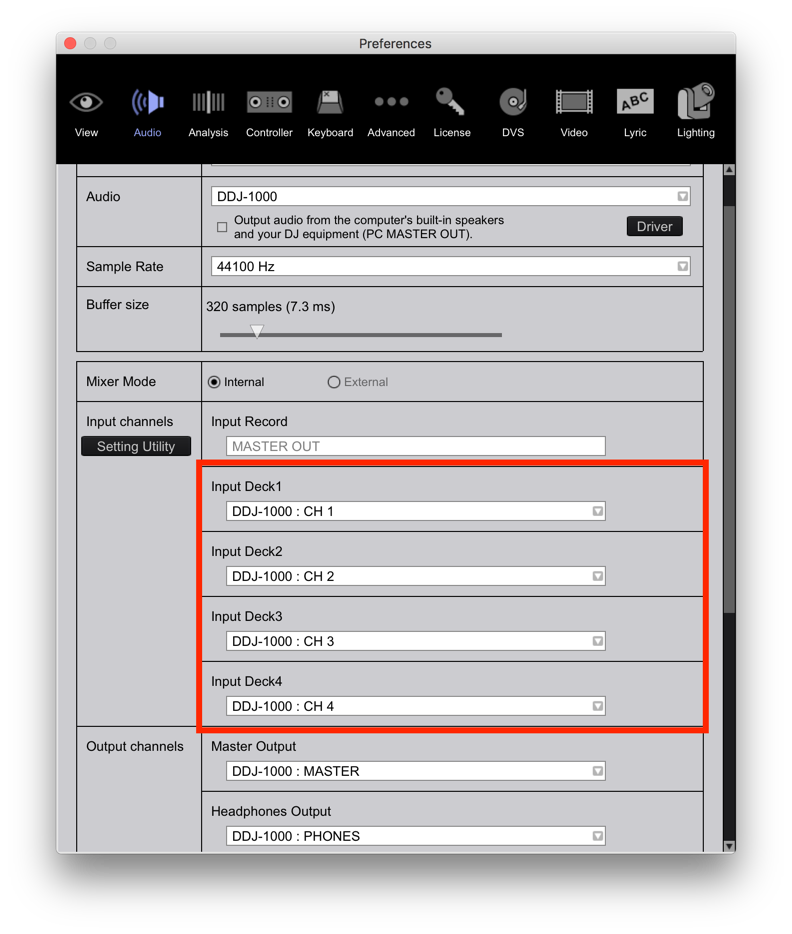 Either way, my recording seems to work running the same versions you are (on OS 10.12.6).
Yeah, I'm running Mojave...for better or worse. Unfortunately I purchased the DDJ after installing Mojave.
Should I try uninstalling and reinstalling?
I played around a bit more using the DDJ1000 as a sound card a found some weird stuff, at least to me.
With Rekordbox closed, I select DDJ as Input in the System Preferences>Sound. I see level within the Sound Input preference panel. I then pop over to Sound Studio and hit record. I get no level and a silent recording.
Sounds like a driver issue, no?

I have same issue on Mojave with DDJ RZX
no sound after recorded set :(((((
WHAT TO DO?
@Evgen > Did you allow rekordbox access to the various components of the operating system?

I am having the same issue. Everything was working fine but now is not working at all. I have tried eveything imaginable. Even as far as a complete install of everything. No luck.
If you are still having this issue, please file an inquiry ticket here and our support team will be able to gather some additional information to assist you in resolving this issue.


