Have a feature request or suggestion? Post your idea here!

Post

2 followers Follow
0
Avatar

RRB-Driver Issue Rekordbox 5.4

I updated to rekordbox 5.4 on my pc (Windows 10) today and have a big issue with my DDJ-RB now because of the latest RRB-driver version. (Everything went well for over a year before.)

In the beginning every attempts to install the new driver failed during installation, but after uninstalling rekordbox, the driver and reinstalling everything (after restarting the pc) I finally made it to finish that driver installation.

Nevertheless it doesn't work. Everytime i plug in the DDJ-RB while setting menu is open, rekordbox freezes until i unplug the device again. When I plug it in while the setting menu is closed, the driver isn't selected automatically, but nothing happens after changing the driver setting manually. When I try to playback tracks now, the message to check the audio settings is shown (changing the driver entry again is also not successful).

Moreover there is neither an entry for the Line-In-Output nor for the pc based output in the driver menu, only the RRB--ASIO driver is available.

To summarize, what I have already done:

-reinstall rekordbox, the RRB-driver while the controller wasn't plugged in

-restart my pc between the installation steps

-download and install the latest driver from pioneer website

-I also used the uninstall.exe

Edit: Sometimes it's working now (at least with ASIO-driver), but there is still no possibility for using the in-line-output. Additionally, playback sound qualitiy is really low (in comparison to the old rekordbox version/driver) and the difference between master channel and cue channel on headphones is problematic (i just had to increase the headphones volume about 20% to have an aedequate level for master output, but accordingly to this the cue-channel volume is now way too high and hurting my ears).

Somebody else has got some problems with that?

Nicolas Lindholm

Post is closed for comments.

6 comments

0
Avatar

If you connect the RB before launching rekordbox, is it automatically loaded and selecting the ASIO driver? You shouldn't be using any other output device; the ASIO one is what you need to have independent outputs for the master and headphones.

Pulse 0 votes
Comment actions Permalink
0
Avatar

No, I have to select it manually. After that everything seem to work (despite the new volume level difference between master cue and channel cues), but when i change the driver setting again, rekordbox crashes and I have to restart it again to continue. That never happened before. It was always possible to change and change back the driver without the need to restart.

Nicolas Lindholm 0 votes
Comment actions Permalink
0
Avatar

What audio device does it default to?

What do you mean "when I change the driver setting" -- when you change drivers?

Which version & build of Windows are you running?

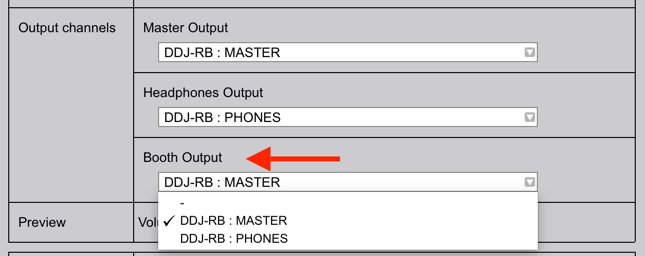
Regarding the level difference, do you perhaps have the BOOTH OUTPUT enabled over the MASTER? That would make it a problem...

Pulse 0 votes
Comment actions Permalink
0
Avatar

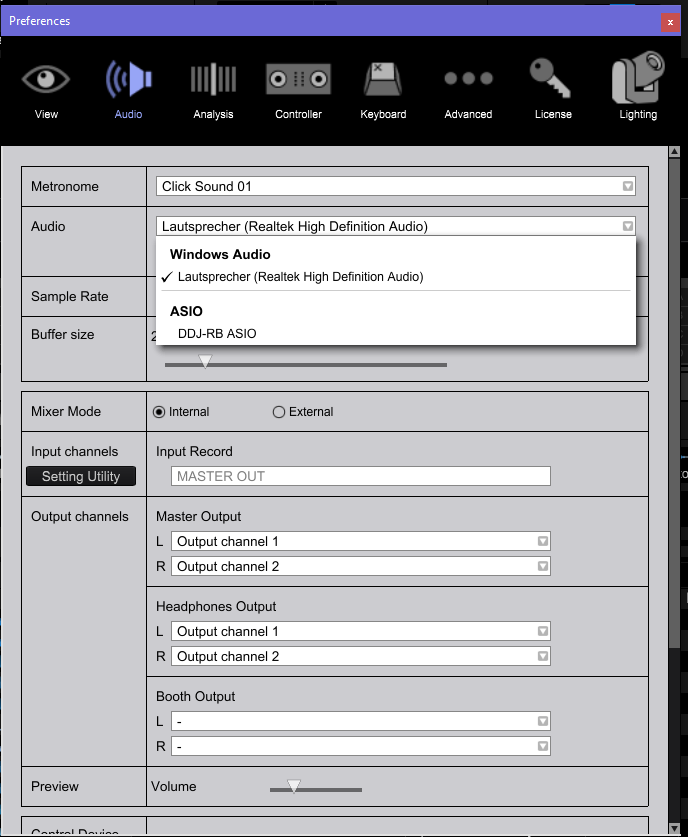
Default audio setting is Realtek High Defintion (as shown below). I have to change it manually to ASIO after starting rekordbox; it won't get activated automatically when plugging in the controller.

When changing back to Realtek Driver rekordbox crashes (i know that there is no need to do that, but with the old version it was possible to switch between the drivers without any problems.)

Windows 10, version is 1803 (Build 17134.228).

Booth output is also disabled.

Nicolas Lindholm 0 votes
Comment actions Permalink
0
Avatar

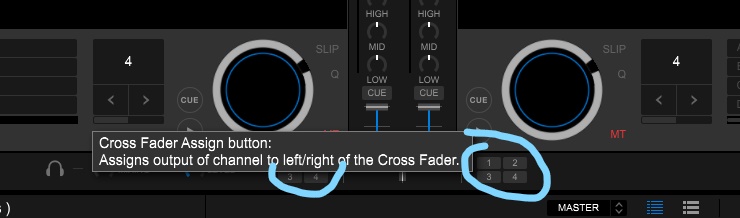
So just to complete this: I had luckily figured out today what the reason for my volume problem was. These buttons were accidentially activated (never noticed them before, are they new in rekordbox 5.4?):
When activated, they decrease the headphone-volume level for the master cue, while the channel-cue-volume level stays the same (independent from any crossfader acitvities).

And even more than that, i used rekordbox for over 2h and didn't have any problems. I changed the driver also and it didn't crash and I had not made any changes before, neither on my windows. Seems as if it had repaired itself. Very mysterious, but I'm happy with that. :D

Anyway, thank you for caring Pulse. :)


Nicolas Lindholm 0 votes
Comment actions Permalink
0
Avatar

Glad to hear you got that headphone monitoring issue sorted.

As for the driver selection / crashing issue, I'll direct you to please file an inquiry ticket here so our rekordbox support team can gather some additional information to resolve this issue for you.

Pulse 0 votes
Comment actions Permalink