Have a feature request or suggestion? Post your idea here!

Post

5 followers Follow
0
Avatar

XDJ-RX2 USB pro link export mode - Master Deck button doesn't work

Hi. I'm trying to use rekordbox on my laptop to pick songs instead of my USB flash drive. The track filter on the RX2 is awesome, and I want to mimic that functionality in the rekordbox export mode software where I can have my playlist pallets open. I read or saw somewhere that you have to click on the "Master Deck" button in the filter window and it will select the correct BPM and KEY to use to filter, however when Rekordbox is connected via my laptop with usb, clicking on the master deck button doesn't do anything. (It may reset the filters all to their default values, i don't remember exactly.) Does the master deck button only work in performance mode? I have the stoplight feature on, if that makes a difference in your conclusion.

Secondary question, is this track filter supposed to filter the playlists you have in your playlist pallet too or just the main browser?

Erik Stagg

Post is closed for comments.

11 comments

0
Avatar

Revisiting this after a week with no replies, is it using the track that's loaded into the rekordbox player as the Master Track instead of the Master Track on my RX2? Therefore if I have my rekordbox export window in the preset without the player there can be no master track to filter with?

Erik Stagg 0 votes
Comment actions Permalink
0
Avatar

Ok, so I just tried testing this. Before I hit the link button, I can play a track in rekordbox on my computer and click Master Player and it selects the correct bpm. The Key isn't selected because I have my Key field in Camelot notation, which also seems like a bug to me. If the software can correctly filter tracks that are in Camelot notation based on a track that is set using traditional key signatures, I would assume it would be able to recognize the Camelot notation and translate it back to traditional notation to select the right filter...

As soon as I click the link button and play a track on my RX2, clicking the master player button does nothing, even if I am playing a track both on my RX2 and in the rekordbox application. If it still picked up the track playing in the rekordbox application as the Master track for the Track Filter I could at least do a workaround with macro keys to make sure that the track I'm loading is also loading into the rekordbox applications player so that the filter still works, but instead I just lose the functionality of that Master track button...

I just updated my firmware 1.32 -> 1.33

Pulse, can I get a response at least? This seems to clearly be a bug. If this should be in the rekordbox forum instead please let me know. 

Erik Stagg 0 votes
Comment actions Permalink
0
Avatar

Sorry, this was on my radar but I wanted to get out the hardware and test it myself before reporting it; if I recall, the "master" doesn't work as expected with the XDJ-RX / RX2 in link mode. I'll give it another test and get back to you.

Pulse 0 votes
Comment actions Permalink
0
Avatar

Ok, thanks for the response. Looking forward to hearing back. 

Erik Stagg 0 votes
Comment actions Permalink
0
Avatar

My mistake - I was thinking of an older version of rekordbox.

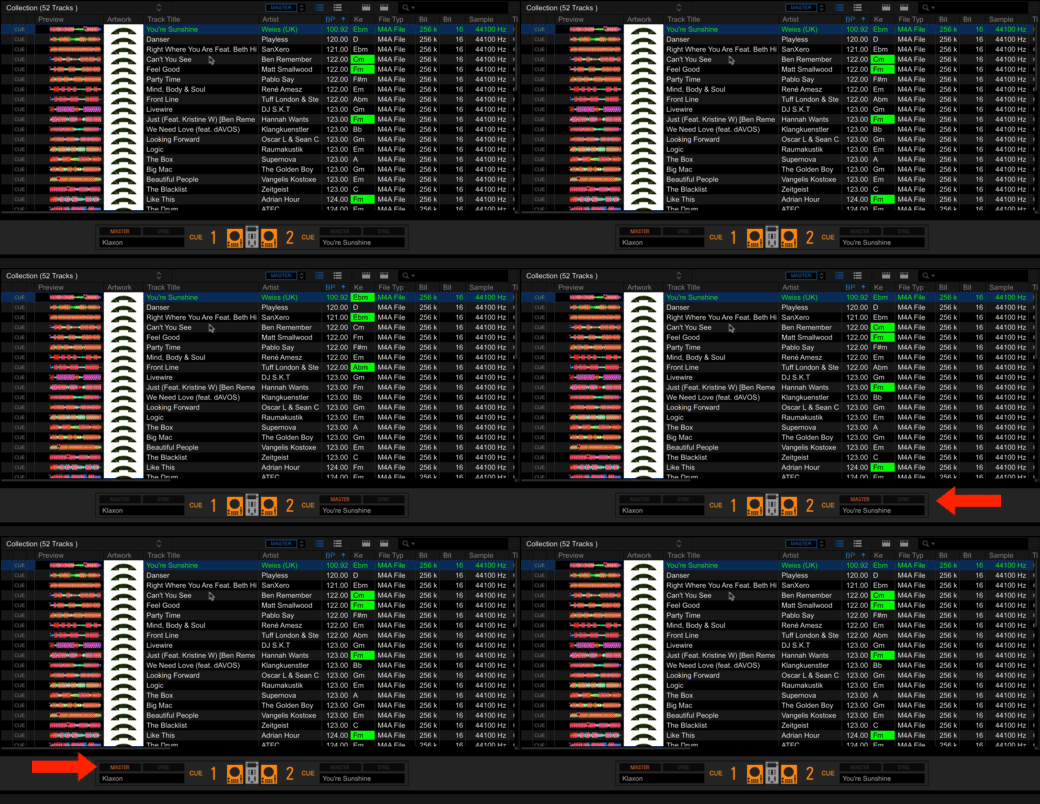
When linked the MASTER in the RELATED TRACKS does refer to the master deck on the XDJ-RX2. Within rekordbox, you'll see "MASTER" and "A" at the top of the window - the "A" refers to the deck within rekordbox (you'd see a "B" there as well if you had it in 2 deck mode).

The same thing applies to the Traffic Light matching (if you had the keys analysed within rekordbox):

So in short, yes - it does account for the MASTER being selected on the RX2 itself.

Pulse 0 votes
Comment actions Permalink
0
Avatar

Thanks for looking into this. I finally got a chance now to test this after reading your reply. I am have the same experience with the stoplight feature, so it is correctly picking up the master track from the RX2. It's also good to know that player A refers to the player in recordbox as that was not intuitive for me. However I am still experiencing the issue with the track filter. 

clicking on the <--------- MASTER PLAYER ------------> button in between BPM and KEY  doesn't do anything when I have my RX2 connected in link mode. The only thing I can think of is that it's not liking that my tracks are in camelot notation, but that wouldn't make sense because it works differently with the same audio files once disconnected from the RX2. When disconnected it doesn't translate the Camelot notation to select the classic key notation from the list, but it does work the opposite way, i.e. if you select a key notation in the dropdown it will filter Camelot notated tracks.

Erik Stagg 0 votes
Comment actions Permalink
0
Avatar

Buenas, eso funciona lo solicite y parece que lo estan haciendo. Lo que podian programar es que tambien saliera pero cuando marcamos los criterios de coincidencia.

Cesar Boal 0 votes
Comment actions Permalink
0
Avatar

@Erik > Correct; Any non-standard notation will be ignored and can't use the traffic-light system.

Pulse 0 votes
Comment actions Permalink
0
Avatar

Pulse: but the traffic-light system DOES work with Camelot key notation. It doesn't, however, work with the track filter. I created a test playlist and here were my steps.

1. While unlinked to my RX2, I created a playlist with two songs of the same key, one song with a relative key to them, and one song that is totally not relative.

2. I clicked on the track filter master player button to try and sort it with Camelot notation, and it picked up the bpm but not the key.

3. I re-analyzed the tracks so that they will be in standard notation.

4. I clicked the track filter master player button and it picked up the bpm and key this time. Only the track with the exact key was being filtered, even though i only have KEY checked off in the track filter. (I hoped it would select relative keys too, but it didn't.

5. I clicked the link button.

6. i repeated step #4 and it did not select the bpm or key.

To reiterate, this is NOT A TRAFFIC LIGHT ISSUE, but there seems to be something wrong here. 

Erik Stagg 0 votes
Comment actions Permalink
0
Avatar

Good Morning, 
I accidentally discovered the problem. 
When I first installed and bought aRX2, I used my note on a wired network and had never had a problem. The problem started after I started using WiFi only. 
I turned off my WIFI network and the Rekordbox link button disappeared and no longer appeared. So I decided to plug a network cable into my notebook and that's when the link button came back. At the same time worked the link in Export mode. Then I reactivated the WiFi network and had internet. If I pull the network cable the Export link stops working. In short, the export mode link only works with a connected network cable. It does not have to have a network, but the interface must be UP. I plugged my network interface into a switch port disconnected from any network. Just to climb my interface and it worked. This configuration that you talk about firewall and anti-virus, when you install rekordbox it is already present. The problem occurs when you do not have an UP wired network interface.

Dj Maxxx 0 votes
Comment actions Permalink