Official comment

Comment actions

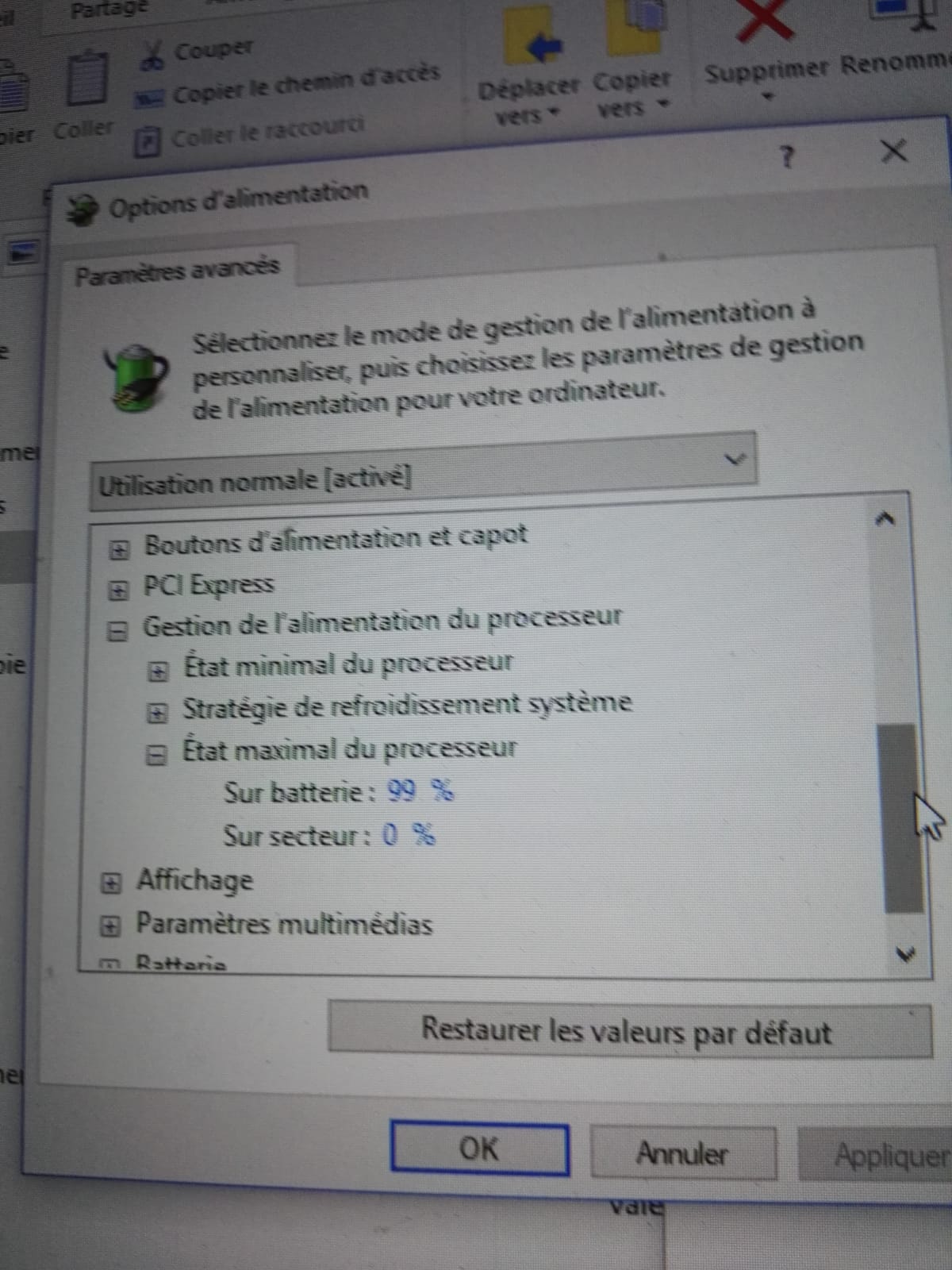
I bought the DDJ-1000 last week and received delivery on Friday. I installed rekordbox and the driver. I added a few tracks to get started. Every single track has annoying cracks and glitches. I raised an enquiry with Pioneer but have heard nothing back. Since then I have tried lots of what I have read here and elsewhere. Buffer size changes dont work. Uninstalled rekordbox and driver and reinstalled - still crackling. Tried different usb cable. Reduced processor to 99%. Tried the firmware update again. Tried on a different laptop and still getting crackling. I notice that when i listen to rekordbox just from the laptop it is fine, it is only when played via the DDJ-1000 it is having this issue. Tried running a normal deck through DDJ-1000 and it played fine with no glitches. I am at the point where i assume this is a faulty controller but would love to try any suggestions rather than return it. Very dissapointing as i heard great things about this unit before buying but now I see alot of people with similar issues and no obvious solution. Thank you in advance to anyone that has any suggestions. I am desperate to get it resolved but need to know in next few days so I can know for sure if it needs to be returned.
Laptop:
HP Pavillion 50R116IP
Intel Core i7-7500U
Ram 8GB
System Type 64 Bit
This laptop ran Serato for 2 years with zero sound issues.
Post is closed for comments.
Thanks for coming back to me but I had already tried that and it did not work. I dont think it is a CPU issue.
Other things you can check:
- disable hyperthreading
- disable the CPU overclock / turbo (note this is NOT the 99% fix)
- disable WiFi
- disable any background software (such as accelerators, antivirus, Cortana, file indexing)
If none of that works, please file an inquiry ticket here and our rekordbox support team will be able to gather some additional information to assist you in resolving this issue.
Thanks. Have tried those and more. I have also filed an enquiry ticket but heard nothing back so will try again.
I see your ticket was filed to the European team yesterday -- don't file a second one, let them get to that one so as to avoid confusion of multiple tickets under your issue. Thanks!
Fair enough, I wont do another one. Thanks for coming back to me. I will be delighted if they can resolve it for me.
Hopefully! :)

Same issue. On Laptop and two PCs. The issue has been around for a long time but it has gotten worse with the last few patches. Can we please get a fix and not a workaround?
Edit: it also happens on a ryzen machine.
Hi Thore. Thanks for your comment. I must agree, I am not normally one to complain too much but I find that having to make lots of changes to a laptop that has worked perfectly for 2 years with all other softwares used (including Ableton and Serato) on it just to suit one new one a little strange and it is starting to feel like a bit of a wild goose chase. Credit to Pioneer DJ support in that they came back to my ticket this morning but they have sent two e-mails that suggest things I have already tried having read them suggested on this forum. The CPU seems fine and isn't spiking on my computer and if I listen to Rekordbox while the DDJ is unplugged it is fine so I am guessing this to be a fault with the controller. Possibly a new firmware update required much like when users were complaining about the effects to the master causing similar issues.
Just out of interest, did you find any workarounds that at least improved it or are you still stuck with the crackling sounds?
Thanks again for joining in as though it sucks for you having the issue I must say it makes me feel a little more positive that it could be resolved if more like you people raise the enquiry. I really do not want to return it as I think otherwise it is a really superb controller.

hi, i have encountered the same problem and found a solution that worked for me. turns out that anything above windows 10 version 1709 will have this glitch, i've had 1803 and 1809 both having the same issues.
found a win10 1709 ISO and did a fresh install (formatted my hard drive just to make sure). with this version rekordbox and ddj1000 just works flawlessly.
so now i guess we would just have to wait for either microsoft and/or pioneer to get around this glitch in future updates. for now i will be sticking with 1709 with updates turned off completely.

Hello everyone, I have the same problem as you with Virtual DJ, and it's more than 30 hours I'm looking for, the sound is bad when the controller is plugged in, and default is greater when I go the mouse on the 'screenshot.
Fabrice
As some are saying, recent updates to Windows have been found to cause the issue, and we recommend avoiding updating where possible. There are other fixes (throttling the CPU to 99%, for example) as the issue is not directly Pioneer DJ related, but also Windows / system-related. Our team continues to investigate and your patience is appreciated.
@Thore > Ryzen is an AMD processor, which is not supported by rekordbox, so there may be other issues encountered using that computer, and they would not be supported by our team.

thanks @pulse for pointing out to this KB article about disabling turbo boost.
that solved my issue that seemed to be related to USB-C only ports:
Hi @pulse thanks for commenting again here, I would really appreciate any updates from the team on this issue as you hear them. I have gone through everything from the info given to me from the support team through my ticket but that seems to have come to dead end and I have not heard from them in a week. The unit is still unusable for me so I am desperate for anything that will fix this, thanks.
Bonjour, je n ai pas encore fait un nouveau post avec toutes les choses que j ai fais pour résoudre le problème que j avais.
Mais la dernière manipulation a vraiment amélioré, je ne comprends pas pourquoi mais ça fonctionne, ce samedi, lors d'une soirée, je vais pouvoir tester sur le long terme.