Official comment

Follow the instructions here (applies to other DDJ models as well).
If that doesn't work for you, please post a reply and we'll help you out.
Comment actions

Got this controller today and went inmediately to set it up.
I did follow every step that's on the website: Installed rekordbox, used the license and all that stuff.
The controller is working okay except for the sound, the screen on the jogwheel is also working.
I did the research and I realized there are several other people with the same problem so I tried following the steps that have been stated here, but none of them worked for me.
I have installed the drivers several time but I still cannot get any sound thru my headphones, even though I see "DDJ 1000" text on the sound icon of my Mac.
I really don't know what to do.
I'm using a Macbook Pro with High Sierra and my headphones only (monitors haven't arrived yet)
Please help
Follow the instructions here (applies to other DDJ models as well).
If that doesn't work for you, please post a reply and we'll help you out.
Post is closed for comments.
Open the DDJ-1000 Driver Version Display application and it should work as expected.
I already did, it says that I have the latest version installed.
I took a few pics:
If you see this photo you'll realize that something isn't right with the sound as it looks "grey". However, last photo shows that I'm actually connected to the controller, yet it remains grey while I have it selected.
I updated my Macbook to Mojave, installed the drivers once again (allowing driver security as well) but it just remains the same.
I also tried using another Macbook but it doesn't even show the "DDJ-1000" option on the sound devices list. I installed the 1000 drivers and latest firmware.
I'm going nuts

Same problem for me ......

Same problem with a DDJ-RR, looks like Mojave is not accepting the drivers anymore.
I followed the 4-page note and re-installed drivers, but it doesn't work.
The drivers keep appearing under "disabled software", but there is no way Mojave is allowing to enable them.
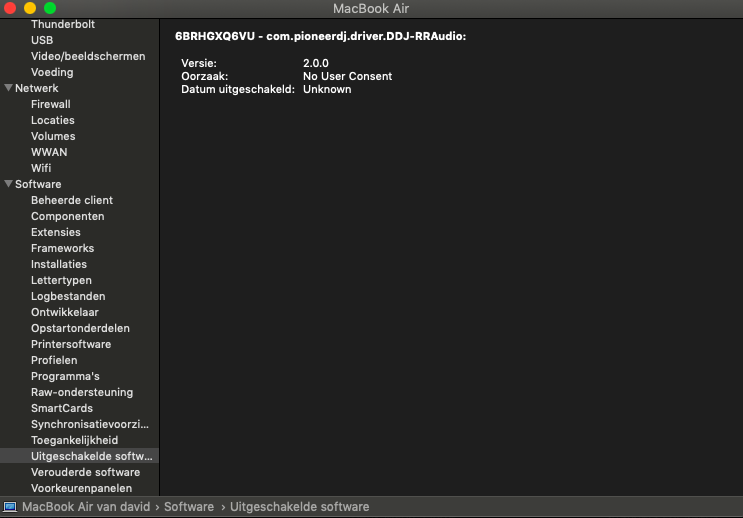

Ok... So after multiple tries... I realized that its not working on USB port A on the controller. I plugged it into USB port B and its finally working.
Not sure why that's happening...
If the drivers aren't installing, rather than reinstalling over them, you may need to first run the uninstaller from the driver package.
You will eventually need to use USB port A for updating the firmware, so it's worth making sure it functions properly.

I've followed all of the instructions, including security allow, uninstall, reinstall, checking the midi setup, checking the driver utility, verifying it recognizes the hardware, verifying in rekordbox as well. Everything looks good but I still get no audio. Please help. I am running Mojave and seems like this is causing all kinds of problems
Did you follow them in the correct order though? Follow item #2.
I realized I was just an idiot. My trim was all the way down.
That'll do it. ;) Glad you found the easy fix! lol

Hi, I had this exact problem with the controller saying NO AUDIO DRIVER or some shit, I tried installing the audio drivers again following the steps above...1) uninstall, restart 2) install driver, restart but that didn't work. Eventually thought to update my serato to the latest version, i was on 2.0 now on 2.4.6 and its working all good.
Hope this helps someone :)

