Have a feature request or suggestion? Post your idea here!

Post

3 followers Follow
0
Avatar

Channels & recording help

Hi All, 

Does anyone know how to be able to have the channels up but not hear the next track I am queuing up in a mix when recording? It seems when recording and both channels are up but the cross-fader is on Deck 1, it picks up what I am doing on Deck 2 on the recording. I am trying to avoid having the cross-fader centre and using the channel level switches to mix!   

I have looked in all the settings but cannot see anything obvious. Surely this is something you can enable /disable?  Thanks 


David Thomson Answered

Official comment

Avatar

You say "have the channels up but not hear the next track I am queuing up in a mix" -- as long as your crossfader is assigned properly, you shouldn't hear the track which is not assigned to the open side of the crossfader. But either way, my recommendation is to close the channel fader for any source not playing live.

As well, as @Infinite posts below, it could also be a matter of not properly configuring your audio devices within the rekordbox preferences.

Pulse
Comment actions Permalink

Post is closed for comments.

4 comments

0
Avatar

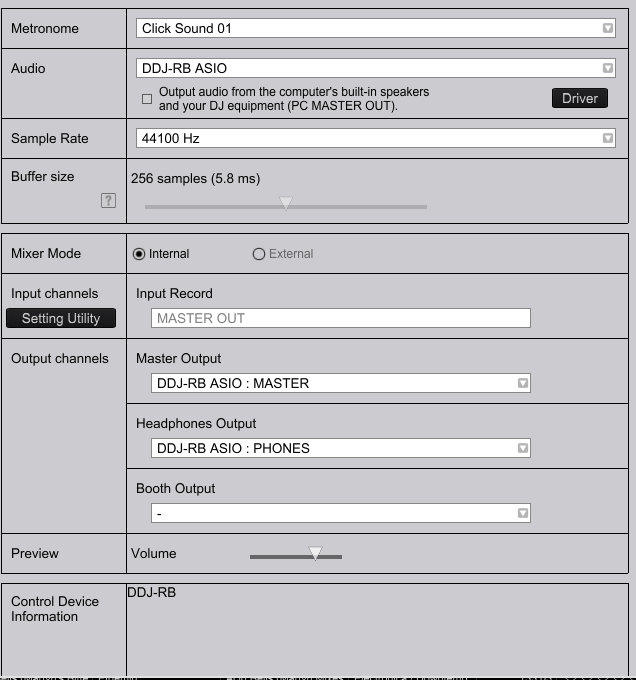
Sounds like your audio settings in Preferences may not be setup correctly. Maybe post a screenshot of that tab or give some more details about your controller/soundcard 

Infinite 0 votes
Comment actions Permalink
0
Avatar

thanks guys. @Pulse - that's exactly what I thought , if the crossfader is on Deck 1 but both channels are up , I still shouldn't hear anything from  Deck 2 through the main output (except on headphones) as I always thought the crossfader was the primary control. 

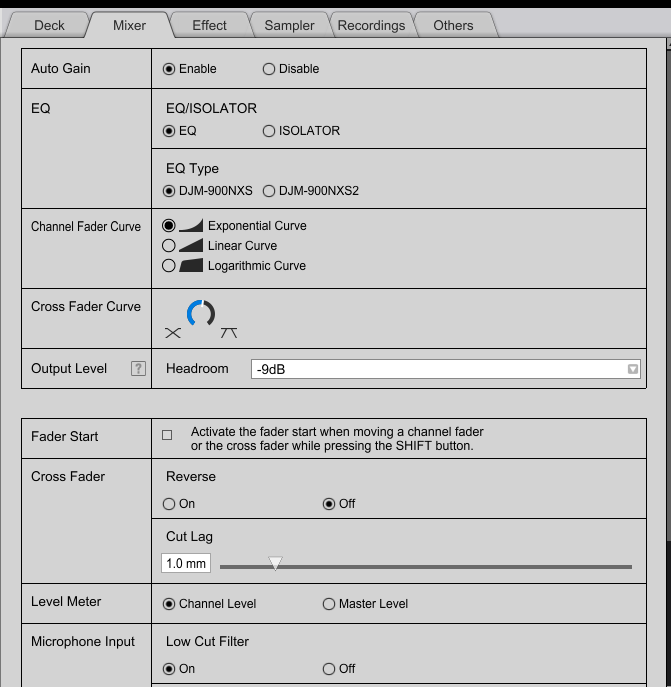
Screenshot of audio & mixer settings 


David Thomson 0 votes
Comment actions Permalink
0
Avatar

@David > Try setting the cut lag to a larger value; it could be that the 1mm is too small and the fader position is technically over the 1mm point when all the way to that side.

Pulse 0 votes
Comment actions Permalink