Official comment

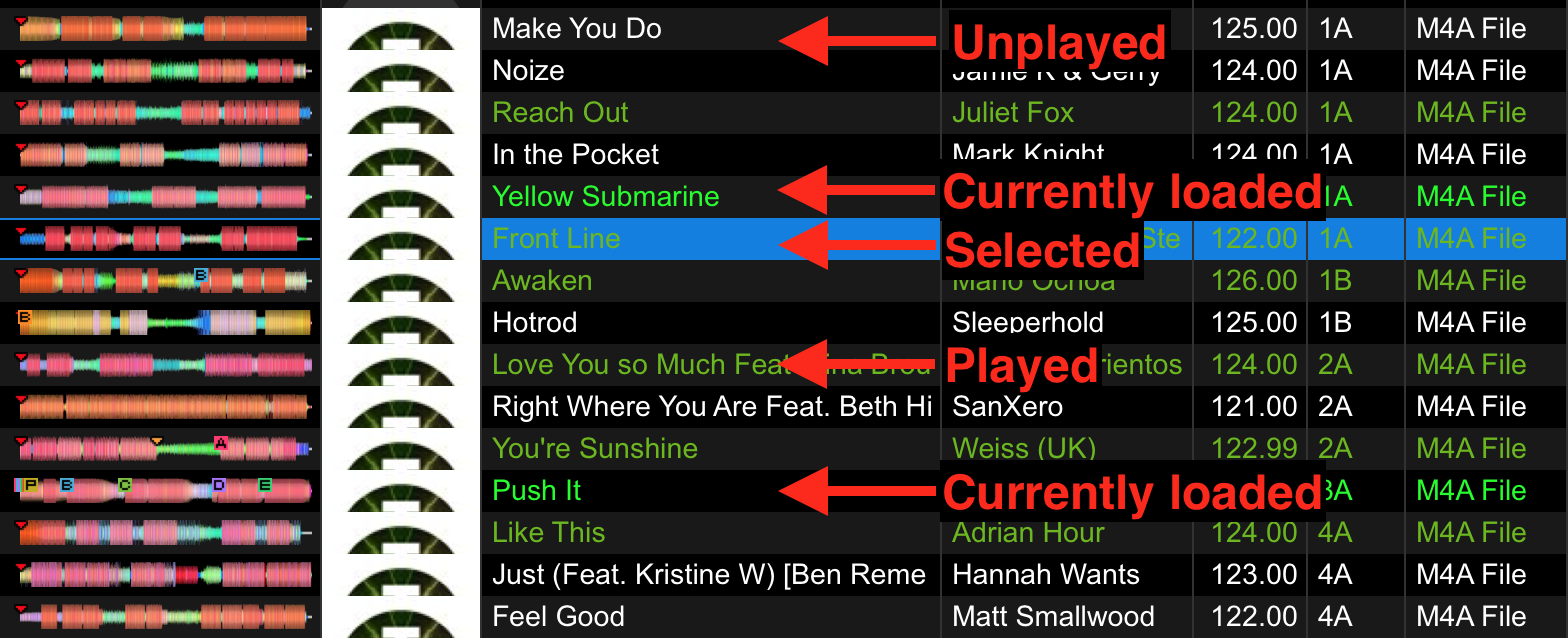
Workaround for rating your history: convert the history to a playlist; edit the track in the playlist.


Comment actions

One of my least favorite things about rekordbox is locating tracks that are playing or loaded.
With traktor it was relatively easy. Orange letters. Rekordbox has very small letters which disappear in a sea of green played tracks.
I REALLY wish the loaded tracks were grey or obviously depressed or highlighted.
Is there a way to locate a plating song in the browser without a search?
I need to adjust the rating of a song playing or played but can't do it if I loose it in the -very long list.
As in traktor.... Following tge history is useless as you can't edit the rating in the history.
I seem to recall traktor has a "locate in browser" option inside the history list and that is the workaround butvibsee no such option in rekordbox.
I just don't have time while mixing to search back through the browser to find a song playing ans rate it.
Workaround for rating your history: convert the history to a playlist; edit the track in the playlist.
Post is closed for comments.

You can always use the keyboard shortcut to locate the currently playing song on any deck. It cycles through all of them. On my windows PC I have that feature mapped to CTRL + SHIFT + L. Just press a few times to see the songs loaded or playing. Hope that helps!