Have a feature request or suggestion? Post your idea here!

Post

2 followers Follow
0
Avatar

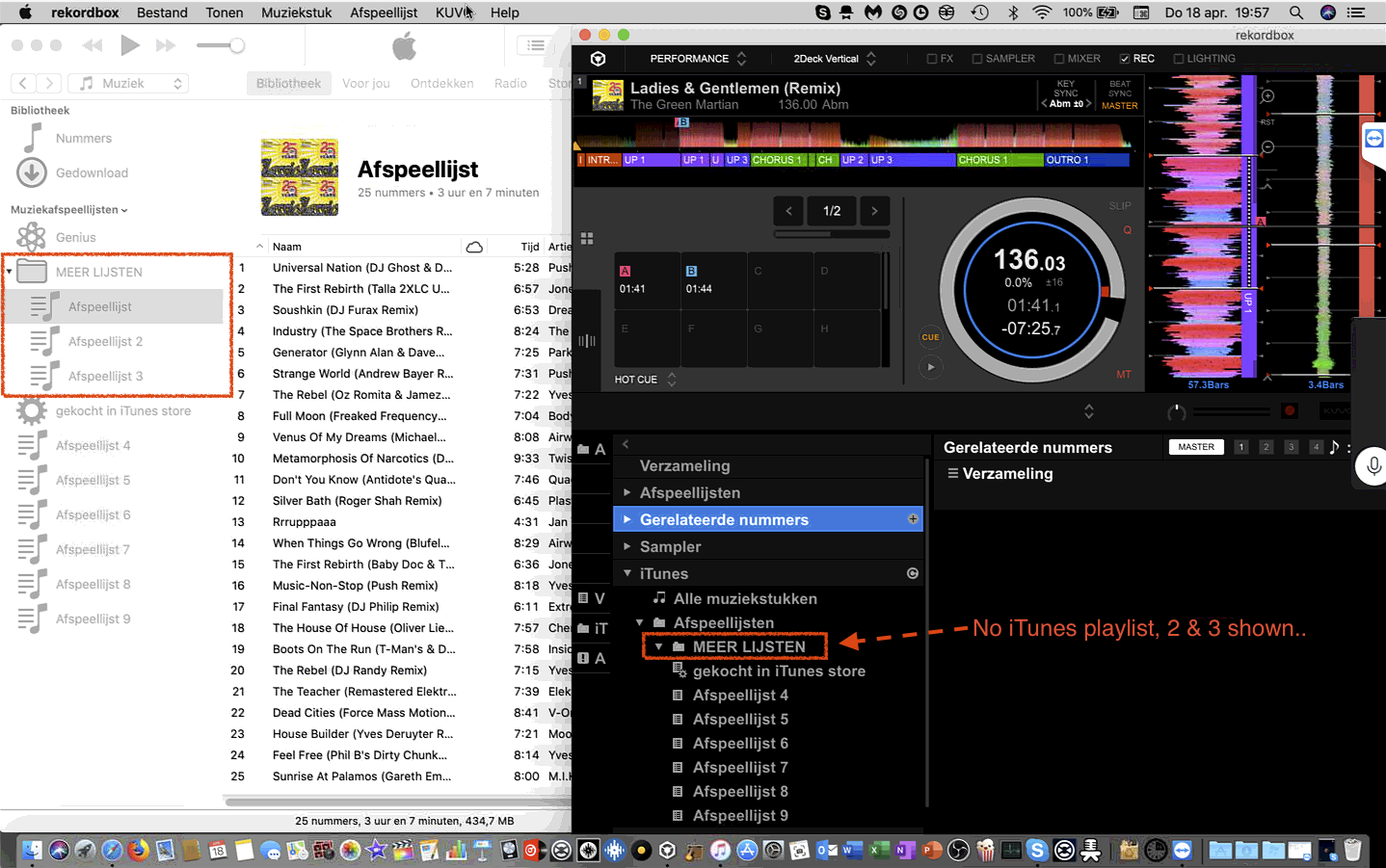
no iTunes playlist shown in folder

This is very mysterious, no iTunes playlist are shown in a folder in Rekordbox on a MacBook Pro with latest macOS Mojave 10.4.4 and iTunes (see image). They do show up in Virtual DJ, Traktor DJ and Serato.

So i decided to uninstall Rekordbox, using the F.A.Q info which is simple, and reinstall Rekordbox from scratch. I've also deleted the database. 

No result.

Then i decided to make a new test iTunes database, which you see in the attached image. Also NO result!

To make it even more mysterious, on two other Macbooks it just works!

Damn, what can i do more?

Thanks in advance.


Bonimac

Official comment

Avatar

Hello Boni,


We are looking into this issue It seems this doesn't happen for everyone.


Are you using the official release of the macOS Mojave, not the beta version?


If you can provide us with your itunes xml file, please make a support ticket here :

https://rekordbox.com/en/support/inquiry.php


Hiroyuki
Comment actions Permalink

Post is closed for comments.

2 comments

0
Avatar

Thanks for answering.

We alway's use the official release of the macOS Mojave, never beta version.

But good news meanwhile, we found the trick reading this topic  > Issue with Itunes folder structure.

The solution there was: 

"Unchecking 'Synchronise iTunes playlists' from the Sync Manager fixed the issue."

We did the opposite, checking synchronise iTunes playlists, and the playlists showed up! :-)

Bonimac 0 votes
Comment actions Permalink