Have a feature request or suggestion? Post your idea here!

Post

2 followers Follow
-1
Avatar

What a mess. I should've gone with Serato.

Following ALL instructions and reading for HOURS and HOURS and watching Youtubes on the "simple" task of keeping a Master Database and Music on an external hard drive, and moving it between two SAME Mac  computers.

NO tags showing up 

NO playlists showing up 

NO hotcues showing up 

UNABLE to restore collection 

Had to manually add songs to the collection again 

Tried backing up the xml and restoring from it = Playlists but NO HOTCUES, and TAG box greyed out.

Yes, the Paths are identical

This is great. Im doing this full time now. Its my new job.

Any tips besides switching to Serato?

Glass Horse Events

Post is closed for comments.

6 comments

1
Avatar

I do it all the time without issues... your mention of "backing up / restoring from the XML" was not what you should have done - the XML use is really for when you need to manipulate the data with an external application, so I hope that's not made Swiss cheese of things.

Can you give me some additional details as to what you did / steps you took so we can figure out what went wrong and how we can fix it?

Pulse 1 vote
Comment actions Permalink
0
Avatar

Thank you! That would be so helpful and I was wondering if it actually works for someone. 

I LOVE my new DDJ -1000 and ALMOST everything about Rekordbox except that I cannot get speedy, effective help resolving this simple issue, so Its delaying my work.

I will tell you everything right here in detail:

1. I have set up RBDJ on Mac1 (High Sierra) with no problems and it looks and works BEAUTIFULLY. 18,000 songs and Master database on an external Hard drive as per video instructions by "Pulse." I also have the zip backup file on the ext hard drive, and just recently copied the xml backup file to it also, called "filacollection.xml."

I "unzipped" the regular Backup file there as well, because I read that might be necessary. 

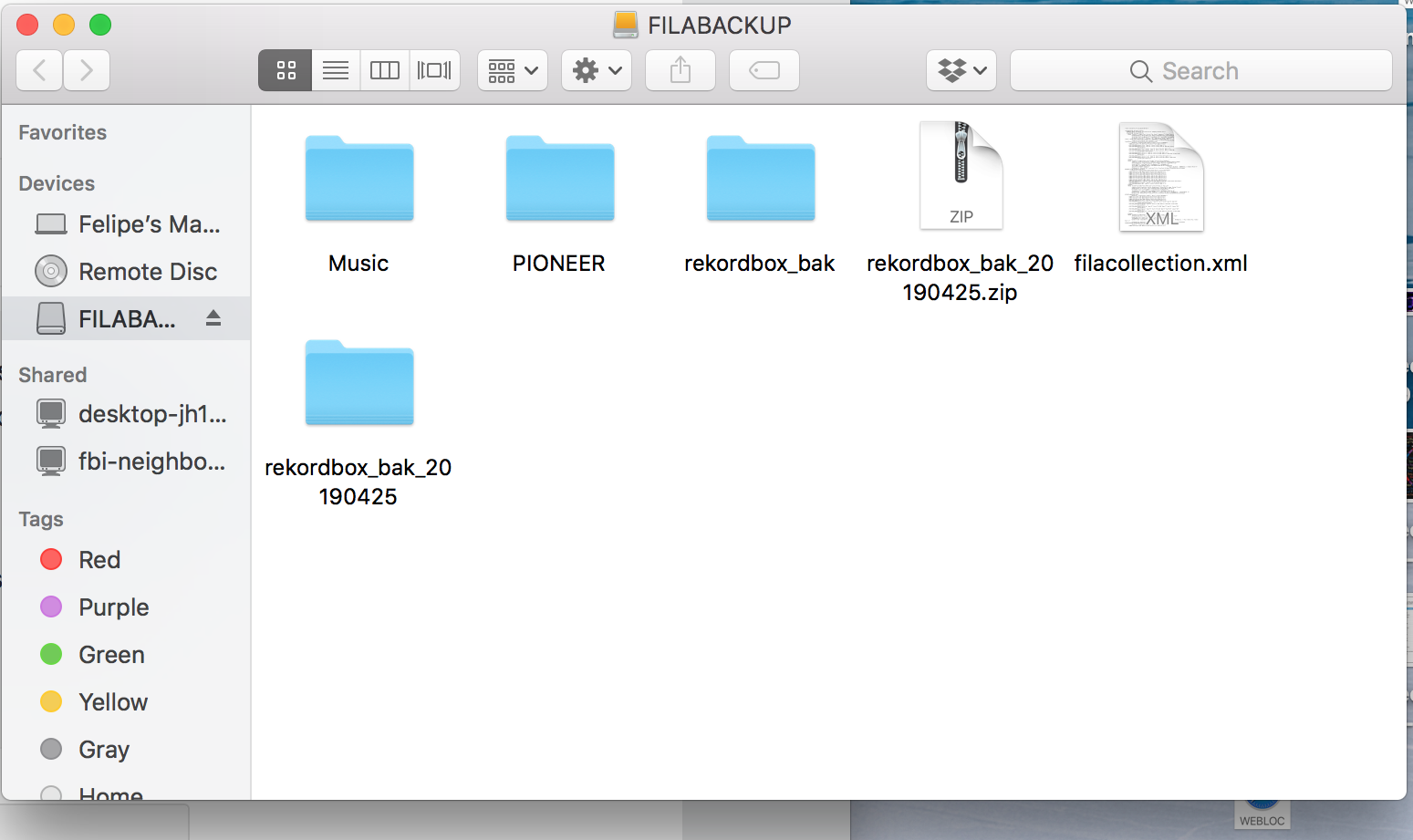
The folder "rekordbox_bk" has 12 folders in it with about 20 songs. I think it is there from the first time I ran a backup and chose " backup music as well". That was before I imported 18k songs into the "Music" folder.

Here is a pic of my EXT HD.

incidentally: I am not "totally" opposed to starting everything from a fresh install if necessary because I just switched over to RKB. (I just wanna get started working so I NEED this backup system to work.)  :)


SO NOW, onto Backup computer, MAC #2 desktop running latest Mojave.

I installed my licensed RKB DJ, attached my External HD above, ...

1. I do NOT sync with my tags

2. The collection is BLANK.

3.Clicking on the "restore library" function and pointing to the eternal HD "RKB_Bak zip file" always "FAILS TO RESTORE COLLECTION".

4. I find all 18,000 songs in the RKB explorer tree in my music folder.

5. SO, I begin importing all 18k songs that are in multiple folders, into the collection and it takes me 2 full days.

Sadly, I don't see any  Tags, Hot cues, Playlists there from MAC 1. 

6. HOURS of reading leads me to a youtube video with instructions on backing up the xml file on MAC 1 and then importing it from the PREFERENCES of MAC 2, so that I can get my playlists, etc. SO I Try it.

7. Result is that I can see my Playlists under the xml tab in the explorer tree, but there are STILL NO tags, Hot cues, and the tag box is now greyed out in RKB "my tags."

8. I try again to restore my collection on MAC 2, but this time I try something fancy and point to a file that is in the UNZIPPED BACKUP folder on the Ext HD called "datafile.edb".

I click it and it crashes RKB immediately and when I reboot, my 18,000 songs in the collection are G O N E.  They are still in the explorer tree but need to be added to the collection AGAIN. 

Thats the whole story. The smart and stupid of it. I need a hand getting my MAC 2 to function as a Backup or I can't work, and Im a full time DJ.

I am willing to reinstall RKB on MAC 2 if I screwed it up, but it would REALLY hurt if I have to reinstall MAC 1. Anyway I have 3 identical external hard drives with the same files and music on them. MAC 1 does not have any problems and the xml file is not visible in the explorer tree because I never needed it.

Any help is appreciated .

Thank you,

FM DJ


Glass Horse Events 0 votes
Comment actions Permalink
0
Avatar

Maybe I did something wrong in the initial installation of the library. I am going to uninstall everything one last time and try again. I will...

install RKB DJ on MAC 1

install my music folder,

relocate the songs  make sure it all works internally,

then follow pulse's video instructions to move it all to the external hard drive,

then Install RKB DJ on Mac 2

attach external hard drive,

instruct RKB DJ to use the MDB on the Ex HD,

reinstall/relocate all the songs on the Ex HD.

Will report on results.

Glass Horse Events 0 votes
Comment actions Permalink
0
Avatar

Okay, so following my instructional video to move the database to the external drive does not specify unzipping a backup file to that drive as well, so that's unnecessary - you can remove those.

Whether you're on Mac 1 or Mac 2, launch rekordbox, with the external connected, it will be no problem. Without the drive connected, rekordbox will ask if you want to use the internal database as the external one is unavailable. Your two choices are to quit, connect the drive, and then start, or to open rekordbox, connect the drive, then switch the database source.

You don't need to import or migrate ANYTHING on the 2nd computer. Just open rekordbox preferences, select the drive from which you want to load the external database, it will warn about the switch, and ... presto.

No relocating required.

Pulse 0 votes
Comment actions Permalink
0
Avatar

Hooray. It worked!!! I unistalled/reinstalled everything and moved very slowly through the process outlined in the video. I tested tags, hot cues, and colors and it all transfers successfully between two computers using one external HD. 

* I noticed that relocating multiple files requires the top menu command "relocate" and NOT the right click command, which only relocates one file at a time even if I select all. Using the Top menu command solved it.

SOLVED.!!!!!!!!!!!!!!

THANK YOU.

Glass Horse Events 0 votes
Comment actions Permalink